Answer

Issue with Custom Screens Not Rendering in Modern UI (25 R1)

  • May 16, 2025
  • 8 replies
  • 203 views

Forum|alt.badge.img

Hi,

I am working with a 25 R1 site that was originally created using 24 R2 and later upgraded to 25 R1. The site includes several customizations, including enhancements to base screens and the development of new custom screens.

After configuring the necessary Modern UI settings in the web.config and site map, the standard base screens are correctly displaying in the Modern UI. However, the customized base screens and newly developed screens are not rendering in the Modern UI as expected.

I have used the built-in converter and followed all the recommended steps for the transition. Below are sample .html and .ts files from a very simple screen that I have converted.

WS101001.html<template>
    <qp-grid id="FreightForwarder_grid" view.bind="FreightForwarder"></qp-grid>
 </template>
 

WS101001.ts

import { Messages as SysMessages } from "client-controls/services/messages";
import { createCollection, createSingle, PXScreen, graphInfo, PXActionState, viewInfo, handleEvent, CustomEventType, actionConfig, RowSelectedHandlerArgs, PXViewCollection, PXPageLoadBehavior, ControlParameter, PXView, PXFieldState, gridConfig, treeConfig, fieldConfig, controlConfig, headerDescription, ICurrencyInfo, disabled, PXFieldOptions, linkCommand, columnConfig, GridColumnShowHideMode, GridColumnType, TextAlign, GridPreset, GridFilterBarVisibility, GridFastFilterVisibility } from "client-controls";

@graphInfo({graphType: "TSBookingForm.TSPrefFreightForwarderMaint", primaryView: "FreightForwarder", })
export class TS101004 extends PXScreen {

    FreightForwarder = createCollection(TSFreightForwarder);
}// Views

@gridConfig({
    showFastFilter: GridFastFilterVisibility.False,
    mergeToolbarWith: "ScreenToolbar",
    preset: GridPreset.Primary
})
export class TSFreightForwarder extends PXView  {

    @columnConfig({width: 180})    FreightForwarder : PXFieldState;
}

Please let me know if there is anything I might have missed or if you have any suggestions on how to proceed further.


Thank you in advance.

Premalatha

Best answer by Vignesh Ponnusamy

@premalathan35, To confirm again, Are files converted files of the screen in  place (FrontendSources\Screen\Src\Screens\ModuleName\ScreenID)?

Additionally, you can check the instructions in the following coffee and code session(timestamp: 10:57) to verify if the your steps, https://www.acumatica.com/coffee-code/


8 replies

Dmitrii Naumov
Acumatica Moderator
Forum|alt.badge.img+7
  • Acumatica Moderator
  • May 16, 2025


I have used the built-in converter and followed all the recommended steps for the transition. Below are sample .html and .ts files from a very simple screen that I have converted.


Did you put these files in the \FrontendSources\screen\src\screens\WS\WS101001 folder?


Forum|alt.badge.img
  • Author
  • Freshman I
  • May 16, 2025

Yes, it is available within the mentioned path.


Dmitrii Naumov
Acumatica Moderator
Forum|alt.badge.img+7
  • Acumatica Moderator
  • May 16, 2025

@premalathan35  did you run “npm run build” for them?


Forum|alt.badge.img
  • Author
  • Freshman I
  • May 16, 2025

I did npm run build-dev and then 

npm run build-dev -- --env screenIds=’  ’

Vignesh Ponnusamy
Acumatica Moderator
Forum|alt.badge.img+5

@premalathan35, A quick suggestion, in 25R1 try using build command with three --- like below instead of using two -- 

npm run build-dev --- --env screenIds 

Forum|alt.badge.img
  • Author
  • Freshman I
  • May 16, 2025

I attempted as instructed. After executing them, I refreshed the screen, but it still displays the Classic UI.

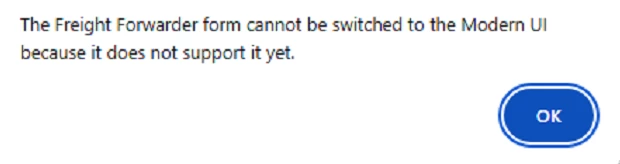
When I clicked on Tools > Convert to Modern UI, I received the attached error message. I had encountered this same message earlier as well.


Vignesh Ponnusamy
Acumatica Moderator
Forum|alt.badge.img+5

@premalathan35, To confirm again, Are files converted files of the screen in  place (FrontendSources\Screen\Src\Screens\ModuleName\ScreenID)?

Additionally, you can check the instructions in the following coffee and code session(timestamp: 10:57) to verify if the your steps, https://www.acumatica.com/coffee-code/


Forum|alt.badge.img
  • Author
  • Freshman I
  • May 19, 2025

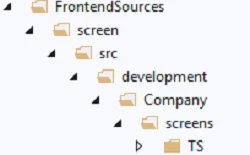
Thank you ​@Dmitrii Naumov  ​@Vignesh Ponnusamy . The Web.config file was being downloaded because I hadn't specified the property rather used ‘declareViewsInViewModelFile="true"’. As a result, it created an additional screen folder (see attached screenshot). Earlier, while searching it shown me under required path. But it was a sub path created.

I've since updated the path , Moved old files to exact folder, and it's working correctly now.