


Answer

Issue customizing Create Payment popup in Modern UI

  • November 24, 2025
  • 3 replies
  • 51 views

I am trying to add several custom fields that already exist on the classic UI version of the “Create Payment” popup into the Modern UI panel of the same screen.
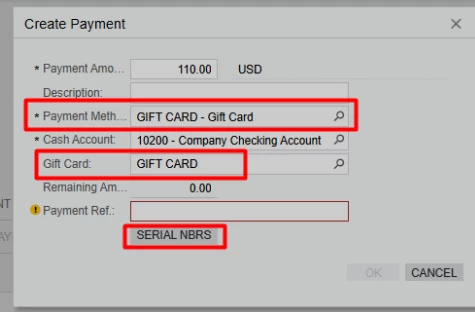


However, I am running into two issues:

1. When I add the fields directly in my Modern UI extension:

I get an error:
“ID does not exist”

Even though these fields exist in the DAC and work correctly in Classic UI.

 

2. When I try to modify the existing Modern UI extension file (SO301000_CreatePayment.html):

The customization works, but when I include this file inside a Customization Project, I get:

“Duplicate ID”
or
“ID already defined in another extension”. This makes the whole customization fail.

I suspect the issue happens because my customized Modern UI file is being added into frontendSources, which already contains the default SO301000_CreatePayment.html.
Because of that, the same element IDs exist twice, and this results in the duplicate ID error.

However, I am not sure what the correct approach is in this situation:

  • Should I replace the existing file?

  • Should I create a separate extension layer?

  • Or is there a recommended way to add new fields to a Modern UI popup without generating duplicate IDs?


Best answer by darylbowman

Your file named SO301000_BZSomething comes alphabetically before SO301000_CreatePayment, meaning that when extensions are compiled, yours gets processed first and the elements you're trying to change don't yet exist.

Name your file SO301000_CreatePayment_BZSomething and it should work.

3 replies

Forum|alt.badge.img+3

Hi ​@mos11 

As I can see, the Payment Method field has already been added in the Modern UI. However, I haven’t found the Gift Card field or the SERIAL NBRS button in either the Modern UI or the Classic UI. They are probably defined in a customization. If so, you’ll need to convert the customization of the base layout to achieve your needs.

Additionally, to customize the layout, you need to create separate Modern UI files for this, such as SO301000_MyProject.ts and SO301000_MyProject.html, and avoid modifying Acumatica’s built-in extensions.

Please check whether the Gift Card field and SERIAL NBRS button are defined in a customization. If so, you can share that customization, and we can discuss what the next steps are.


  • Author
  • Freshman I
  • November 25, 2025

Hi @aleksandrsechin


The Gift Card field, Remaining amount and SERIAL NBRS button are indeed defined in a customization. I also already have separate Modern UI files created for this. Here is my custom ts file 


import {
    SO301000,
    SOLine,

} from "src/screens/SO/SO301000/SO301000";

import {
    SOLineSplit
} from "src/screens/SO/SO301000/extensions/SO301000_LineSplitting";

import {
    PXFieldState,
    PXActionState,
    createCollection,
    createSingle,
    columnConfig,
    gridConfig,
    PXView
} from "client-controls";
import { CreatePaymentBase, SOQuickPayment } from "../../common/panel-create-payment/panel-create-payment";
 

export interface SO301000_BZGiftCard extends SO301000 { }
export class SO301000_BZGiftCard {
    bZSerialNumbers: PXActionState;
}

export interface SOQuickPayment_BZGiftCard extends SOQuickPayment { }
export class SOQuickPayment_BZGiftCard {
    UsrBZGiftCardItemID: PXFieldState;
    UsrBZRemainingAmount: PXFieldState;
}


and html file 


 <template modify="#fsColumnA-CreatePayment">

     <field name="UsrBZGiftCardItemID">
     </field>
     <field name="UsrBZRemainingAmount">
     </field>
     <qp-button id="buttonserialNmb_SO301000" caption="Serial Nbrs" state.bind="bZSerialNumbers" class="col-12"></qp-button>
 </template>


But when I try to build, the previous error appears (as I showed in the screenshot). To make sure it’s not the code, I tried writing the same code in the SO301000_CreatePayment files, and it worked perfectly. However, as you mentioned, I need to avoid modifying Acumatica’s built-in extensions, so I can’t use this method.


darylbowman
Captain II
Forum|alt.badge.img+15
  • Answer
  • November 25, 2025

Your file named SO301000_BZSomething comes alphabetically before SO301000_CreatePayment, meaning that when extensions are compiled, yours gets processed first and the elements you're trying to change don't yet exist.

Name your file SO301000_CreatePayment_BZSomething and it should work.
