Answer

Is there anyway to change Acumatica Screen UI element color conditionally?

  • September 24, 2022
  • 3 replies
  • 736 views

Forum|alt.badge.img+6

Hello,

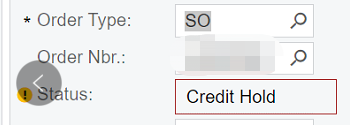
       I understand we are having yellow alert and also the highlight frames like below.


        But I am still curious to ask, is there anyway that we could change the font color of “Credit Hold” to RED?    Only this single element.  No other fields. And also it is only red when it is “Credit hold”, it remains black when open or completed.

Best answer by Nayan Vadher

is there anyway that we could change the font color of “Credit Hold” to RED?    Only this single element.  No other fields. And also it is only red when it is “Credit hold”, it remains black when open or completed.

Yes, one need to rely on Javascript for such purpose.  See example below:

    <px:PXDataSource>
...
<ClientEvents CommandPerformed="changeStatusColor" />
</px:PXDataSource>
<script type="text/javascript">
function changeStatusColor(sender, e) {
var edStatus = px_all["ctl00_phF_form_t0_edStatus"];
var edStatusControl = document.getElementById("ctl00_phF_form_t0_edStatus");
if (edStatus && edStatus.value == "N")
edStatusControl.style.color = "#FF0000";
else
edStatusControl.style.color = "#00FF00";
}
</script>

Here, CommandPerformed is raised whenever record is acted upon in terms of loading, navigating, refreshing, actions, etc.  e.command can be checked to see what raised this event.

3 replies

Manikanta Dhulipudi
Captain II
Forum|alt.badge.img+15

Nayan Vadher
Community Manager
Forum|alt.badge.img+2
  • Acumatica Developer Support
  • Answer
  • September 26, 2022

is there anyway that we could change the font color of “Credit Hold” to RED?    Only this single element.  No other fields. And also it is only red when it is “Credit hold”, it remains black when open or completed.

Yes, one need to rely on Javascript for such purpose.  See example below:

    <px:PXDataSource>
...
<ClientEvents CommandPerformed="changeStatusColor" />
</px:PXDataSource>
<script type="text/javascript">
function changeStatusColor(sender, e) {
var edStatus = px_all["ctl00_phF_form_t0_edStatus"];
var edStatusControl = document.getElementById("ctl00_phF_form_t0_edStatus");
if (edStatus && edStatus.value == "N")
edStatusControl.style.color = "#FF0000";
else
edStatusControl.style.color = "#00FF00";
}
</script>

Here, CommandPerformed is raised whenever record is acted upon in terms of loading, navigating, refreshing, actions, etc.  e.command can be checked to see what raised this event.


Forum|alt.badge.img+6
  • Author
  • Captain II
  • September 30, 2022

@manikantad18 @nmansinha   Thank you both for your kindly and quickly help . Either looks like a way to go. I will try when needed.  Thank you again.