Answer

Is there a way to update a custom field in the Customer record when the status of a Sales Order changes to Completed?

  • January 22, 2022
  • 8 replies
  • 591 views

Forum|alt.badge.img+1

We need to record somewhere the most recent completed order date for a customer so we can report later on how recently a customer made an order.  Is there any way to do this automatically when changing status to Completed on the Sales Order? The field we want to update is on the Customer record. Is this something that can be done using a Customization?

Best answer by KishoK

I couldn’t post the answer . So attached as a file

8 replies

Forum|alt.badge.img+1
  • Jr Varsity III
  • January 22, 2022

This looks like it will be a good use of the new workflow engine.  


KishoK
Jr Varsity I
  • Jr Varsity I
  • Answer
  • January 24, 2022

I couldn’t post the answer . So attached as a file


deebhane
Semi-Pro I
Forum|alt.badge.img+1
  • Semi-Pro I
  • January 24, 2022

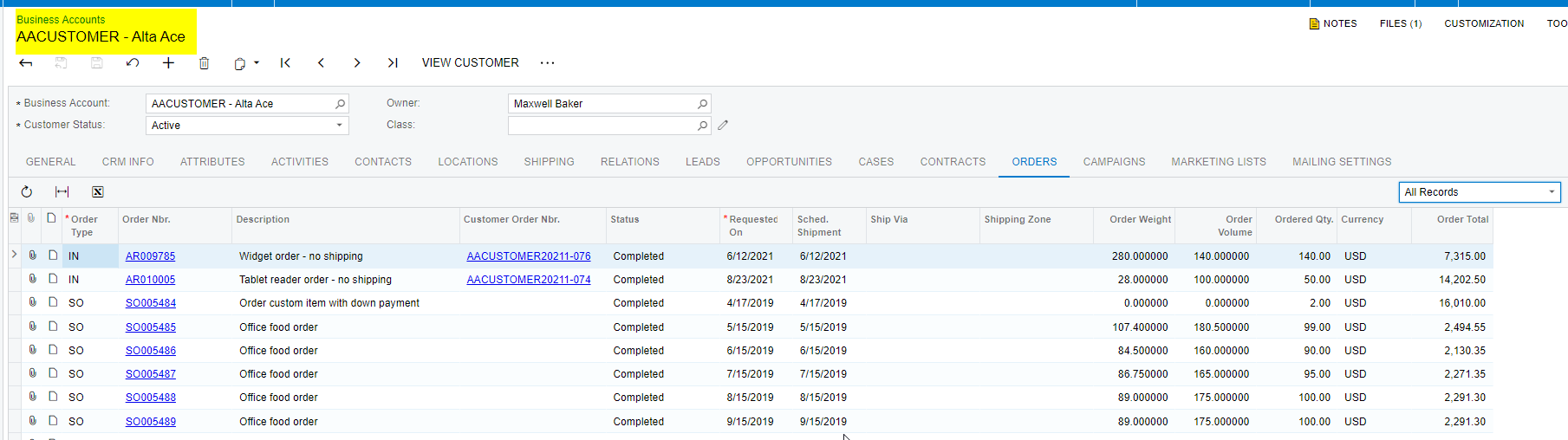
hi @ppowell,  the standard acumatica Business Accounts screen shows the orders, placed by this customer. 

You can either use the same screen or create a GI or reports based on this. 

If your particular looking for customer screen, custom field only to show the last completed order then it has to customized. Let me know if you need help on the approach for customization.


Forum|alt.badge.img+1
  • Author
  • Semi-Pro I
  • January 25, 2022

I couldn’t post the answer . So attached as a file

Thanks so much.  I’ll have a look at this and see if it does what we need.  It’s useful to see some code so I can at least get an idea of how things work with this. Really appreciate your help.


Forum|alt.badge.img+1
  • Author
  • Semi-Pro I
  • January 25, 2022

hi @ppowell,  the standard acumatica Business Accounts screen shows the orders, placed by this customer. 

You can either use the same screen or create a GI or reports based on this. 

If your particular looking for customer screen, custom field only to show the last completed order then it has to customized. Let me know if you need help on the approach for customization.


Unfortunately what we need is a single entry showing the most recent order date for each customer (so max(Order.OrderDate)) for completed SO or WO orders. This is because we have to report on how many customers has their most recent order in each month.  A GI doesn’t seem to have a way to group by Max(SOOrder.OrderDate) as well as count the customers in a given month. As we don't seem to be able to do it as a GI I decided the best option is to record the most recent order date somewhere when we complete the order which then gives us a single entry per customer and I can group by that date instead.


Thanks for your input


Forum|alt.badge.img+1
  • Author
  • Semi-Pro I
  • January 25, 2022

This looks like it will be a good use of the new workflow engine.  

I’ll have to look into the workflow engine.  I’m pretty new to Acumatica and still learning what is possible and what isn’t and the best way to achieve the results we desire.


Thanks for your input


gprice27
Jr Varsity I
Forum|alt.badge.img
  • Jr Varsity I
  • January 25, 2022

I couldn’t post the answer . So attached as a file

We have used this method as well - over-riding the Persist on the Sales order is the best way to update the user field on the Customer


deebhane
Semi-Pro I
Forum|alt.badge.img+1
  • Semi-Pro I
  • January 25, 2022

hi @ppowell,  the standard acumatica Business Accounts screen shows the orders, placed by this customer. 

You can either use the same screen or create a GI or reports based on this. 

If your particular looking for customer screen, custom field only to show the last completed order then it has to customized. Let me know if you need help on the approach for customization.


Unfortunately what we need is a single entry showing the most recent order date for each customer (so max(Order.OrderDate)) for completed SO or WO orders. This is because we have to report on how many customers has their most recent order in each month.  A GI doesn’t seem to have a way to group by Max(SOOrder.OrderDate) as well as count the customers in a given month. As we don't seem to be able to do it as a GI I decided the best option is to record the most recent order date somewhere when we complete the order which then gives us a single entry per customer and I can group by that date instead.


Thanks for your input


hi @ppowell 

Below event / logic will help you to build the logic to update the sales order count. 

  protected virtual void SOOrder_RowPersisted(PXCache sender, PXRowPersistedEventArgs e, PXRowPersisted baseEvent)
        {

            baseEvent?.Invoke(sender, e);
            SOOrder row = (SOOrder)e.Row;
            if (row == null)
            {
                return;
            }

            if (e.TranStatus == PXTranStatus.Completed && row.Status == SOOrderStatus.Completed)
            {
                 // You can build logic here based on to update the count of the customer ID and additional filter if required.              
                
            }     

        }

Let me know this helps.