Answer

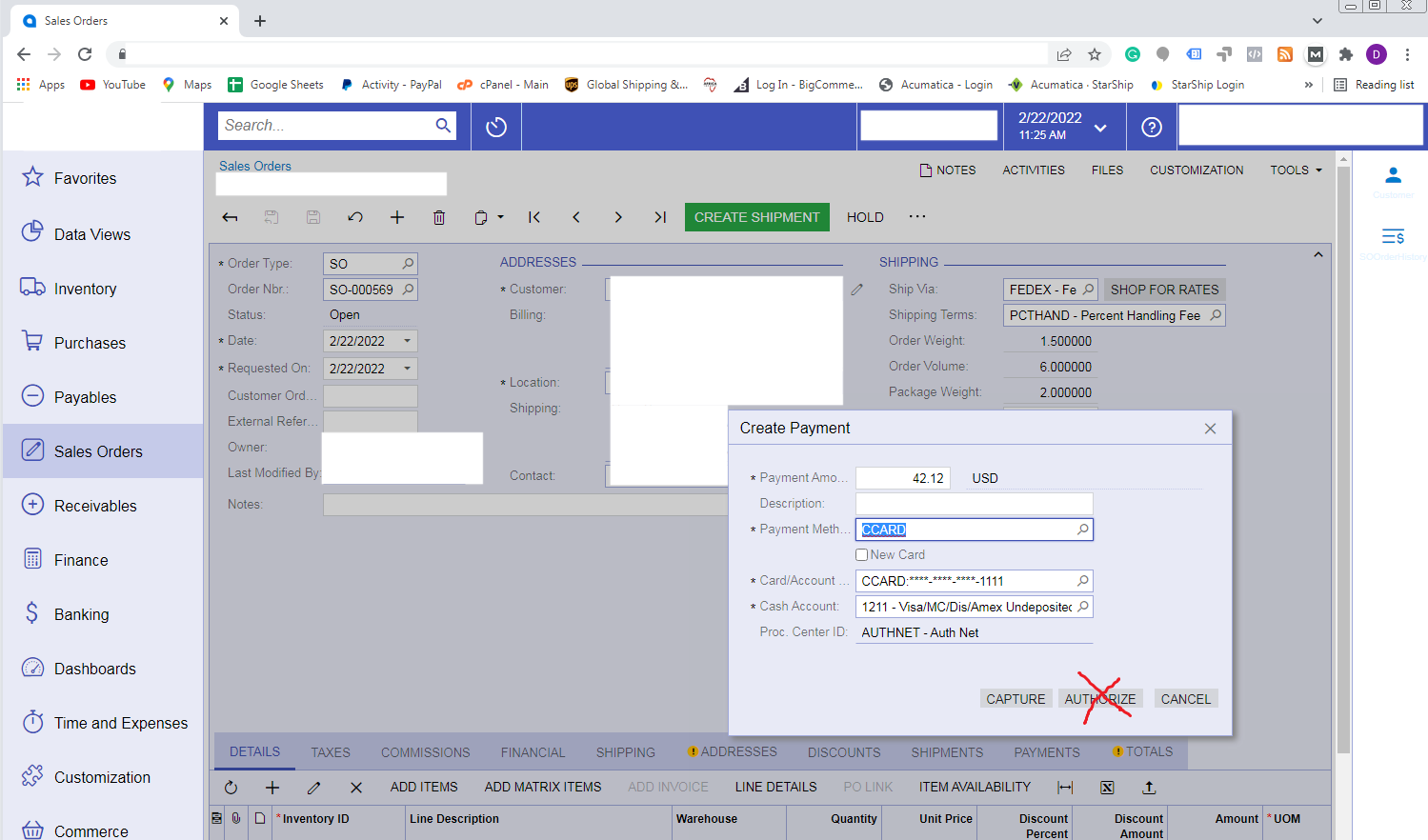
Is there a way to conditionally hide a button in a dialog?

  • February 24, 2022
  • 10 replies
  • 598 views

Forum|alt.badge.img+1

We would like to hide the AUTHORIZE button in the dialog for Create Payment on Sales Order Entry.  The button should be disabled/hidden if Payment Method ID = “CCARD” 


Is this something that is possible to do?


I have the code to check the payment method but I’m not sure how or even if it’s possible to hide the AUTHORIZE button when the field is updated.


Thanks for any advice even if it’s just that it’s not possible to do what we want.


Phil 

Best answer by Nayan Vadher

With that knowledge, couldn’t you do a 

createPaymentAuthorize.SetEnabled(false);

somewhere?

That somewhere will be in the RowSelected event of the DAC that displays Create Payment dialog.  See example  code below:

using PX.Data;
using PX.Objects.SO.GraphExtensions.SOOrderEntryExt;

namespace PX.Objects.SO
{
public class SOOrderEntry_Extension : PXGraphExtension<CreatePaymentExt, SOOrderEntry>
{
public static bool IsActive() => true;

#region Event Handlers

protected virtual void _(Events.RowSelected<SOQuickPayment> eventArgs, PXRowSelected baseEvent)
{
baseEvent?.Invoke(eventArgs.Cache, eventArgs.Args);

// control buttons here
Base1.createPaymentAuthorize.SetVisible(
eventArgs.Row.PaymentMethodID != "CCARD");
}

#endregion
}
}


10 replies

darylbowman
Captain II
Forum|alt.badge.img+15

I’m not sure if it’s possible or not, but one alternative could be duplicating the dialog and removing the button from one, so that you have two different versions of the same dialog. If you override where the dialog is called from, you could decide which dialog to show depending on which payment method is used.

Edit:

Just realized I don’t think you have that information prior to the dialog being called, in which case, this wouldn’t work.

(I’d delete this post, but I don’t think that’s possible.)


Chris Hackett
Community Manager
Forum|alt.badge.img
  • Acumatica Community Manager
  • February 28, 2022

Hi @Deetz no worries, it’s your effort to help that’s appreciated! Anyone have any other ideas for @ppowell ? Thank you!


Forum|alt.badge.img+1
  • Author
  • Semi-Pro I
  • February 28, 2022

Failing being able to hide the button is it possible to just pop up a warning message and ignore the button press if the payment method is CCARD? I’ve been looking at the source for SOOrderEntry but can’t seem to find where this is triggered.


Forum|alt.badge.img+7
  • Captain II
  • February 28, 2022

The button is a Dialog within the SO301000 screen. I invoked the screen and then used Ctrl+Alt to click on the Authorize button so I could add the screen to a customization project and find the button faster.

Looking at the properties of the button I see that it is calling a command called CreatePaymentAuthorize.  I searched through the codebase and found that action declared in CreatePaymentExtBase.cs which is a graph extension.
 

public PXAction<TDocument> createPaymentAuthorize;
[PXUIField(DisplayName = "Authorize", MapEnableRights = PXCacheRights.Select, MapViewRights = PXCacheRights.Select)]
[PXButton(DisplayOnMainToolbar = false)]
protected virtual IEnumerable CreatePaymentAuthorize(PXAdapter adapter)
{
AssignAuthorize();

return adapter.Get();
}

Now, at this point, I’ve hit the end of my knowledge because I don’t understand how this graph extension is being instantiated so I’m not sure how to write the extension to wrap around it.

Hopefully someone can expand upon that to get you further.


darylbowman
Captain II
Forum|alt.badge.img+15

With that knowledge, couldn’t you do a 

createPaymentAuthorize.SetEnabled(false);

somewhere?


Forum|alt.badge.img+1
  • Author
  • Semi-Pro I
  • February 28, 2022

With that knowledge, couldn’t you do a 

createPaymentAuthorize.SetEnabled(false);

somewhere?

Thanks.  I’ll try it and see what I can come up with.


Nayan Vadher
Community Manager
Forum|alt.badge.img+2
  • Acumatica Developer Support
  • Answer
  • March 2, 2022

With that knowledge, couldn’t you do a 

createPaymentAuthorize.SetEnabled(false);

somewhere?

That somewhere will be in the RowSelected event of the DAC that displays Create Payment dialog.  See example  code below:

using PX.Data;
using PX.Objects.SO.GraphExtensions.SOOrderEntryExt;

namespace PX.Objects.SO
{
public class SOOrderEntry_Extension : PXGraphExtension<CreatePaymentExt, SOOrderEntry>
{
public static bool IsActive() => true;

#region Event Handlers

protected virtual void _(Events.RowSelected<SOQuickPayment> eventArgs, PXRowSelected baseEvent)
{
baseEvent?.Invoke(eventArgs.Cache, eventArgs.Args);

// control buttons here
Base1.createPaymentAuthorize.SetVisible(
eventArgs.Row.PaymentMethodID != "CCARD");
}

#endregion
}
}


Forum|alt.badge.img+1
  • Author
  • Semi-Pro I
  • March 2, 2022

With that knowledge, couldn’t you do a 

createPaymentAuthorize.SetEnabled(false);

somewhere?

That somewhere will be in the RowSelected event of the DAC that displays Create Payment dialog.  See example  code below:

using PX.Data;
using PX.Objects.SO.GraphExtensions.SOOrderEntryExt;

namespace PX.Objects.SO
{
public class SOOrderEntry_Extension : PXGraphExtension<CreatePaymentExt, SOOrderEntry>
{
public static bool IsActive() => true;

#region Event Handlers

protected virtual void _(Events.RowSelected<SOQuickPayment> eventArgs, PXRowSelected baseEvent)
{
baseEvent?.Invoke(eventArgs.Cache, eventArgs.Args);

// control buttons here
Base1.createPaymentAuthorize.SetVisible(
eventArgs.Row.PaymentMethodID != "CCARD");
}

#endregion
}
}


Thanks.  I just tested and it appears to do exactly what we wanted.  I really appreciate your help,


Phil


darylbowman
Captain II
Forum|alt.badge.img+15

@nmansinha 

If I may ask, what is the difference between

protected virtual void _(Events.RowSelected<SOQuickPayment> eventArgs, PXRowSelected baseEvent) { }

and

protected virtual void _(Events.RowSelected<SOQuickPayment> eventArgs) { }


I see you’re invoking a base event of some sort. Is this necessary? I haven’t seen that around much.


Nayan Vadher
Community Manager
Forum|alt.badge.img+2
  • Acumatica Developer Support
  • March 4, 2022

@nmansinha

If I may ask, what is the difference between

protected virtual void _(Events.RowSelected<SOQuickPayment> eventArgs, PXRowSelected baseEvent) { }

and

protected virtual void _(Events.RowSelected<SOQuickPayment> eventArgs) { }


First one allows to override the base event, and the other one hooks up(creates) an event.  Learn more about it here: Acumatica