Answer

Is it possible to change the default button in the warning dialog when changing class for a customer?

  • June 28, 2022
  • 6 replies
  • 170 views

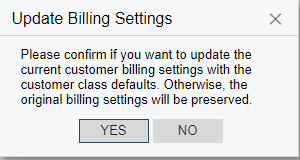
We would like the warning dialog when changing the customer class to default to No rather than Yes.  I have looked at the code and found where it is defined:

protected virtual void Customer_CustomerClassID_FieldVerifying(PXCache cache, PXFieldVerifyingEventArgs e)
{
Customer row = (Customer)e.Row;
CustomerClass cc = (CustomerClass)PXSelectorAttribute.Select<Customer.customerClassID>(cache, row, e.NewValue);
this.doCopyClassSettings = false;
if (cc != null)
{
this.doCopyClassSettings = true;
if (cache.GetStatus(row) != PXEntryStatus.Inserted)
{
if (BAccount.Ask(Messages.Warning, Messages.CustomerClassChangeWarning, MessageButtons.YesNo) == WebDialogResult.No)
{
this.doCopyClassSettings = false;
}
}
}
}

Is there a way to specify which button (Yes/No) should be the default?


Thanks,

Phil

Best answer by Vinay Koppula

@pjpowell you can follow the below post which will help you to create your own message dialog pop-up (smart panel)

https://asiablog.acumatica.com/2015/11/using-smart-panel.html

6 replies

Dioris Aguilar
Jr Varsity I
Forum|alt.badge.img+2

@pjpowell The default selection in this dialog is made by the framework behind the scenes:
 

The code you found, is one of the events that is triggered when the Customer Class is changed and that code sets the logic to display or not the above dialog depending if the customer already exists or not. The code does not set the default answer button.


  • Author
  • Freshman I
  • June 29, 2022

@Dioris Aguilar Thanks for the information.  Does this mean it’s not possible to change the default button or simply that I’m looking in the wrong place to do so?


Thanks,


Phil 


Dioris Aguilar
Jr Varsity I
Forum|alt.badge.img+2

@pjpowell It’s not possible, at least using standard customization procedures. Maybe some custom javascript code could do the trick.


Vinay Koppula
Semi-Pro II
Forum|alt.badge.img+1

@pjpowell As an alternative, you can add a custom popup with custom buttons in it. 


  • Author
  • Freshman I
  • June 30, 2022

@Vinay Koppula   I had also thought about changing the message text and the behaviour to set to false when the user clicks yes as that is the default but I would prefer not to change the behaviour if possible. How would I go about popping up my own message dialog?


Phil


Vinay Koppula
Semi-Pro II
Forum|alt.badge.img+1
  • Semi-Pro II
  • Answer
  • July 4, 2022

@pjpowell you can follow the below post which will help you to create your own message dialog pop-up (smart panel)

https://asiablog.acumatica.com/2015/11/using-smart-panel.html