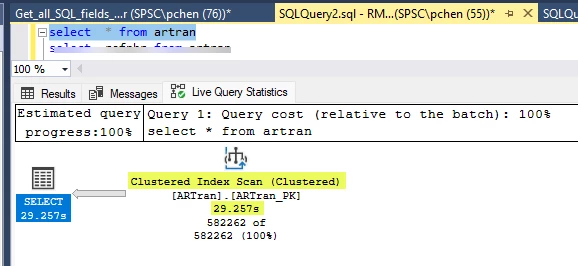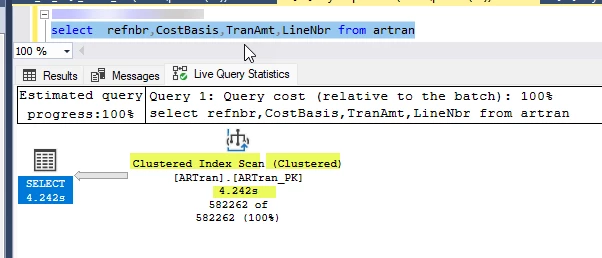


I’m always on the lookout for ways to increase the performance of our product. Recently I came across a technique that has the potential to increase performance for BQL queries and views and I thought I would share. Typically, when I am trying to increase the performance of an Acumatica query, I will run the process in the site with a SQL Profiler session active to capture the SQL query that results from my code. I can then run the query in SQL Server Management Studio with Live Query Statistics to assess the performance and tweak the code. I was working on a particularly slow query with a large data set the other day when I found a strategy for optimizing my code. Those who have used Profiler, will know that Acumatica will translate our BQL queries into search clauses that includes every possible field. I was considering building a new index for my query when I changed the Select clause generated by Acumatica to select just a couple of specific fields and ran the query. The Query ran much quicker, way quicker than I anticipated. While that may be obvious to the database administrators out there, I was surprised by the scale of the difference. I was working with ARTran at the time which is large in terms of data and field number. I was also joining this table with some meta data tables from our customization. The question now became, how do I get the BQL layer to only ask for these fields instead of translating my query into what was basically a wildcard search?
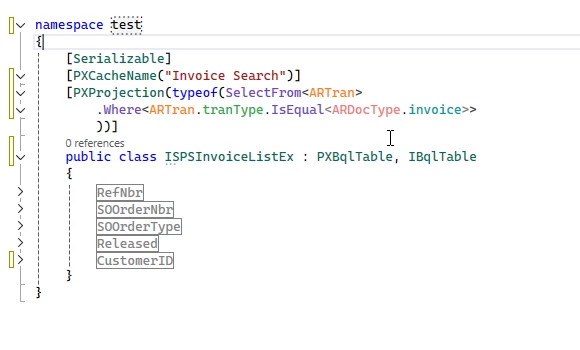
There are a couple of methods for doing this with Acumatica, but the most versatile for my purposes was to use a PXProjection. A PXProjection is like a SQL view; it is an object based on a BQL query. You can have it retrieve every field or optionally you can specify the exact fields you are interested in.
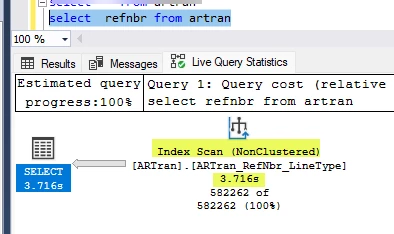
If you are really hard up for performance, you can even try only retrieving fields that are specifically included in an index on the table which will switch the SQL query from a Clustered Index search to a Non-Clustered Index search. The great thing about that is that you only query the index instead of pulling data from the table. Results as always will vary depending on your table and index.
Outside of performance, I also love this technique because you can create modular BQL components that you can reuse instead of duplicating them on multiple screens. While the PXProjection example below is very simplistic, the ones I build have multiple joins and conditions such that using them makes my code base much more readable and easier to manage. It turns out that it can also make them much faster!
Happy Coding!