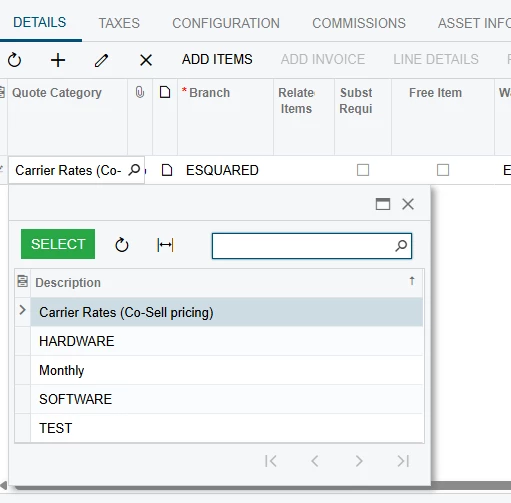
Hello Acumatica Community,
I'm working on a custom integration in the Sales Order Entry screen and facing challenges with dynamically updating the values in a custom ComboBox field (usrAISQuoteCategory) within the SOLine table. Specifically, I want the ComboBox to reflect the correct list of values in real-time when the InventoryID field changes.
Here's a summary of what I'm trying to achieve:
- When
InventoryIDis updated, the ComboBox should fetch and display descriptions fromCSAttributeDetailbased on the attribute ID "QUOTECTGRY". - I'm using the
PXStringListAttribute.SetListmethod within theSOLine_InventoryID_FieldUpdatedevent handler, but the UI requires a manual refresh to update the ComboBox values. - I've attempted using
SetValueExtto trigger UI refreshes, but the real-time display update isn't working as expected.
Here’s a snippet of my current implementation:
using PX.Data;
using PX.Objects.SO;
using PX.Objects.IN;
using PX.SM;
using System;
using System.Collections;
using System.Collections.Generic;
using PX.Objects.CS;

namespace AISQuoteCategory2023R2V2
{
  public class SOOrderEntry_Extension : PXGraphExtension<SOOrderEntry>
  {
    #region Event Handlers
      public virtual void SOLine_InventoryID_FieldUpdated(PXCache sender, PXFieldUpdatedEventArgs e, PXFieldUpdated baseMethod)
        {
            baseMethod?.Invoke(sender, e);

            SOLine row = (SOLine)e.Row;

            if (row == null)
            {
                return;
            }

            if(row.InventoryID != null)
            {
                InventoryItem inventory = PXSelect<InventoryItem,
                    Where<InventoryItem.inventoryID, Equal<Required<InventoryItem.inventoryID>>>>.Select(Base, row.InventoryID);

                if(inventory != null)
                {
                    CSAnswers answers = PXSelect<CSAnswers,
                        Where<CSAnswers.refNoteID, Equal<Required<CSAnswers.refNoteID>>,
                            And<CSAnswers.attributeID, Equal<Required<CSAnswers.attributeID>>>>>.Select(Base, inventory.NoteID, "QUOTECTGRY");

                    if (answers != null)
                    {
                        row.GetExtension<SOLineExtension>().UsrAISQuoteCategory = answers.Value;
                    }
                }
            }
        }
        public virtual void SOLine_UsrAISQuoteCategory_FieldSelecting(PXCache sender, PXFieldSelectingEventArgs e)
        {
            SOLine row = (SOLine)e.Row;

            if (row != null)
            {
                PXResultset<CSAttributeDetail> attribDetailRes = PXSelect<CSAttributeDetail,
                    Where<CSAttributeDetail.attributeID, Equal<Required<CSAttribute.attributeID>>>>.Select(Base, "QUOTECTGRY");

                List<string> values = new List<string>();

                foreach (CSAttributeDetail item in attribDetailRes)
                {
                    values.Add(item.Description);
                }

                PXStringListAttribute.SetList<SOLineExtension.usrAISQuoteCategory>(sender, null, values.ToArray(), values.ToArray());
            }
        }

    #endregion
  }
}
Any tips on addressing this issue with real-time updates or best practices for dynamic ComboBoxes in Acumatica would be highly appreciated!
Thank you!