



Answer

How to show code description for customized scalar field from SOShipmentCarrierData?

  • June 18, 2025
  • 6 replies
  • 121 views

plambert
Semi-Pro I
Forum|alt.badge.img+2

I’m starting in on code customizations with this simple project, but I don’t know how to do the last step. In brief, I have added a PXDBScalar field to an SOShipment extension which pulls in the External Status field from SOShipmentCarrierData. The code displays correctly (C, S, or N), but I would like it to show the more user-friendly descriptions of ‘Completed’, ‘Workbench Processing’, or ‘Not Submitted’ respectively. Is there a way to have that display instead of the underlying code?


Context:

The goal is to have the PaceJet processing Status visible on the Process Shipments screen (SO503000) so that we can distinguish between shipments which have finished processing in the external carrier and those which have not; We don’t want to prepare invoices on shipments which have been confirmed but not fully packed through PaceJet.

To accomplish this, I extended SOShipment with a Scalar value using the following code (adjusting the code from another post)

public class SOShipmentExt : PXCacheExtension<PX.Objects.SO.SOShipment>
{
#region UsrCarrierStatus
[PXString]
[PXDBScalar(typeof(SearchFor<SOShipmentCarrierData.externalStatus>.
In<SelectFrom<SOShipmentCarrierData>.
Where<SOShipmentCarrierData.shipmentNbr.IsEqual<SOShipment.shipmentNbr>>>))]
[PXUIField(DisplayName="Pacejet Status", Enabled = false)]
public virtual string UsrCarrierStatus{ get; set; }
public abstract class usrCarrierStatus: PX.Data.BQL.BqlString.Field<usrCarrierStatus> { }
#endregion
}

After publishing, I added the field as a column in the Process Shipments screen and confirmed that the ExternalStatus does populate through. However, only the base char(1) value is displayed. We’d prefer to see the same text available on the Shipment screen:
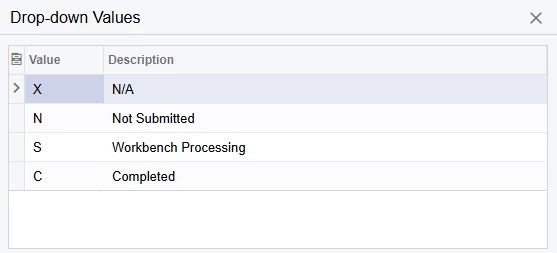
Any guidance or insight you can provide is appreciated!

Best answer by CherryStreet

I ran through your scenario through our AI Assistant, we are in final testing phases and trying to help out the community.  Let me know if it helps:
 

Great work getting the PXDBScalar field working — you're 90% there. Now, to display the user-friendly description (i.e., 'Completed', 'Workbench Processing', 'Not Submitted') instead of the raw C, S, N codes, you’ll want to use a PXStringList attribute. This tells Acumatica to map internal values to human-readable labels.


Goal: Show descriptive status names ('Completed', etc.) in SO503000 grid instead of code (C, S, N)


Solution: Add [PXStringList] to your UDF

Here's how you update your extension:

public class SOShipmentExt : PXCacheExtension<PX.Objects.SO.SOShipment>

{

    #region UsrCarrierStatus

    [PXString(1)]

    [PXDBScalar(typeof(SearchFor<SOShipmentCarrierData.externalStatus>.

        In<SelectFrom<SOShipmentCarrierData>.

        Where<SOShipmentCarrierData.shipmentNbr.IsEqual<SOShipment.shipmentNbr>>>))]

    [PXStringList(

        new string[] { "C", "S", "N" },

        new string[] { "Completed", "Workbench Processing", "Not Submitted" }

    )]

    [PXUIField(DisplayName = "Pacejet Status", Enabled = false)]

    public virtual string UsrCarrierStatus { get; set; }

    public abstract class usrCarrierStatus : PX.Data.BQL.BqlString.Field<usrCarrierStatus> { }

    #endregion

}


🔍 Explanation

  • [PXString(1)]: Matches the data type of externalStatus (single character).
  • [PXStringList(...)]: Translates internal codes (C, S, N) to labels.
  • [PXUIField(...)]: Ensures this field shows up in the UI grid with a label.
 

👀 Result

  • On the Process Shipments screen (SO503000), your UsrCarrierStatus field will now display:
    • C → Completed
    • S → Workbench Processing
    • N → Not Submitted
 

💡 ERP Pro Tips

💡 Tip for Devs: You can localize the display strings in Acumatica Translations if needed, using PXLocalizableStringAttribute.


6 replies

CherryStreet
Jr Varsity I
Forum|alt.badge.img
  • Jr Varsity I
  • Answer
  • June 19, 2025

I ran through your scenario through our AI Assistant, we are in final testing phases and trying to help out the community.  Let me know if it helps:
 

Great work getting the PXDBScalar field working — you're 90% there. Now, to display the user-friendly description (i.e., 'Completed', 'Workbench Processing', 'Not Submitted') instead of the raw C, S, N codes, you’ll want to use a PXStringList attribute. This tells Acumatica to map internal values to human-readable labels.


Goal: Show descriptive status names ('Completed', etc.) in SO503000 grid instead of code (C, S, N)


Solution: Add [PXStringList] to your UDF

Here's how you update your extension:

public class SOShipmentExt : PXCacheExtension<PX.Objects.SO.SOShipment>

{

    #region UsrCarrierStatus

    [PXString(1)]

    [PXDBScalar(typeof(SearchFor<SOShipmentCarrierData.externalStatus>.

        In<SelectFrom<SOShipmentCarrierData>.

        Where<SOShipmentCarrierData.shipmentNbr.IsEqual<SOShipment.shipmentNbr>>>))]

    [PXStringList(

        new string[] { "C", "S", "N" },

        new string[] { "Completed", "Workbench Processing", "Not Submitted" }

    )]

    [PXUIField(DisplayName = "Pacejet Status", Enabled = false)]

    public virtual string UsrCarrierStatus { get; set; }

    public abstract class usrCarrierStatus : PX.Data.BQL.BqlString.Field<usrCarrierStatus> { }

    #endregion

}


🔍 Explanation

  • [PXString(1)]: Matches the data type of externalStatus (single character).
  • [PXStringList(...)]: Translates internal codes (C, S, N) to labels.
  • [PXUIField(...)]: Ensures this field shows up in the UI grid with a label.
 

👀 Result

  • On the Process Shipments screen (SO503000), your UsrCarrierStatus field will now display:
    • C → Completed
    • S → Workbench Processing
    • N → Not Submitted
 

💡 ERP Pro Tips

💡 Tip for Devs: You can localize the display strings in Acumatica Translations if needed, using PXLocalizableStringAttribute.


plambert
Semi-Pro I
Forum|alt.badge.img+2
  • Author
  • Semi-Pro I
  • June 19, 2025

Hello and thank you for the quick response.
This solution does get me pointed in the right direction. A PXStringList is what I need, though hard-coding the values doesn’t feel like the best solution. I would prefer if the values were sourced from SOShipmentCarrierData.externalStatus, so that any changes in future updates would be included; This list doesn’t even cover all current possible values, excluding ‘X’. Is there a way to populate the string lists from the definition of the original value that the Scalar is reflecting?


CherryStreet
Jr Varsity I
Forum|alt.badge.img
  • Jr Varsity I
  • June 19, 2025

My pleasure, yeah the AI tool is great but not perfect.  The more specific we are with it, the better it gets.  Try this and let me know if it gets you closer to what you are looking for:


That’s a great follow-up — and you are absolutely right to want to avoid hard-coding values in [PXStringList]. Here’s the full answer, based strictly on Acumatica’s documented customization practices:


Objective:


Display friendly labels for values in a [PXDBScalar] field that pulls externalStatus (e.g., 'C', 'S', 'N', 'X') without hardcoding those values in a [PXStringList].


🚫 Limitation:


Acumatica does not support dynamically populating [PXStringList] from another table at runtime.

As of current framework limitations (including in 2024 R2), [PXStringList] requires compile-time, hard-coded definitions.


What You Can Do (Documented Workarounds)


🔹 Option 1: Use a PXStringList with Constants Class (Best Practice)


This is the recommended Acumatica pattern, seen in native DACs like ARInvoice, SOOrder, etc.:

public static class CarrierStatuses

{

    public class completed : PX.Data.BQL.BqlString.Constant<completed> { public completed() : base("C") { } }

    public class workbench : PX.Data.BQL.BqlString.Constant<workbench> { public workbench() : base("S") { } }

    public class notSubmitted : PX.Data.BQL.BqlString.Constant<notSubmitted> { public notSubmitted() : base("N") { } }

    public class error : PX.Data.BQL.BqlString.Constant<error> { public error() : base("X") { } }


    public const string Completed = "C";

    public const string Workbench = "S";

    public const string NotSubmitted = "N";

    public const string Error = "X";

}

Then apply:

[PXString(1)]

[PXDBScalar(typeof(SearchFor<SOShipmentCarrierData.externalStatus>.

    In<SelectFrom<SOShipmentCarrierData>.

    Where<SOShipmentCarrierData.shipmentNbr.IsEqual<SOShipment.shipmentNbr>>>))]

[PXStringList(

    new[] {

        CarrierStatuses.Completed,

        CarrierStatuses.Workbench,

        CarrierStatuses.NotSubmitted,

        CarrierStatuses.Error

    },

    new[] {

        "Completed",

        "Workbench Processing",

        "Not Submitted",

        "Error"

    })]

[PXUIField(DisplayName = "Pacejet Status", Enabled = false)]

public virtual string UsrCarrierStatus { get; set; }

✅ This pattern is documented and follows Acumatica’s best practices for:

  • Type safety
  • Localizability
  • Consistency with other native enum-like values
 

🔹 Option 2: Use a Selector (Advanced & Dynamic)


If you want true dynamic value resolution from SOShipmentCarrierData definitions:

  1. Create a custom table or view that holds:
    • StatusCode (e.g., 'C', 'S')
    • Description (e.g., 'Completed', etc.)
  2. Use [PXSelector] on the scalar field:

[PXSelector(

    typeof(Search<CarrierStatusLookup.statusCode>),

    typeof(CarrierStatusLookup.description),

    SubstituteKey = typeof(CarrierStatusLookup.description),

    DescriptionField = typeof(CarrierStatusLookup.description)

)]

This requires you to populate that lookup table either manually or via import scenario — it’s more work but gives true flexibility.


🔹 Option 3: Create a UI-only Bound Field for Display


If the scalar field must remain raw ('C', 'S', etc.), you can create a UI-only unbound field to display the description:

[PXString]

[PXUIField(DisplayName = "Status Description", Enabled = false)]

public virtual string UsrCarrierStatusDesc

{

    get

    {

        switch (UsrCarrierStatus)

        {

            case "C": return "Completed";

            case "S": return "Workbench Processing";

            case "N": return "Not Submitted";

            case "X": return "Error";

            default: return "Unknown";

        }

    }

}

This field can be used purely for display, while keeping the original scalar untouched.


🧠 ERP Pro Tips


💡 Tip for Localizability: [PXStringList] with constants allows future localization via the translation dictionary.


💡 Tip for Extensibility: If Pacejet or external integrations add more status codes, you can safely extend the constants and string list without needing to rebuild the whole framework.


Final Recommendation

Option

Supports Dynamic Source?

UI Friendly

Easy to Maintain

[PXStringList] + constants class

❌ No

✅ Yes

✅ Yes

[PXSelector] w/ lookup table

✅ Yes

✅ Yes

⚠️ Medium

Separate display-only field

⚠️ Manual logic

✅ Yes

✅ Yes


Forum|alt.badge.img+7
  • Captain II
  • June 19, 2025

What’s the DAC definition of the field you’re pulling?  If it is a PXStringList itself, then you can check it’s definition to see if the list is coded into the attribute or if the list is a separate object. If the latter is the case, then you can use the same definition in your field attributes.


plambert
Semi-Pro I
Forum|alt.badge.img+2
  • Author
  • Semi-Pro I
  • June 19, 2025

See, that’s the thing ​@Django, I can’t find any access to the definition of this DAC. I know that I’m new to these deeper levels of customizing, so I might just not know the proper place to look. The DAC Schema browser for PX.ExernalCarriersHelper.SOShipmentCarrierData doesn’t have the Source Code link, investigating the field on the Shipments tab and doing Actions > View Data Class Source yields nothing as well. After upgrading to 24r2 (24r1 specifically) PaceJet integration became part of Acumatica instead of being a customization, so it isn’t there either.

There isn’t a large issue with writing out these values for now, so perhaps this is something I will be able to solve with more experience and make airtight in the future.


Forum|alt.badge.img+7
  • Captain II
  • June 19, 2025

Ah - that can be a challenge.

If you’re working in Visual Studio, it might be able to bust that open using reflection/decompiling to help.

Otherwise I might suggest that you hard code it for now and maybe send a support request to see if support can send you the DAC setup for that field or the whole DAC. The second AI offering above is close. When they’re done right your

[PXStringList(...)]

turns into 

[CarrierStatuses.List]

and then you’re future proofed.