Question

How to refresh grid after field was updated

  • September 4, 2026
  • 5 replies
  • 47 views

Hi,

I have a Labor Item filed on grid and when I update the field on one line, value changes for this field for other lines. And in the cache it looks right. But to see the changes on grid, I need to hit the Refresh button for changes to be visible. The logic of updating the field for other lines is written in RowUpdated event handler and i wrote View.RequestRefresh() for FieldUpdated event handler but it did nothing too. I tried adding AutoCallBack for grid with Refresh command and for target i wrote the id of the grid. And, well, it refreshes but only when i click on other cell of grid. And when i just click on my grid or want to change some field, the grid is always refreshing. So I dont think this option works for me. 

What is the recommended approach to force the grid to repaint secondary cached rows after a field update without losing input focus or requiring a manual refresh button click?

 

5 replies

darylbowman
Captain II
Forum|alt.badge.img+17

Could you share the code block that makes this update?


  • Author
  • Freshman I
  • September 4, 2026

Heres the RowUpdated of the grid
 

 protected virtual void _(Events.RowUpdated<EPTimeTrackerTracking> e)
        {
            EPTimeTrackerSetTaskFilter filter = SetTaskFilter.Current;
            EPTimeTrackerTracking row = e.Row;

            if (filter == null || trackingAutoUpdate == true)
                return;

            List<EPTimeTrackerTracking> trackingList = new List<EPTimeTrackerTracking>();

            if (row.Category == EPTimeTrackerCategoryAttribute.Services)
            {
                trackingList = Tracking.Select()
                    .RowCast<EPTimeTrackerTracking>()
                    .Where(tracking => tracking.Category == row.Category
                        && tracking.AppointmentRefNbr == row.AppointmentRefNbr
                        && tracking.AppointmentLineRefNbr == row.AppointmentLineRefNbr)
                    .ToList();
            }
            else if (row.Category == EPTimeTrackerCategoryAttribute.Project)
            {
                trackingList = Tracking.Select()
                    .RowCast<EPTimeTrackerTracking>()
                    .Where(tracking => tracking.Category == row.Category
                        && tracking.ProjectID == row.ProjectID
                        && tracking.ProjectTaskID == row.ProjectTaskID
                        && tracking.CostCodeID == row.CostCodeID
                        && tracking.WorkCodeID == row.WorkCodeID)
                    .ToList();
            }

            if (trackingList.Count > 0)
            {
                bool foundCurrent = false;

                try
                {
                    trackingAutoUpdate = true;

                    foreach (EPTimeTrackerTracking tracking in trackingList)
                    {
                        if (row.LineNbr == tracking.LineNbr)
                        {
                            foundCurrent = true;
                            continue;
                        }

                        if (!foundCurrent) continue;

                        if (tracking.LaborItemID != row.LaborItemID)
                        {

                            Tracking.SetValueExt<EPTimeTrackerTracking.laborItemID>(updatedRow, row.LaborItemID);

                            Tracking.Update(tracking);
                        }

                        if (tracking.PunchType == EPTimeTrackerPunchTypeAttribute.ClockOut ||
                            tracking.PunchType == EPTimeTrackerPunchTypeAttribute.TaskOut)
                        {
                            break;
                        }
                    }
                }
                finally
                {
                    trackingAutoUpdate = false;
                }
            }


darylbowman
Captain II
Forum|alt.badge.img+17
if (tracking.LaborItemID != row.LaborItemID)
{
Tracking.SetValueExt<EPTimeTrackerTracking.laborItemID>(updatedRow, row.LaborItemID);
Tracking.Update(tracking);
}

I’m confused by this. Where does updatedRow come from, and why are you ‘updating’ a different object than you changed?


  • Author
  • Freshman I
  • September 4, 2026

I was just changing names a bit and sent not fully changed by accident. heres the code

protected virtual void _(Events.RowUpdated<EPTimeTrackerTracking> e)
        {
            EPTimeTrackerSetTaskFilter filter = SetTaskFilter.Current;
            EPTimeTrackerTracking row = e.Row;

            if (filter == null || trackingAutoUpdate == true)
                return;

            List<EPTimeTrackerTracking> trackingList = new List<EPTimeTrackerTracking>();

            if (row.Category == EPTimeTrackerCategoryAttribute.Services)
            {
                trackingList = Tracking.Select()
                    .RowCast<EPTimeTrackerTracking>()
                    .Where(tracking => tracking.Category == row.Category
                        && tracking.AppointmentRefNbr == row.AppointmentRefNbr
                        && tracking.AppointmentLineRefNbr == row.AppointmentLineRefNbr)
                    .ToList();
            }
            else if (row.Category == EPTimeTrackerCategoryAttribute.Project)
            {
                trackingList = Tracking.Select()
                    .RowCast<EPTimeTrackerTracking>()
                    .Where(tracking => tracking.Category == row.Category
                        && tracking.ProjectID == row.ProjectID
                        && tracking.ProjectTaskID == row.ProjectTaskID
                        && tracking.CostCodeID == row.CostCodeID
                        && tracking.WorkCodeID == row.WorkCodeID)
                    .ToList();
            }

            if (trackingList.Count > 0)
            {
                bool foundCurrent = false;

                try
                {
                    trackingAutoUpdate = true;

                    foreach (EPTimeTrackerTracking tracking in trackingList)
                    {
                        if (row.LineNbr == tracking.LineNbr)
                        {
                            foundCurrent = true;
                            continue;
                        }

                        if (!foundCurrent) continue;

                        if (tracking.LaborItemID != row.LaborItemID)
                        {
                            Tracking.SetValueExt<EPTimeTrackerTracking.laborItemID>(tracking, row.LaborItemID);
                            Tracking.Update(tracking);
                        }

                        if (tracking.PunchType == EPTimeTrackerPunchTypeAttribute.ClockOut ||
                            tracking.PunchType == EPTimeTrackerPunchTypeAttribute.TaskOut)
                        {
                            break;
                        }
                    }
                }
                finally
                {
                    trackingAutoUpdate = false;
                }
            }


Jhon Reeve Penuela
Varsity I
Forum|alt.badge.img

Hi ​@ulfwee,

Hope this helps. I found documentation that explains how data gets updated, including how the cache behaves. Here's the resource: https://beacon.acumatica.com/r/Acumatica-Framework-Guide/Getting-Started-with-Acumatica-Framework/Data-Modification-Scenarios


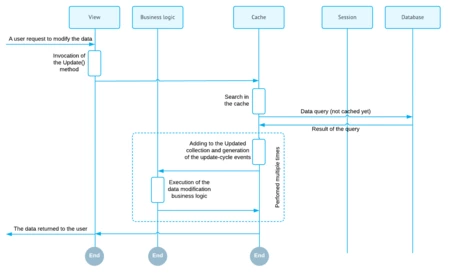
Updating the record for the first time


“An existing record can be updated through the Update(record) method of the data view. This method places the modified record into the cache.

If the data record is not found in the Cached collection, the cache controller loads the data record from the database, adds it to the Cached collection, marks it as updated, and updates it with the new values. The search of the data record in the Cached collection and loading of the data record from the database is based on the DAC key fields. The diagram below illustrates this scenario.”


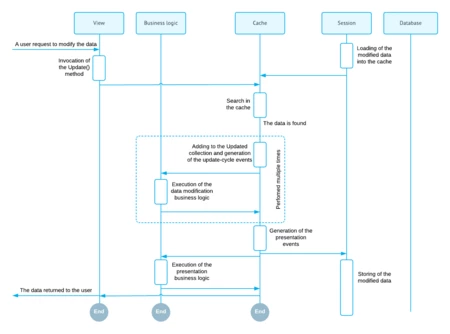
Updating the cached (previously modified) record
“If the updated record exists in the Cached collection the cache controller locates it and updates it with the new values. The diagram below illustrates this scenario.”


Thanks!.