

I tried using @columnConfig({ textAlign: TextAlign.Left }) in ts for my field, but it does not change its position.
Solved
How to place a field on the left side in Modern UI
Best answer by Vard03
These are my two checkboxes:
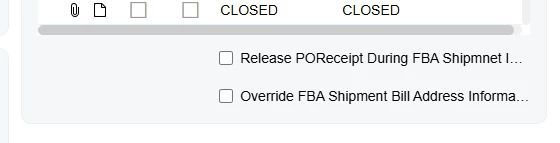
As you can see, they are placed on the right side, but in the Classic UI they look like this:
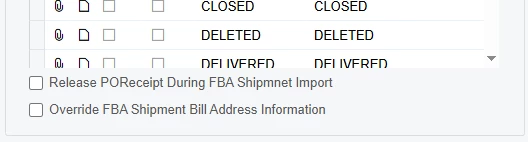
here is the code in my ts
@columnConfig({textAlign: TextAlign.Left })
ReleasePOReceiptDuringFBAShipmnetImport: PXFieldState;
@columnConfig({textAlign: TextAlign.Left })
OverrideFBAShipmentBillToInfo: PXFieldState;
and html
    <qp-fieldset id="CstPXLayoutRule234_fs1" view.bind="Store" slot="B" caption="FBA Default Shipment Options">
                  ...
                    <field name="ReleasePOReceiptDuringFBAShipmnetImport"></field>
                    <field name="OverrideFBAShipmentBillToInfo"></field>
                </qp-fieldset>
what am i missing?
Hello
You can try applying class="no-label" to your field in the .html file.
Regards,
Vard


Enter your E-mail address. We'll send you an e-mail with instructions to reset your password.