Answer

How to modify Storage Summary(IN409010)

  • August 1, 2025
  • 14 replies
  • 266 views

Forum|alt.badge.img

When I click on CUSTOMIZATION, it doesn't show the standard 'Edit Generic Inquiry' option. How can I modify it to add two additional columns?
 

Best answer by aiwan

@lihong 


You will have to do this via a customisation project.

Press customize existing screen:


Then navigate to the part of the screen you want to add the field to, then add data fields:
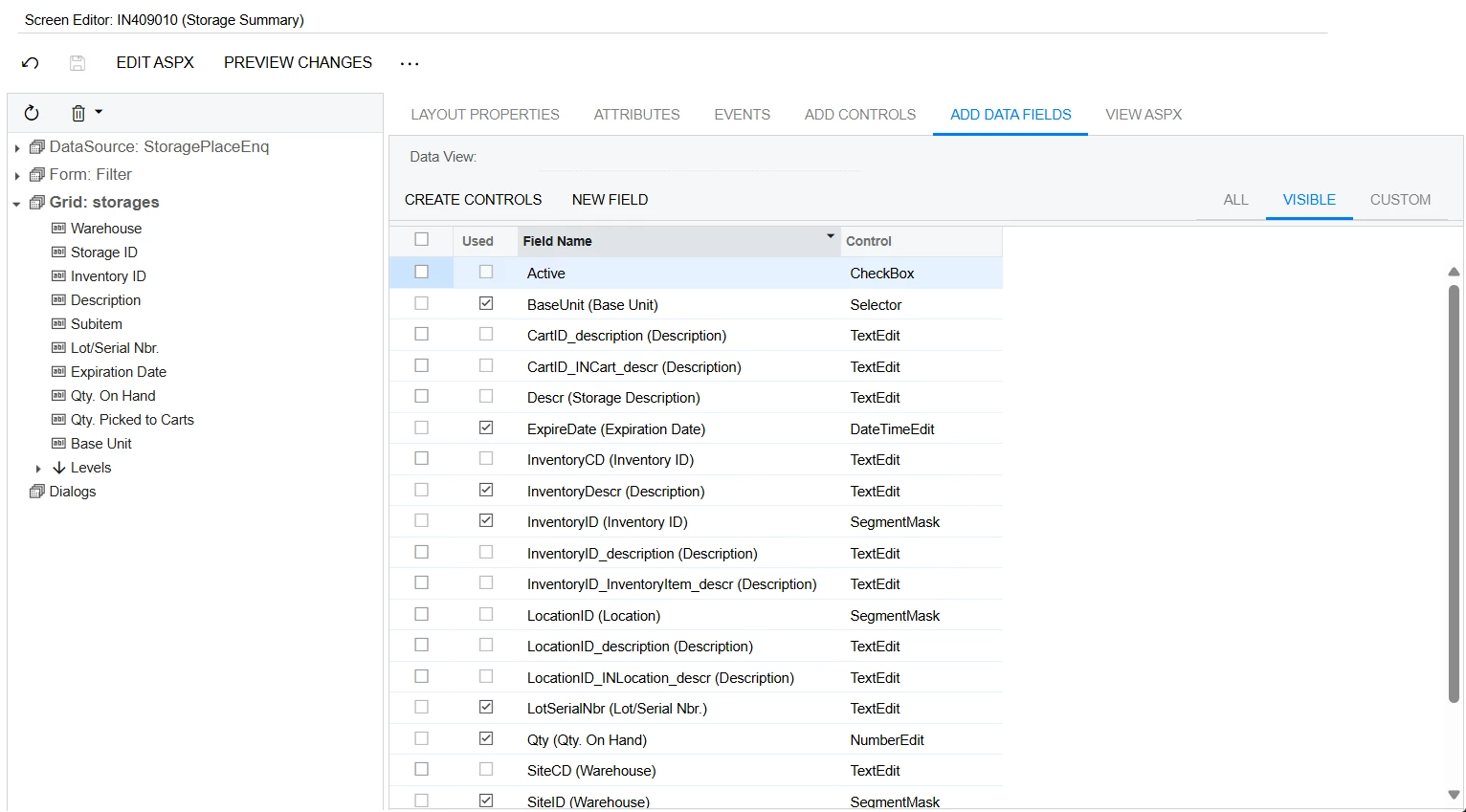
If you dont see your field here, you will need to press ‘New Field’ and configure it as you need it.


Let me know if you need any help with that.

14 replies

lauraj46
Captain II
Forum|alt.badge.img+8
  • Captain II
  • August 1, 2025

Hi ​@lihong ,

This screen is not based on a generic inquiry.  You need to use the customization framework to make changes.

Hope this helps.

Laura 


Forum|alt.badge.img
  • Author
  • Freshman I
  • August 4, 2025

Hi ​@lihong ,

This screen is not based on a generic inquiry.  You need to use the customization framework to make changes.

Hope this helps.

Laura 

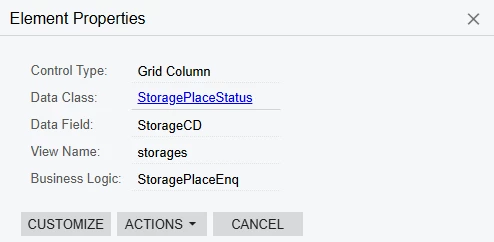
Thank you for your reply. Since I would like to edit this customization project, I noticed that the Storage Summary screen is not visible. I have full access to the customization project. Also, this project uses the Data Class: StoragePlaceStatus, but I’m unable to find StoragePlaceStatus in the system. I also have full access to our company’s Data Classes.


lauraj46
Captain II
Forum|alt.badge.img+8
  • Captain II
  • August 4, 2025

Hi ​@lihong ,

I would recommend that you post this question in the Customization area of the community so that the right experts will be more likely to see it. 

I’m not sure if you need to repost or if ​@Chris Hackett can help you to move it.

Laura


Forum|alt.badge.img
  • Author
  • Freshman I
  • August 4, 2025

Hi ​@lihong ,

I would recommend that you post this question in the Customization area of the community so that the right experts will be more likely to see it. 

I’m not sure if you need to repost of if ​@Chris Hackett can help you to move it.

Laura


Thank you for your kind suggestion and support.


Forum|alt.badge.img+8
  • Captain II
  • August 11, 2025

@lihong 


This screen is what is called a ‘Custom Inquiry’. It is essentially a ‘Form’ screen which dynamically filters the results based on the header parameters.


What is it that you are trying to achieve?


Forum|alt.badge.img
  • Author
  • Freshman I
  • September 10, 2025

@lihong 


This screen is what is called a ‘Custom Inquiry’. It is essentially a ‘Form’ screen which dynamically filters the results based on the header parameters.


What is it that you are trying to achieve?

Thank you for your reply. I’d like to modify it and add a new data field. Could you please let me know where I can open the edit screen?

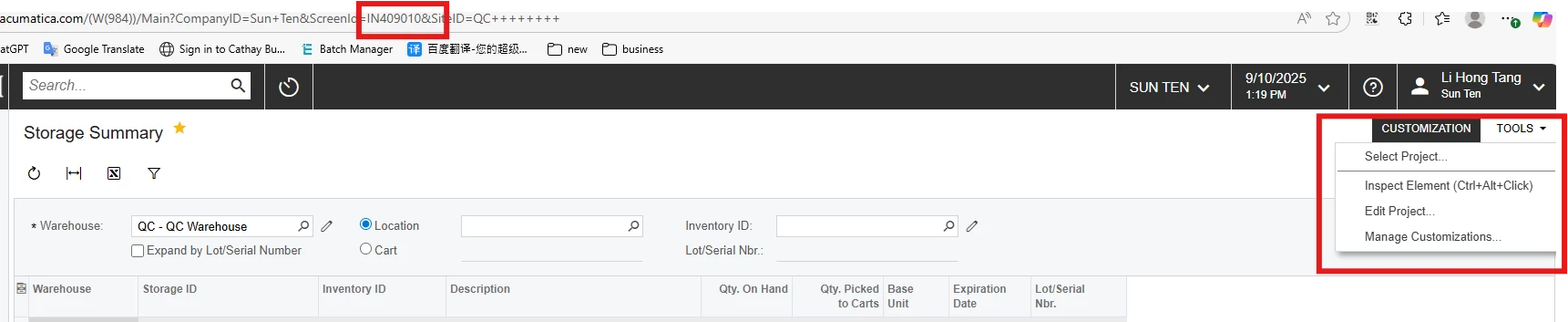
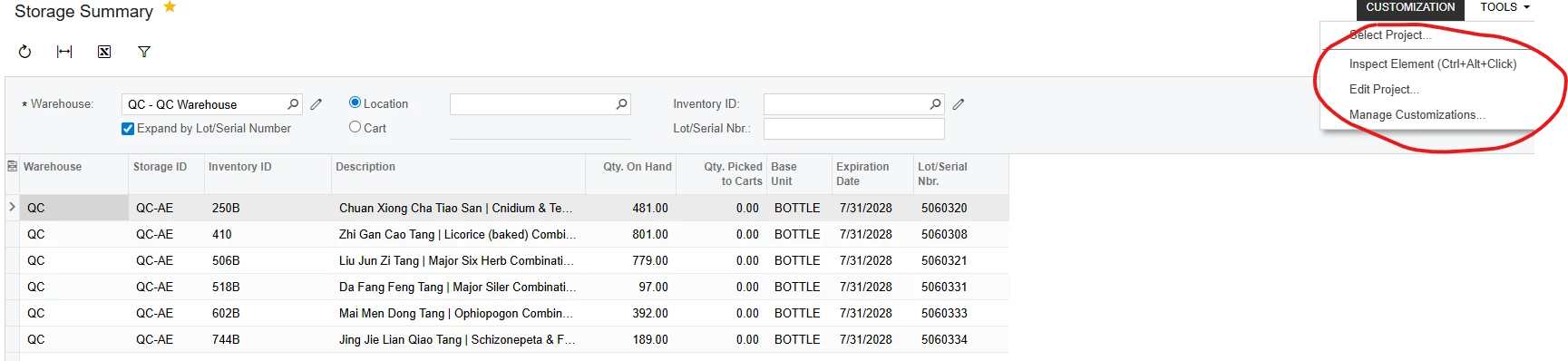
When I click on CUSTOMIZATION, it shows the options below, but none of them allow me to open IN409010 for editing.


Forum|alt.badge.img+8
  • Captain II
  • Answer
  • September 11, 2025

@lihong 


You will have to do this via a customisation project.

Press customize existing screen:


Then navigate to the part of the screen you want to add the field to, then add data fields:

If you dont see your field here, you will need to press ‘New Field’ and configure it as you need it.


Let me know if you need any help with that.


DipakNilkanth
Pro III
Forum|alt.badge.img+13

@lihong 


This screen is what is called a ‘Custom Inquiry’. It is essentially a ‘Form’ screen which dynamically filters the results based on the header parameters.


What is it that you are trying to achieve?

Thank you for your reply. I’d like to modify it and add a new data field. Could you please let me know where I can open the edit screen?

When I click on CUSTOMIZATION, it shows the options below, but none of them allow me to open IN409010 for editing.


Hi ​@lihong,

You can use the Customization Editor to edit the Storage Summary screen by following the steps below:

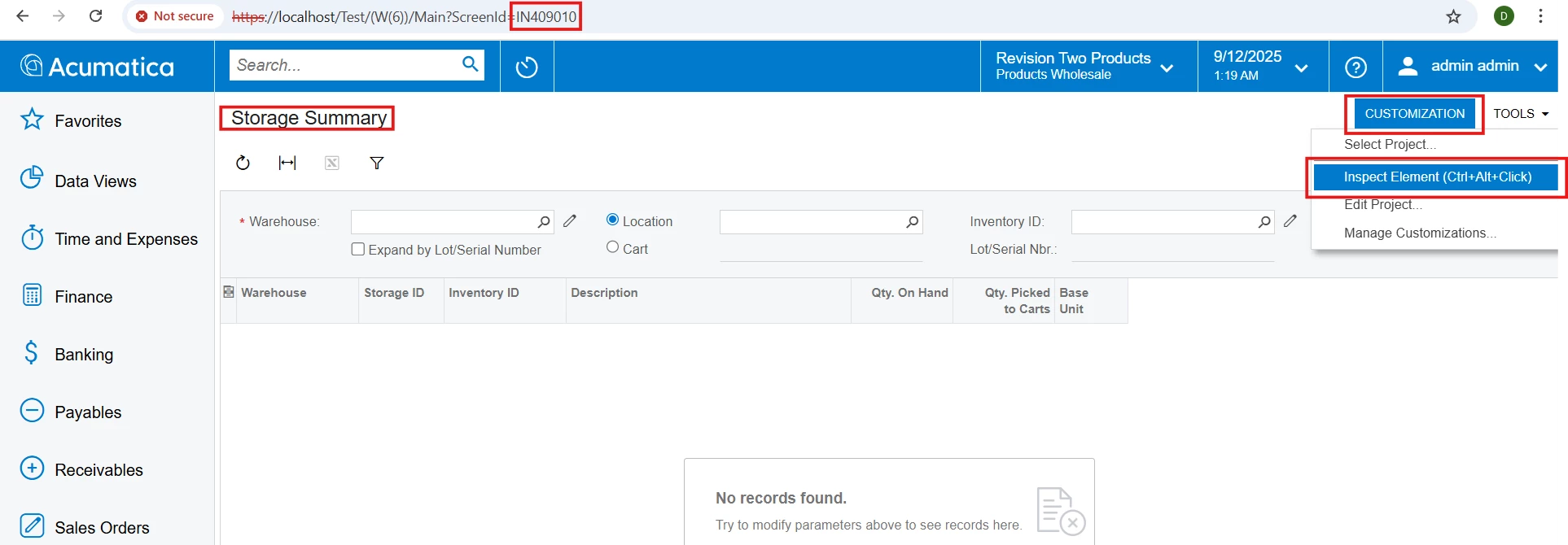
  1. Open the Storage Summary screen.

  2. Go to Customization → Inspect Element.

  3. Click anywhere on the screen (depending on whether you want to edit the grid or the header).


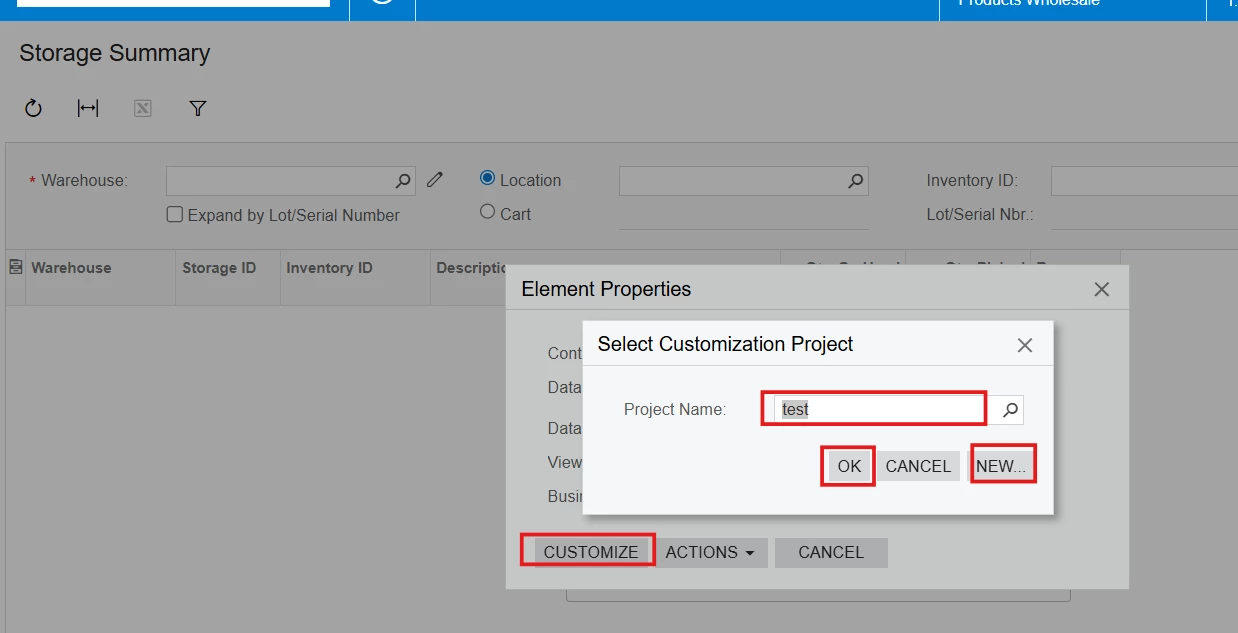
  • Click on Customize.

  • A popup window will appear showing your existing customization projects.

    • If you want to customize within an existing project, select that project from the list.

    • If you want to create a new project, click New, provide the project details, and then click OK.

  • The Storage Summary screen will now open in the Customization Editor, where you can add new columns or make other changes.

Hope, it helps!


Forum|alt.badge.img
  • Author
  • Freshman I
  • September 12, 2025

Thank you everyone for your replies. I currently don’t have access, but I’ll check again later.

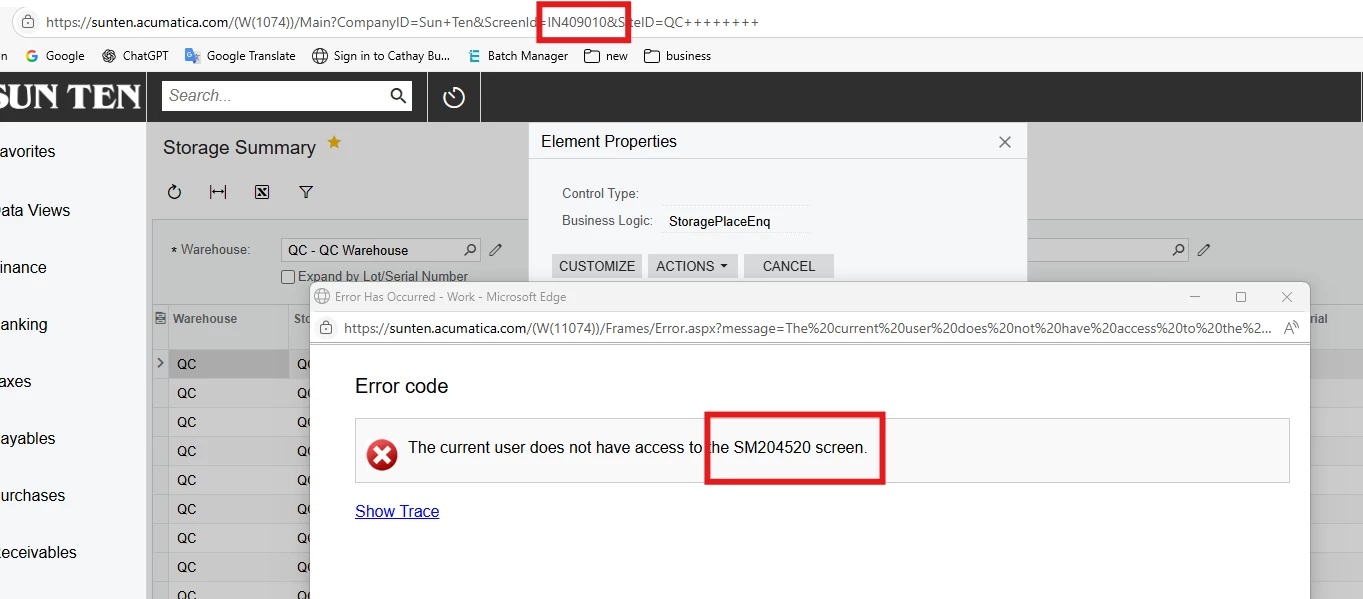
I also have a question: when I click Customize, it brings up the SM204520 screen. Why doesn’t it open IN409010 instead?


DipakNilkanth
Pro III
Forum|alt.badge.img+13

Hi ​@lihong,

Please verify that you have the Customizer role assigned on the Users screen.

When you click on Customize, the system opens screen SM204520 (Customization Projects). This means you will need to either select an existing project or create a new one if no projects are available.


Forum|alt.badge.img
  • Author
  • Freshman I
  • September 16, 2025

@aiwan ​@DipakNilkanth 

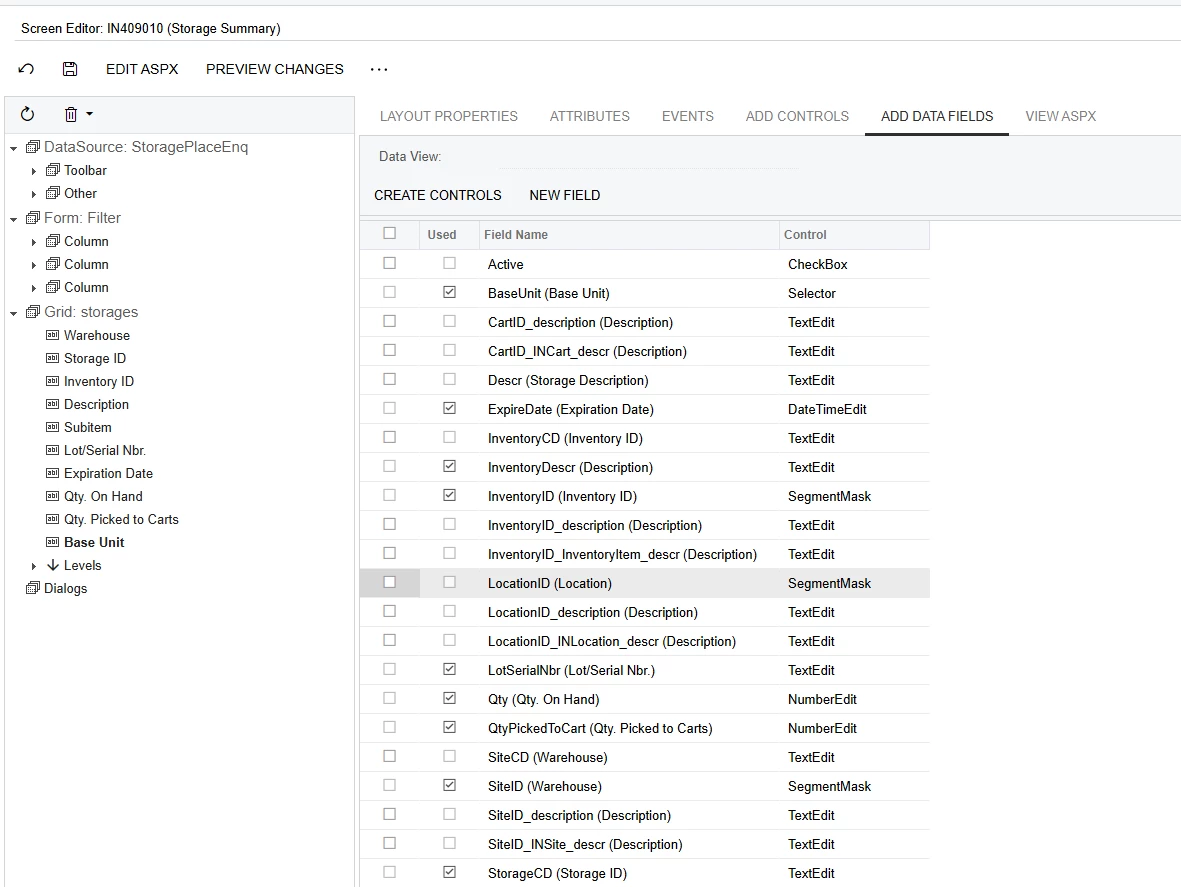
I can now access IN409010(first image below). I’d like to add a column for unit price, similar to what is shown in the Inventory Summary (second image below), to the Storage Summary. However, I’m still not sure how to add that column.


Forum|alt.badge.img
  • Author
  • Freshman I
  • September 19, 2025

@aiwan ​@DipakNilkanth 

I can now access IN409010(first image below). I’d like to add a column for unit price, similar to what is shown in the Inventory Summary (second image below), to the Storage Summary. However, I’m still not sure how to add that column.


Could anyone give me some guidance?


Forum|alt.badge.img+1
  • Jr Varsity I
  • September 19, 2025

@aiwan ​@DipakNilkanth 

I can now access IN409010(first image below). I’d like to add a column for unit price, similar to what is shown in the Inventory Summary (second image below), to the Storage Summary. However, I’m still not sure how to add that column.


Could anyone give me some guidance?

You can add a field under the Add Data Fields tab, click New Field. However, the issue here is this screen uses a data view delegate, so the values are inserted via code. If you need to add a field with any functionality, you will most likely need a developer to assist you


Forum|alt.badge.img
  • Author
  • Freshman I
  • October 9, 2025

@aiwan ​@DipakNilkanth 

I can now access IN409010(first image below). I’d like to add a column for unit price, similar to what is shown in the Inventory Summary (second image below), to the Storage Summary. However, I’m still not sure how to add that column.


Could anyone give me some guidance?

You can add a field under the Add Data Fields tab, click New Field. However, the issue here is this screen uses a data view delegate, so the values are inserted via code. If you need to add a field with any functionality, you will most likely need a developer to assist you

Thank you!