

Answer

How to load data from a smart panel to a customized grid?

  • February 19, 2023
  • 3 replies
  • 424 views

Forum|alt.badge.img

Hi,

I’m new to acumatica. I customized a new screen with formtab template. Inside my tab I customized a grid. This time I want to add  “Add order” button which is used to pop-up a new window (smart Panel) including all the purchase orders which are available in the POOrder DAC and select and insert into the grid when click on each order. below screenshots for the reference.

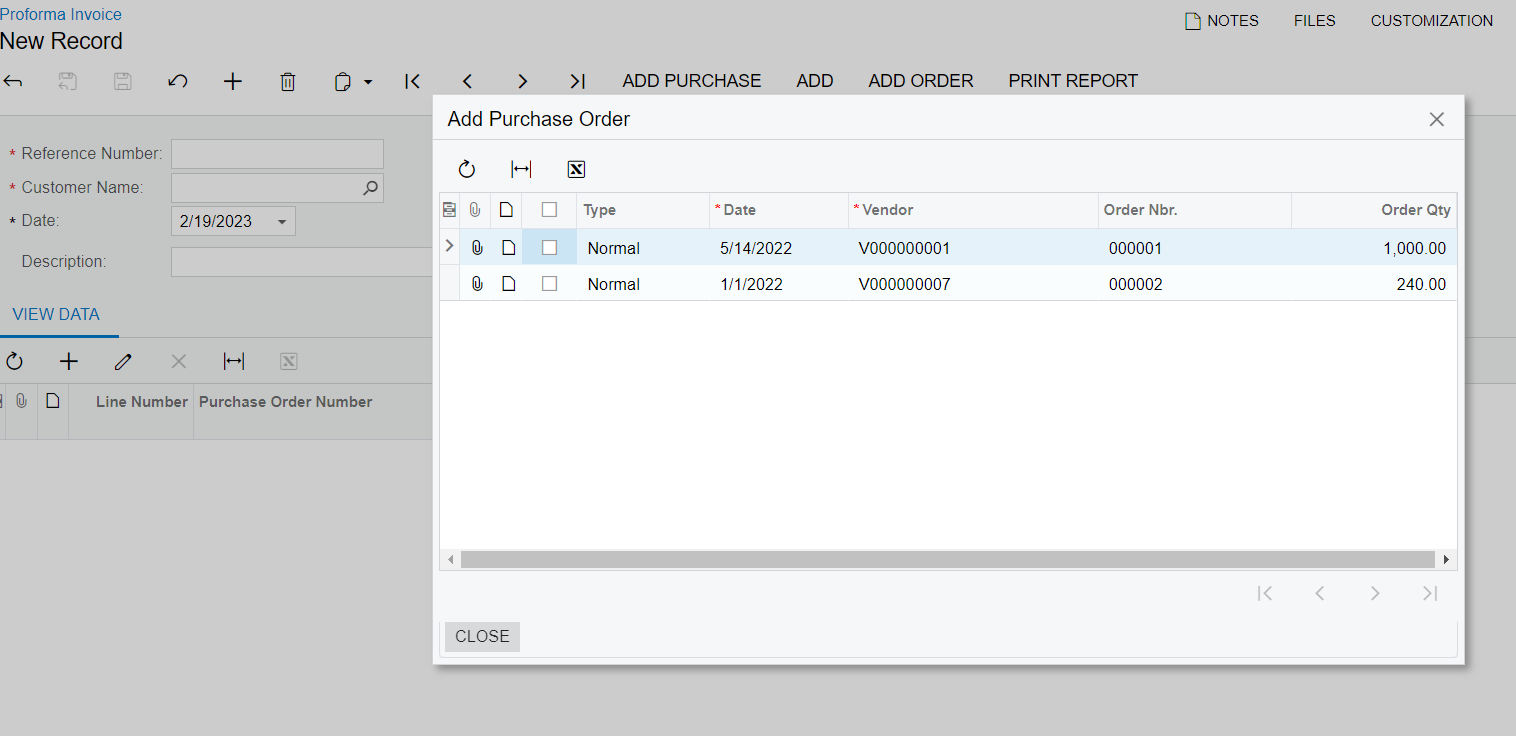
 

the grid

I have created the smart panel so far. But I need to add the values of smart panel into the grid. Can someone suggest me the way to do this or provide me any guidence resource.

thank You.

Best answer by oshadarodrigo64

Hi,

Please use the following link to refer the topic which I have already found a solution. 

Cheers.

3 replies

Forum|alt.badge.img
  • Author
  • Jr Varsity III
  • February 20, 2023

Hi, 

I attempted to add selected values from my smart panel to the grid using below code. But it doesn’t work. I don’t know what I have done wrong in this code. Can someone help me with this?

Thank you in advance.

namespace GRIProformaInvoice.Extension
{
// Acuminator disable once PX1016 ExtensionDoesNotDeclareIsActiveMethod extension should be constantly active
public class APProformaEntry_Extension : PXGraphExtension<APProformaEntry>
{

public SelectFrom<POOrder>.View POrdersView; //view for the smart panel

public SelectFrom<APProformaItemList>.View APProformaView; //view for the grid

public PXAction<APProforma> MyAction;
[PXUIField(DisplayName = "Add Purchase", MapEnableRights = PXCacheRights.Select, MapViewRights = PXCacheRights.Select)]
[PXButton(CommitChanges = true)]
public virtual IEnumerable myAction(PXAdapter adapter)
{

POrdersView.AskExt();
return adapter.Get();


}

public PXAction<APProforma> addNewOrder;
[PXButton(CommitChanges = true, DisplayOnMainToolbar = false)]
[PXUIField(DisplayName = "", MapEnableRights = PXCacheRights.Select, MapViewRights = PXCacheRights.Select, Visible = false)]


protected virtual IEnumerable AddNewOrder(PXAdapter adapter)
{
APProformaView.AllowInsert = true;
PXSelectBase<POOrder> orders =
new PXSelectReadonly<POOrder,
Where<POOrder.orderNbr, Equal<Current<APProformaItemList.ponbr>>>>(Base);


foreach (POOrder item in orders.Select())
{

APProformaItemList newOrder = new APProformaItemList();
newOrder = APProformaView.Insert(newOrder);
newOrder.Ponbr = item.OrderNbr;
newOrder.POLineNbr = 5;
newOrder.ProFormaQty = 100;
newOrder.Itemid = 1;
newOrder.POrderQty = 25;
APProformaView.Update(newOrder);

}

return adapter.Get();


}
}
}

for your reference:

APProforma = Parent DAC (customized form)

APProformaItemList = DAC for the grid in the tab
APProformaEntry = screen graph


Chris Hackett
Community Manager
Forum|alt.badge.img
  • Acumatica Community Manager
  • March 20, 2023

Hi @oshadarodrigo64  were you able to find a solution? Thank you!


Forum|alt.badge.img
  • Author
  • Jr Varsity III
  • Answer
  • March 23, 2023

Hi,

Please use the following link to refer the topic which I have already found a solution. 

Cheers.