Question

How to Hide Empty Rows and Columns in the Add Matrix Items Grid (SO301000)?

  • July 28, 2026
  • 5 replies
  • 113 views

Forum|alt.badge.img+3

Hello Acumatica,

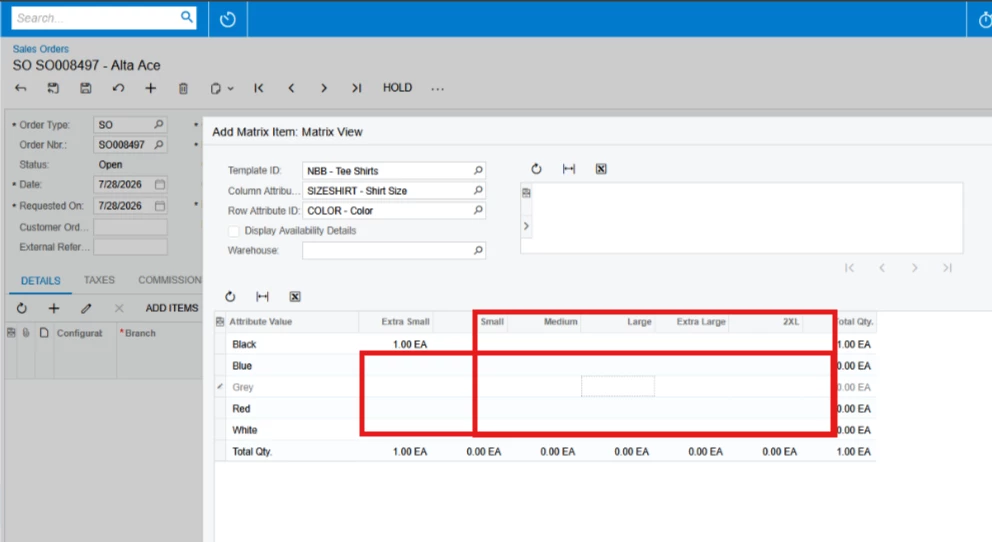
Hide the rows and columns in the Matrix Item grid when there are no corresponding inventory variants or all matrix cells are empty.

If a row or column has no valid Attribute values, I want it to be hidden instead of being displayed with empty cells.
Any guidance or sample implementation would be greatly appreciated. Thank you!

5 replies

jinin
Pro I
Forum|alt.badge.img+12
  • Pro I
  • July 30, 2026

Hi ​@SaiKrishnaV ,

Try to extend `MatrixEntryExt` and override `GetMatrixAttributeValues()`. That method supplies the attribute values the panel turns into rows and columns — prune what it returns and the empty rows/columns are never built.

- The extension class must live in the `PX.Objects.IN.GraphExtensions.SOOrderEntryExt` namespace. The base type resolves relative to it and won't compile anywhere else.
- Extend `MatrixEntryExt`, not `SmartPanelExt`.


Forum|alt.badge.img+3
  • Author
  • Captain I
  • July 31, 2026

@jinin Thanks for the input! I will give it a try.


Forum|alt.badge.img+3
  • Author
  • Captain I
  • August 16, 2026

@jinin ​@RohitRattan88 ​@arpine08 

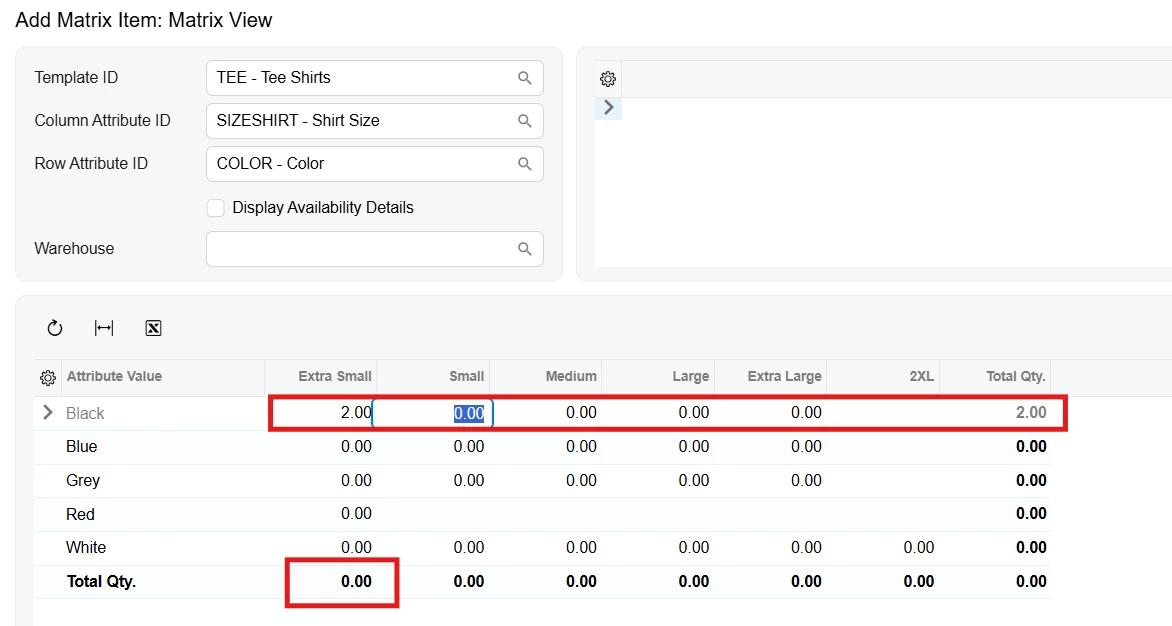
I tried the code below to hide empty rows and columns. However, the Total Qty values in the button row are not refreshing/updating correctly, while the Total Qty in the last column is updating as expected.   

public class MatrixEntryExtSOExt : PX.Objects.IN.GraphExtensions.SOOrderEntryExt.MatrixEntryExt
{
protected override MatrixAttributeValues GetMatrixAttributeValues()
{
// Get all row/column values
MatrixAttributeValues matrixValues = base.GetMatrixAttributeValues();

// Existing inventory combinations
var inventoryMap = GetInventoryMap();

// Remove rows that have no inventory variants
matrixValues.RowValues = matrixValues.RowValues
.Where(row => inventoryMap.Keys.Any(k => k.RowAttributeValue == row.ValueID)).ToArray();

// Remove columns that have no inventory variants
matrixValues.ColumnValues = matrixValues.ColumnValues
.Where(col => inventoryMap.Keys.Any(k => k.ColumnAttributeValue == col.ValueID)).ToArray();

return matrixValues;
}
}


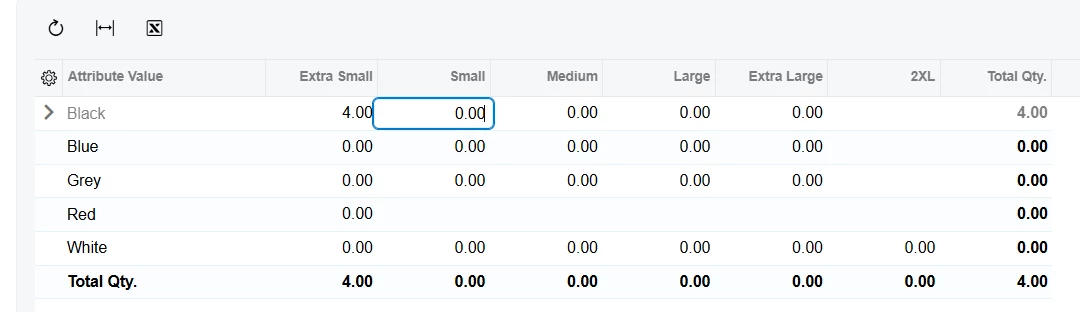
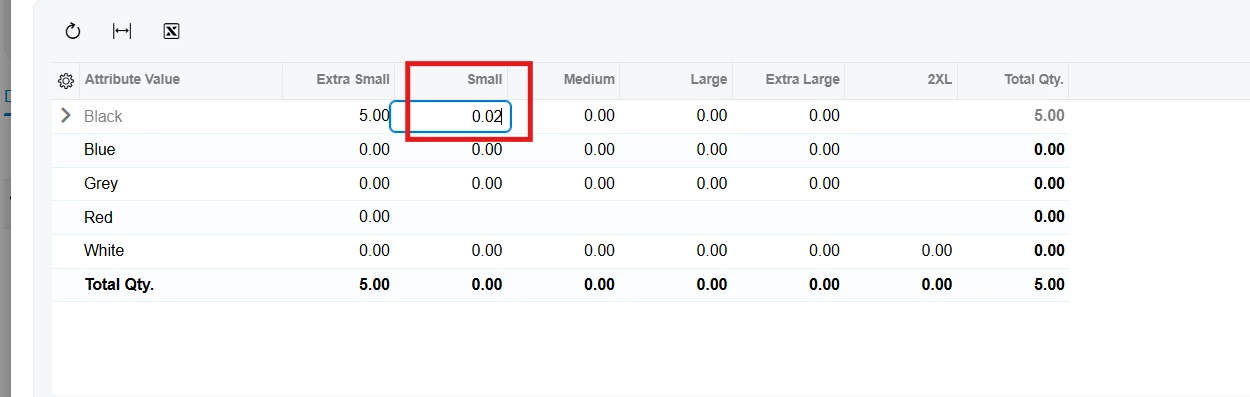
I tried using view.requestRefresh() in the RowSelected event, and it refreshes the Total Qty correctly. However, it affects the grid behavior. For example, after entering a value and pressing Tab, the next 0.00 cell gets focus, but the value is not selected the cursor is placed at the end of the value instead.

Could you please help me identify what might be causing this issue and how I can fix it?


arpine08
Jr Varsity I
Forum|alt.badge.img+2
  • Jr Varsity I
  • August 16, 2026

Hi ​@SaiKrishnaV,


Thanks for tagging me.

I reviewed the issue. The filtering logic itself works as expected. The issue appears to be caused by deriving the customization class directly from MatrixEntryExt. Even with only the derived class declaration and no overrides, the Total Qty. calculations and the removal of empty rows/columns did not work as expected.

Instead, I extended MatrixEntryExt using PXGraphExtension and used PXOverride for GetMatrixAttributeValues(). Since GetInventoryMap() is protected, I exposed it through PXProtectedAccess.

With this approach, the standard Total Qty. calculations continue to work correctly, and the empty rows/columns are removed. I tested this with the Sales Demo data in my local environment.

Please try the code below in your environment and see if it resolves the issue.

Here is the full code:

using PX.Data;
using PX.Objects.IN.Matrix.GraphExtensions;
using PX.Objects.SO;
using System.Collections.Generic;
using System.Linq;

namespace Graph_Ext.SO
{
[PXProtectedAccess(typeof(PX.Objects.IN.GraphExtensions.SOOrderEntryExt.MatrixEntryExt))]
public abstract class MatrixEntryExtProtectedAccess : PXGraphExtension<PX.Objects.IN.GraphExtensions.SOOrderEntryExt.MatrixEntryExt, SOOrderEntry>
{
[PXProtectedAccess]
public abstract IDictionary<MatrixGridExt<SOOrderEntry, SOOrder>.InventoryMapKey, MatrixGridExt<SOOrderEntry, SOOrder>.InventoryMapValue> GetInventoryMap();
}


public class MatrixEntryExtSOExt : PXGraphExtension<PX.Objects.IN.GraphExtensions.SOOrderEntryExt.MatrixEntryExt, SOOrderEntry>
{

public delegate MatrixGridExt<SOOrderEntry, SOOrder>.MatrixAttributeValues GetMatrixAttributeValuesDelegate();
[PXOverride]
public MatrixGridExt<SOOrderEntry, SOOrder>.MatrixAttributeValues GetMatrixAttributeValues(GetMatrixAttributeValuesDelegate baseMethod)
{
// Get all row/column values
MatrixGridExt<SOOrderEntry, SOOrder>.MatrixAttributeValues matrixValues = baseMethod();

MatrixEntryExtProtectedAccess baseExt = Base.GetExtension<MatrixEntryExtProtectedAccess>();

// Existing inventory combinations
var inventoryMap = baseExt.GetInventoryMap();
// Remove rows that have no inventory variants
matrixValues.RowValues = matrixValues.RowValues
.Where(row => inventoryMap.Keys.Any(k => k.RowAttributeValue == row.ValueID)).ToArray();
// Remove columns that have no inventory variants
matrixValues.ColumnValues = matrixValues.ColumnValues
.Where(col => inventoryMap.Keys.Any(k => k.ColumnAttributeValue == col.ValueID)).ToArray();
return matrixValues;
}

}
}


Forum|alt.badge.img+3
  • Author
  • Captain I
  • August 17, 2026

@arpine08  thanks for looking into this. I tried the suggested approach, but I am still seeing an issue with the grid behavior. When I enter a value and press Tab, the next 0.00 cell gets focus, but the value is not selected; the cursor is placed at the end instead. please refer below screenshot.