

Answer

How to go to a URL from clicking on a Workspace item?

  • October 25, 2023
  • 6 replies
  • 396 views

Forum|alt.badge.img+1

What I am looking to do is simple, I want to have a workspace item which, when clicked, opens an external URL I specify in the same tab.
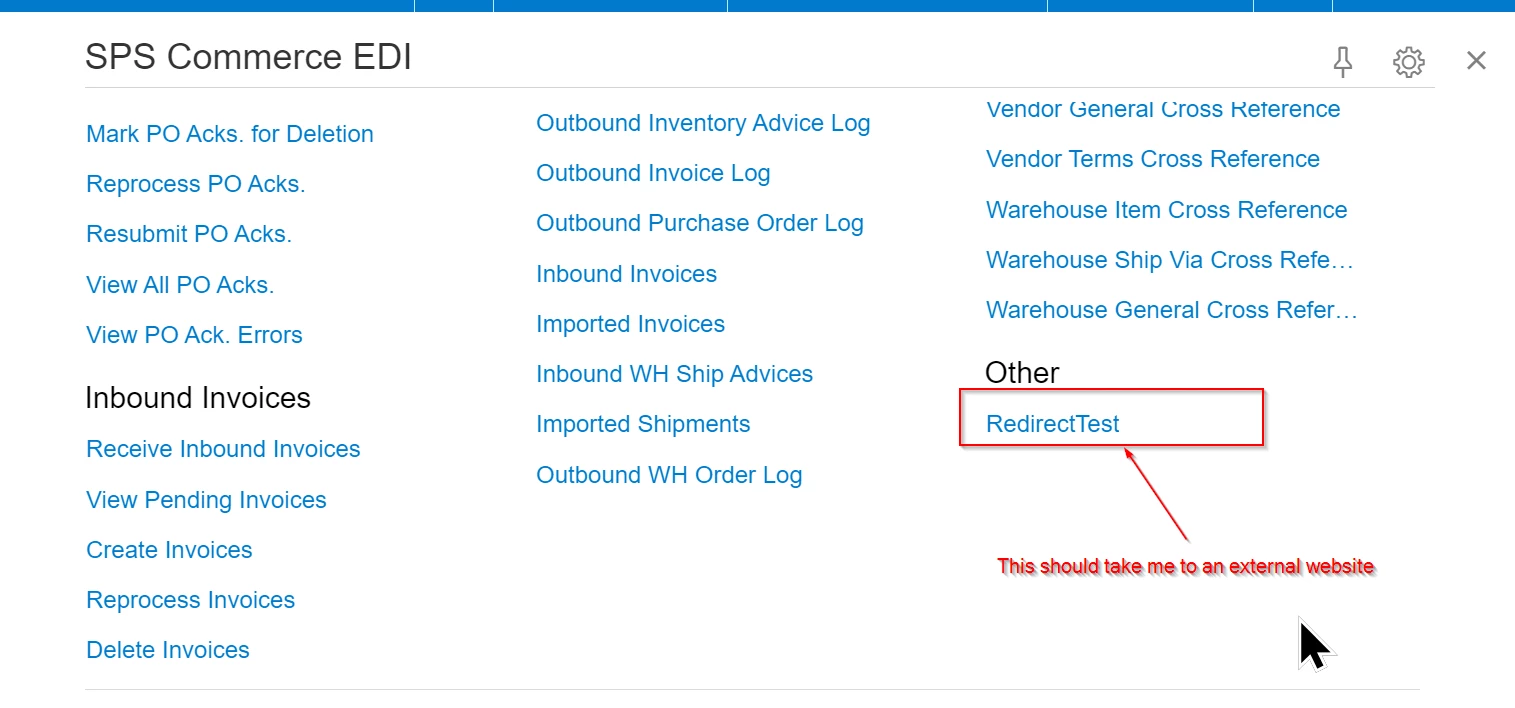
Note : I do not want the external website to be embedded in my Acumatica screen(The external website doesn’t support that).

I’ve tried several different things, but none have quite worked.

One approach I took is creating a new Screen and then adding in the below code to the aspx.cs code behind file’s  Page_Load callback. This got me very close but there is a pesky popup message when I try opening the page before the redirect happens.

    protected void Page_Load(object sender, EventArgs e)

    {

        System.Web.HttpContext context = System.Web.HttpContext.Current;
        String url = "https://www.acumatica.com";
        context.Response.Clear();
        context.Response.Write("<script language=javascript>");
        context.Response.Write(String.Format("window.open(\"{0}\",\"{1}\");", url, "_top"));

        context.Response.Write("</script>");
        context.Response.Cache.SetNoStore();
        context.Response.Cache.SetNoServerCaching();
        context.Response.End();
    }

Here is the problem popup message I’m seeing
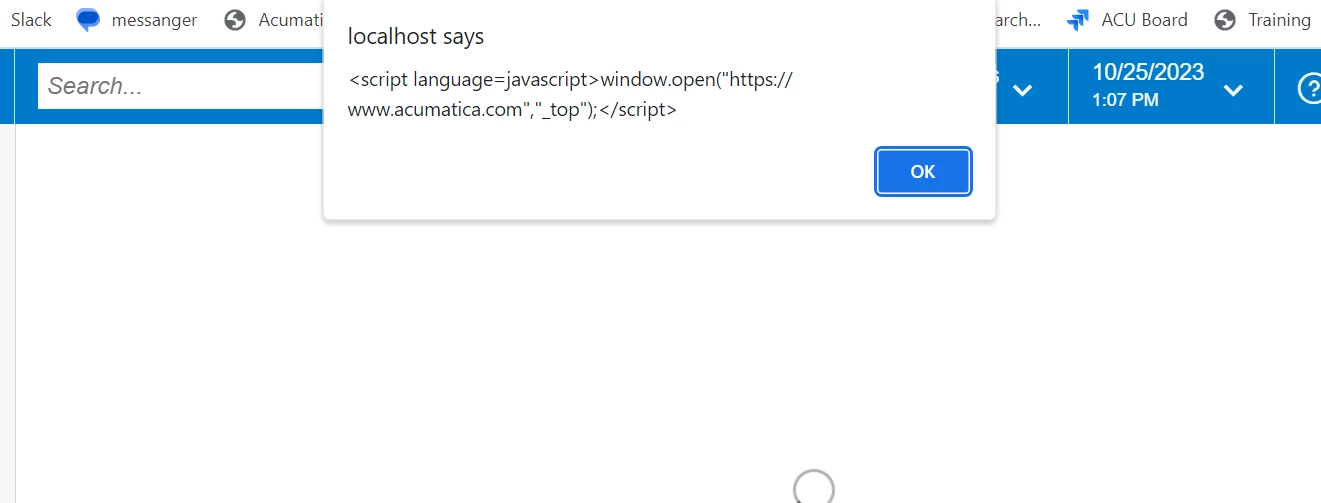
After I click okay the correct screen then opens up. Also the above message doesn’t always popup, it seems to popup every other time I click on the Workspace item for some strange reason.

If anyone has any suggestions I’d appreciate your thoughts,

Philip Engesser

Best answer by Mike Gifford

I think you were close - looking more at Sergeys article http://asiablog.acumatica.com/2017/06/redirect-on-page-load.html


I think you just had some things missing?

    protected void Page_Load(object sender, EventArgs e)

    {

       System.Web.HttpContext context = System.Web.HttpContext.Current;
       String url = "http://acumatica.com";
       Boolean iscallback = context.Request.Form["__CALLBACKID"] != null;
       Boolean isget = String.Equals(context.Request.HttpMethod, "GET", StringComparison.InvariantCultureIgnoreCase);
       Boolean ispost = String.Equals(context.Request.HttpMethod, "POST", StringComparison.InvariantCultureIgnoreCase);
       context.Response.Clear();
       if (iscallback)
       {
              context.Response.Write("eRedirect0:" + url);
       }
       else if (isget || ispost)
       {
        context.Response.Clear();
      context.Response.Write("<script language=javascript>");
        context.Response.Write(String.Format("window.open(\"{0}\",\"{1}\");", url, "_top"));
              context.Response.Write("</script>");
       }
       context.Response.Cache.SetNoStore();
       context.Response.Cache.SetNoServerCaching();
       context.Response.End();
    }

6 replies

Mike Gifford
Jr Varsity III
Forum|alt.badge.img
  • Jr Varsity III
  • Answer
  • October 30, 2023

I think you were close - looking more at Sergeys article http://asiablog.acumatica.com/2017/06/redirect-on-page-load.html


I think you just had some things missing?

    protected void Page_Load(object sender, EventArgs e)

    {

       System.Web.HttpContext context = System.Web.HttpContext.Current;
       String url = "http://acumatica.com";
       Boolean iscallback = context.Request.Form["__CALLBACKID"] != null;
       Boolean isget = String.Equals(context.Request.HttpMethod, "GET", StringComparison.InvariantCultureIgnoreCase);
       Boolean ispost = String.Equals(context.Request.HttpMethod, "POST", StringComparison.InvariantCultureIgnoreCase);
       context.Response.Clear();
       if (iscallback)
       {
              context.Response.Write("eRedirect0:" + url);
       }
       else if (isget || ispost)
       {
        context.Response.Clear();
      context.Response.Write("<script language=javascript>");
        context.Response.Write(String.Format("window.open(\"{0}\",\"{1}\");", url, "_top"));
              context.Response.Write("</script>");
       }
       context.Response.Cache.SetNoStore();
       context.Response.Cache.SetNoServerCaching();
       context.Response.End();
    }


Forum|alt.badge.img+1
  • Author
  • Varsity I
  • October 30, 2023

Hi Mike,

Thanks for the suggestion. I did try the full code snippet from Sergeys article but unfortunately that also did not work for me. The code I posted was just a slimed down version to make understanding the question easier.
If you tried the above code and it worked then let me know, because maybe I messed something up. Otherwise thanks for the suggestion but it doesn’t quite do what I was looking for.


Mike Gifford
Jr Varsity III
Forum|alt.badge.img
  • Jr Varsity III
  • October 30, 2023

Hi - yes i tried it and it worked. I created a new dummy page/graph and put that code into the page_load - worked fine for me.


With yours i got the same error that you did.


Mike Gifford
Jr Varsity III
Forum|alt.badge.img
  • Jr Varsity III
  • October 30, 2023

I added a customization attachment that should work - i did it on 23r1..


Forum|alt.badge.img+1
  • Author
  • Varsity I
  • November 1, 2023

Hi @Mike Gifford,

I appreciate the help and customization to try out. A bunch of work recently came down the pipeline so depending on how that goes it might take me a bit to follow up on this. I just wanted to let you know that this is still very much on my to do list!

Sorry about the delay,

Philip Engesser


Forum|alt.badge.img+1
  • Author
  • Varsity I
  • November 3, 2023

@Mike Gifford I gave your code a try and it worked!
I’m not sure what I was doing wrong, I thought I had already tried that, but I must have messed it up somehow 😅

Thanks for your help and for being persistent when I had doubts that it would work!

Philip Engesser
