




This post is inspired by the old Dmitrii Naumov's blog post:
https://asiablog.acumatica.com/index.php/2019/03/working-with-generic-inquiries-from-code/
This post attempts to explain how to correctly get Generic Inquiry results from code and also attempts to address some inaccuracies of the original post.
Selecting GI Data from Database
Sometimes, you may wish to obtain Generic Inquiry results from code. The first step to do that is to create an instance of the PXGenericInqGrph graph which is a special graph type used by all Generic Inquiries. To do that, use the PXGenericInqGrph.CreateInstance factory method. The parameters of this method are Generic Inquiry ID or Name, or Screen ID, or previously prepared GI description, or DAC type for auto-generated GI. You can also pass GI parameters to this method. The GI parameters mean Generic Inquiry parameters configured for the used Generic Inquiry that you want to set.
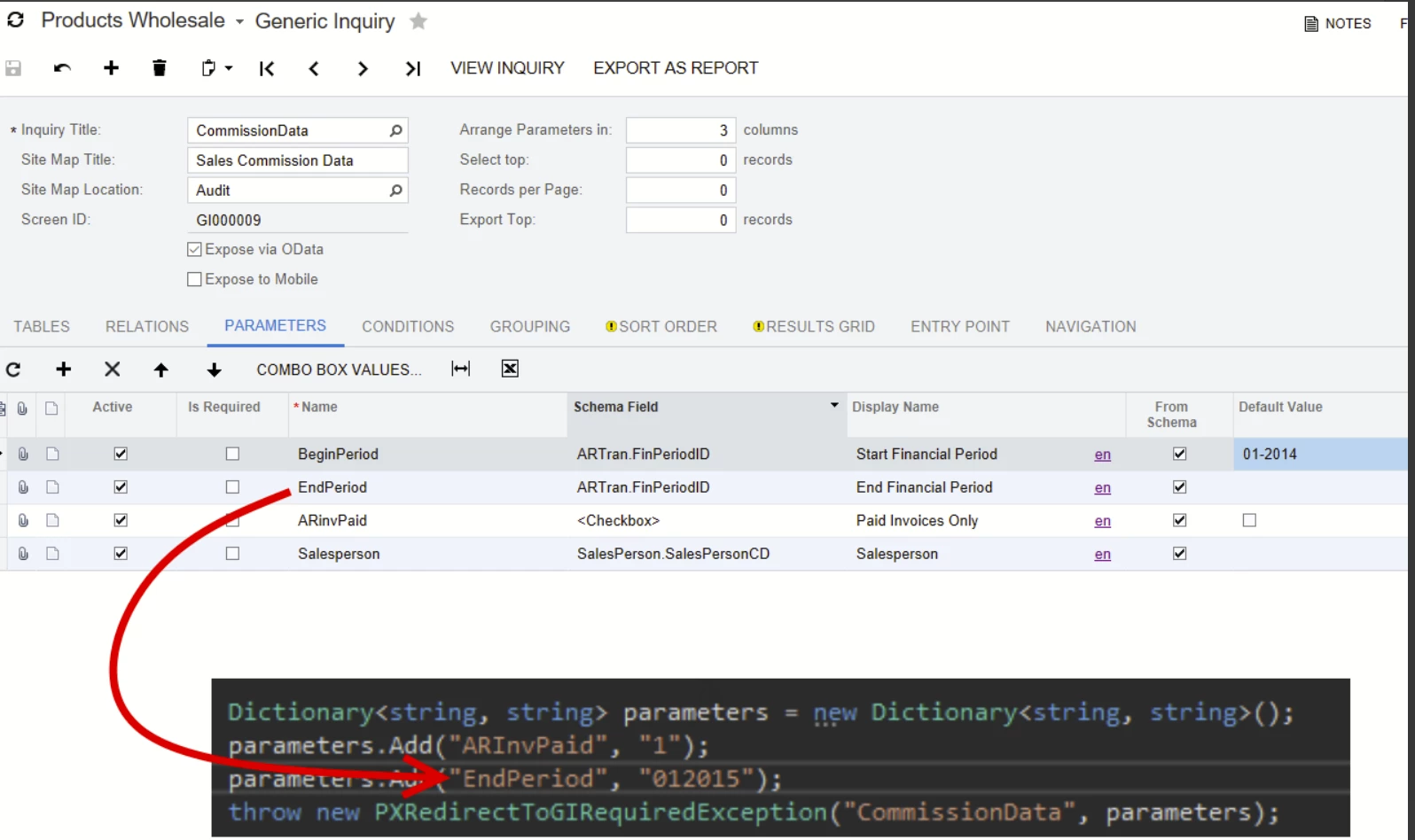
To pass parameters you create Dictionary<string, string> containing parameter name as a key and parameter value as a value. After creating the generic inquiry graph, you should use its Results graph view to select the data. The results are rows of a special DAC type GenericResult. See following example:
var giParameters = new Dictionary<string, string>
{
    { "ARInvPaid", "1" },
    { "BeginPeriod", "012014" },
    { "EndPeriod", "012015" }
};

PXGenericInqGrph giGraph = PXGenericInqGrph.CreateInstance("CommissionData", "CommissionData", giParameters);
PXResultset<GenericResult> results = giGraph.Results.Select();
Note that only fields present in the Results grid of the used Generic Inquiry will be filled in the GenericResult DACs retrieved from the GI. Every other field will be filled with the null value unless it is referenced by the PXDependOnFieldsAttribute attribute declared on one of the fields present in the Results grid.
Reading DAC Fields from GenericResult DAC
Generic Inquiries in some way are similar to regular inquiry screens and should be treated as such by the code calling them. Like many code-based inquiry screens GIs have a special DAC GenericResult to present the results. This DAC represents rows in the GI Results grid and combines fields from several DACs joined in GI. There are two methods to get DAC field values. One method is correct, and another is incorrect one, but you can still see it used in Acumatica code and it was also used in the original blog post. Both methods require from the developer to know the alias of the DAC specified in the Generic Inquiry configuration by the GI creator.
Incorrect Method with Direct Access to Values Property
The first method is an incorrect one, although used in the application code in some places that obtain GI data from code. It relies on the GenericResult's Values dictionary property where you can find actual DAC instances. The keys in this dictionary are aliases specified for DACs in the GI configuration by the user. For instance, if there is "ARTran" alias for PX.Objects.AR.ARTran DAC, then you can get DAC from the results by alias like this:
GenericResult genericResult = results.FirstOrDefault();
ARTran tran = genericResult.Values["ARTran"];
Then you can read DAC field values directly from ARTran instance.
You must not use this method, it is described in this article only with the goal to describe how you should not access data in the GenericResult DAC. In the future this DAC implementation including Values property may change significantly. In addition, some scenarios may require the execution of field selecting event handlers to get correct values of DAC fields. Such event handlers won't be executed in case with the direct access of the Values collection. You should use the method described in the next section instead. |
Correct Method with Reading DAC Fields via PXCache API
The correct method to read data from the GenericResult DAC is to obtain the reference to Result grid's PXCache instance. This instance is not a regular graph cache, its type is PX.Data.GenericResultCache and it overrides several key PXCache API methods to correctly support the GenericResult DAC. To obtain DAC field value you should use standard PXCache methods like GetValue and GetValueExt. The DAC field name passed to PXCache methods is a bit unusual because it should also include the GI alias of the DAC configured in the GI and separated from the name of the field with underscore ("_"). The pattern is MyDacAlias_DacField.
Here is the code example that demonstrates how to get the value of Qty DAC field for PX.Objects.AR.ARTran DAC with "ARTran" GI alias specified as a hard-coded string literal:
GenericResult genericResult = results.FirstOrDefault();
var giCache = giGraph.Results.Cache;
const string dacAlias = "ARTran";
string fieldName = $"{dacAlias}_{nameof(PX.Objects.AR.ARTran.Qty)}";
var value = giCache.GetValue(genericResult, fieldName);
However, using hard-coded string DAC aliases is not a very good approach. It has several drawbacks:
- What will happen if the DAC alias is changed in the GI configuration? The code won't work anymore.,
- What if you do not know the alias for the DAC?
In this case you can use GI engine's data structures to find the required alias by the full type name of the DAC type. The GI graph PXGenericInqGrph has the Description property that contains the object of type GIDescription that describes the GI. It contains DACs used by the GI, conditions, joins, sorts, groupings, and other things. You can search through the GIDescription.Tables property to find information about a particular DAC type and what alias is specified in GI for it. The code should look like this:
string arTranFullTypeName = typeof(PX.Objects.AR.ARTran).FullName;
var arTranGiTable =
  giGraph.Description.Tables
                     .FirstOrDefault(giTable =>
                          string.Equals(giTable.Name,
                                        arTranFullTypeName,
                                        StringComparison.Ordinal));
if (arTranGiTable == null)
{
    // If GITable for DAC is not found, then the DAC is not used by the GI.
    // In this case you can return null, throw exception, or do any other fallback logic
    // The example will throw an exception.
    throw new InvalidOperationException(
           $"The DAC \"{arTranFullTypeName}\" is not used by the GI");
}

string fieldName =
   $"{arTranGiTable.Alias}_{nameof(PX.Objects.AR.ARTran.Qty)}";
GenericResult genericResult = results.FirstOrDefault();
var giCache = giGraph.Results.Cache;

var value = giCache.GetValue(genericResult, fieldName);
Thank you for you attention!



