
Answer

How to get data from a generic inquiry programatically

  • December 10, 2024
  • 11 replies
  • 299 views

Kyle Vanderstoep
Varsity I
Forum|alt.badge.img+1

Hi everyone,


Can someone pass me a code snippet on how to get data from a specified generic inquiry programmatically? (i.e. SELECT * FROM MyGI and return the data rows that I can then manipulate) If you happen to know how to select a GI respecting a shared filter as well, that would be extremely helpful as well. 


Thank you

-Kyle

Best answer by darylbowman

// Acuminator disable once PX1076 CallToInternalApi []
PXGenericInqGrph giGraph = PXGenericInqGrph.CreateInstance((Guid)designID);

int batchStart = 0;
int batchSize = 2500;
int rowCount = 0;

do
{
// Select GI rows from the database
PXResultset<GenericResult> results = giGraph.Results.SelectWindowed(batchStart, batchSize);
batchStart += batchSize;
var resultRows = results?.Cast<GenericResult>()?.ToList()?.Select(r => r.Values)?.ToList();
rowCount = resultRows.Count;
}
while (rowCount > 0);

(This includes a form of paging that isn’t necessarily required for all situations, but was for mine)

11 replies

Dmitrii Naumov
Acumatica Moderator
Forum|alt.badge.img+7
  • Acumatica Moderator
  • December 10, 2024

darylbowman
Captain II
Forum|alt.badge.img+15
  • Answer
  • December 10, 2024
// Acuminator disable once PX1076 CallToInternalApi []
PXGenericInqGrph giGraph = PXGenericInqGrph.CreateInstance((Guid)designID);

int batchStart = 0;
int batchSize = 2500;
int rowCount = 0;

do
{
// Select GI rows from the database
PXResultset<GenericResult> results = giGraph.Results.SelectWindowed(batchStart, batchSize);
batchStart += batchSize;
var resultRows = results?.Cast<GenericResult>()?.ToList()?.Select(r => r.Values)?.ToList();
rowCount = resultRows.Count;
}
while (rowCount > 0);

(This includes a form of paging that isn’t necessarily required for all situations, but was for mine)


Kyle Vanderstoep
Varsity I
Forum|alt.badge.img+1

Thank you guys! Any idea on how to apply a shared filter to the GI?


darylbowman
Captain II
Forum|alt.badge.img+15
  • December 10, 2024

😐


Kyle Vanderstoep
Varsity I
Forum|alt.badge.img+1

Haha, I know it can be done! Dashboard widgets can do it!


Forum|alt.badge.img
  • Jr Varsity III
  • March 22, 2025

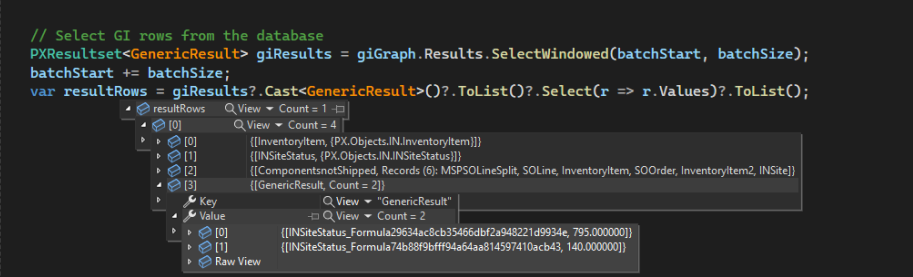
I created a table to track component lines before the shipment is created.  When a Kit is ordered the component lines are written to a related table and tied to SOLine. I then created a gi to summarize the total on open orders for each component.  I now want to retrieve the information from the generic inquiry in my custom program.

I am trying to use Daryl Bowman’s answer, but I want to retrieve one record.  I created a generic inquiry InventoryAllocation that gives me a few calculated fields.  The generic inquiry requires siteID and InventoryID parameters.

How do I adapt this statement to return the one record?  

do

{ // Select GI rows from the database PXResultset<GenericResult> results = giGraph.Results.SelectWindowed(batchStart, batchSize); batchStart += batchSize; var resultRows = results?.Cast<GenericResult>()?.ToList()?.Select(r => r.Values)?.ToList(); rowCount = resultRows.Count; }

while (rowCount > 0)

Thank-you.


darylbowman
Captain II
Forum|alt.badge.img+15

PXResultset<GenericResult> results = giGraph.Results.SelectWindowed(0, 1); will give you a single record


Forum|alt.badge.img
  • Jr Varsity III
  • March 24, 2025

PXResultset<GenericResult> results = giGraph.Results.SelectWindowed(0, 1); will give you a single record

How do I pass the siteID and InventoryID to get the correct 1 record returned?  If I load all of the records the generic inquiry provides, without parameters, and then use the Where clause on the resultRows, I would have to load over 100,000 records.

Is it possible to pass on the parameters with the PXResultset command?

Thanks.


darylbowman
Captain II
Forum|alt.badge.img+15

I don’t know how to incorporate parameters in the context of a GI. Is it possible instead to make normal selects and calculate the values in code that would be calculated by the GI?


Forum|alt.badge.img
  • Jr Varsity III
  • March 24, 2025

I found another community post and figured out how to pass parameters to a generic inquiry.


Dictionary<string, string> parameters = new Dictionary<string, string>();
parameters.Add("SiteID", siteCD);
parameters.Add("InventoryID", invCD);

PXGenericInqGrph giGraph = PXGenericInqGrph.CreateInstance("InventoryAllocation", "InventoryAllocation", parameters);


Now I am trying to figure out how to reference the result values that are formulas.  I am not sure of the syntax on how to this.  


Thank-you.


darylbowman
Captain II
Forum|alt.badge.img+15

Dictionary<string, string> parameters = new Dictionary<string, string>();
parameters.Add("SiteID", siteCD);
parameters.Add("InventoryID", invCD);

PXGenericInqGrph giGraph = PXGenericInqGrph.CreateInstance("InventoryAllocation", "InventoryAllocation", parameters);

That was easy 😁