Answer

How to fetch the item unit conversion rate by code on stock item screen

  • October 30, 2025
  • 5 replies
  • 70 views

Forum|alt.badge.img+6

Hello,

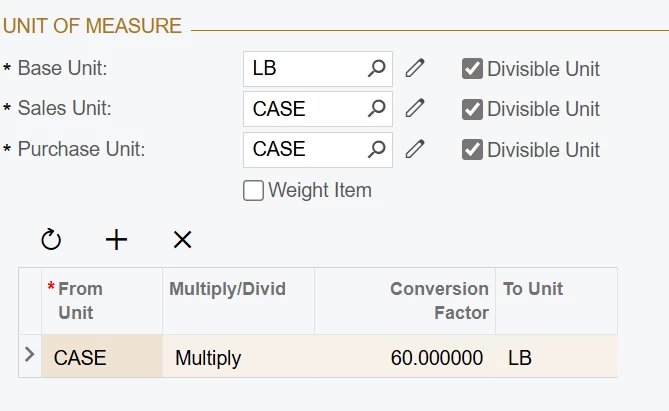
           Is there a way to get the conversion factor (shows 60 in below) by code.
Actually, need the case to lb conversion factor exactly.


Best answer by aleksandrsechin

Have you tried something like this?
 

var unit = new SelectFrom<INUnit>
    .Where<INUnit.inventoryID.IsEqual<@P.AsInt>
        .And<INUnit.fromUnit.IsEqual<@P.AsString>>
        .And<INUnit.toUnit.IsEqual<@P.AsString>>>
    .View(graph)
    .SelectSingle(inventoryID, fromUnit, toUnit);

var conversionFactor = unit?.UnitRate;


Or were you looking for a built-in or more straightforward method to handle this?

5 replies

Forum|alt.badge.img+3

Have you tried something like this?
 

var unit = new SelectFrom<INUnit>
    .Where<INUnit.inventoryID.IsEqual<@P.AsInt>
        .And<INUnit.fromUnit.IsEqual<@P.AsString>>
        .And<INUnit.toUnit.IsEqual<@P.AsString>>>
    .View(graph)
    .SelectSingle(inventoryID, fromUnit, toUnit);

var conversionFactor = unit?.UnitRate;


Or were you looking for a built-in or more straightforward method to handle this?


darylbowman
Captain II
Forum|alt.badge.img+15

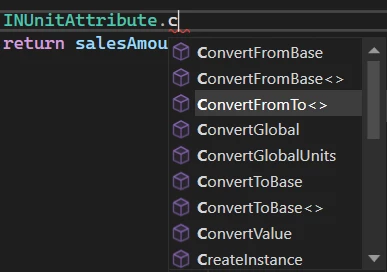
Not sure if this is what you’re looking for, but this is a really helpful set of tools that could be used to return that value:


For instance:

decimal? conversionFactor = 1m;
INUnitAttribute.ConvertFromTo<InventoryItem.inventoryID>(Base.Item.Cache, Base.Item.Current, "CASE", "LB", conversionFactor);

Expected value of conversionFactor: 60.0


Forum|alt.badge.img+6
  • Author
  • Captain II
  • October 31, 2025

Have you tried something like this?
 

var unit = new SelectFrom<INUnit>
    .Where<INUnit.inventoryID.IsEqual<@P.AsInt>
        .And<INUnit.fromUnit.IsEqual<@P.AsString>>
        .And<INUnit.toUnit.IsEqual<@P.AsString>>>
    .View(graph)
    .SelectSingle(inventoryID, fromUnit, toUnit);

var conversionFactor = unit?.UnitRate;


Or were you looking for a built-in or more straightforward method to handle this?

@aleksandrsechin 
\App_RuntimeCode\InventoryItemMaint.cs(52): error CS0246: The type or namespace name 'P' could not be found (are you missing a using directive or an assembly reference?)
I’ve got the above error, when I am trying to use the code below:
 

INUnit uom = SelectFrom<INUnit>
.Where<INUnit.inventoryID.IsEqual<@P.AsInt>
.And<INUnit.fromUnit.IsEqual<@P.AsString>>
.And<INUnit.toUnit.IsEqual<@P.AsString>>>
.View(Base)
.SelectSingle(row.InventoryID, "CASE", "LB");

Forum|alt.badge.img+3

Make sure you’ve added the following using directive:

using PX.Data.BQL;

Additionally, add the new keyword to your BQL query as follows:

INUnit uom = new SelectFrom<INUnit>
...


Forum|alt.badge.img+6
  • Author
  • Captain II
  • November 3, 2025

@aleksandrsechin   Hello, Thank you for your help. What you provide is mightbe Fluent-BQL.
I tried the below code, it also worked

        INUnit uom = PXSelect<INUnit,Where<INUnit.inventoryID, Equal<Required<InventoryItem.inventoryID>>,  
        And<INUnit.fromUnit, Equal<Required<INUnit.fromUnit>>,
            And<INUnit.toUnit, Equal<Required<INUnit.toUnit>>>>>>.Select(Base, row.InventoryID, "CASE", "LB");