Solved

How to extend AdjdDocType in DAC ARAdjust to support my custom document types in Acumatica?

  • December 31, 2025
  • 2 replies
  • 45 views

Forum|alt.badge.img+2

I am working with ARAdjust in Acumatica and need to apply adjustments for custom AR document types that are not included in the standard [ARInvoiceType.AdjdList].

Currently, the field in the DAC is defined as:

[PXDBString(3, IsKey = true, IsFixed = true, InputMask = "")]
[PXDefault("INV")]
[PXUIField(DisplayName = "Doc. Type", Visibility = PXUIVisibility.Visible)]
[ARInvoiceType.AdjdList]
public virtual string AdjdDocType { get; set; }


When I try to set AdjdDocType to my custom type, the PXSelector on AdjdRefNbr fails, because the selector only allows standard AR types.

My goal is to extend the AdjdDocType field to accept custom document types while keeping ARAdjust functionality intact.

What is the recommended approach in Acumatica for this? Can I safely extend the [ARInvoiceType.AdjdList], or is there another way to handle custom document types in ARAdjust?
Best answer by aleksandrsechin

Hi ​@bihalivan15 

You can try the following approach. It consists of these steps:

  1. Define your custom PXStringListAttribute.

  2. Copy the original values from ARInvoiceType.AdjdList into it.

  3. Add your custom values.

  4. Apply the created PXStringListAttribute to the field by creating a PXCacheExtension and copying the corresponding field definition with all its attributes, replacing [ARInvoiceType.AdjdList] with your custom one.
    This way, the system will consistently apply your custom attribute to the field wherever it is used across all screens.

Custom PXStringListAttribute code:

public class MyAdjdListAttribute : PXStringListAttribute
{
private static string[] Values =
{
"INV",
"DRM",
"FCH",
"PPI",

"MYV"
};

private static string[] Labels =
{
"Invoice",
"Debit Memo",
"Overdue Charge",
"Prepmt. Invoice",

"My Value"
};

public MyAdjdListAttribute() : base(Values, Labels) { }
}


PXCacheExtension code:

public sealed class ARAdjustExt : PXCacheExtension<ARAdjust>
{
[PXDBString(3, IsKey = true, IsFixed = true, InputMask = "")]
[PXDefault("INV")]
[PXUIField(DisplayName = "Doc. Type", Visibility = PXUIVisibility.Visible)]
//[ARInvoiceType.AdjdList]
[MyAdjdList]
public string AdjdDocType { get; set; }
public abstract class adjdDocType : BqlType<IBqlString, string>.Field<adjdDocType> { }
}


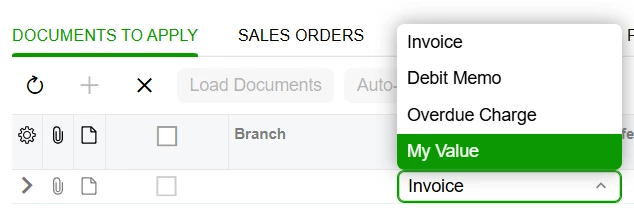
Result:


2 replies

Forum|alt.badge.img+4
  • Jr Varsity I
  • Answer
  • December 31, 2025

Hi ​@bihalivan15 

You can try the following approach. It consists of these steps:

  1. Define your custom PXStringListAttribute.

  2. Copy the original values from ARInvoiceType.AdjdList into it.

  3. Add your custom values.

  4. Apply the created PXStringListAttribute to the field by creating a PXCacheExtension and copying the corresponding field definition with all its attributes, replacing [ARInvoiceType.AdjdList] with your custom one.
    This way, the system will consistently apply your custom attribute to the field wherever it is used across all screens.

Custom PXStringListAttribute code:

public class MyAdjdListAttribute : PXStringListAttribute
{
private static string[] Values =
{
"INV",
"DRM",
"FCH",
"PPI",

"MYV"
};

private static string[] Labels =
{
"Invoice",
"Debit Memo",
"Overdue Charge",
"Prepmt. Invoice",

"My Value"
};

public MyAdjdListAttribute() : base(Values, Labels) { }
}


PXCacheExtension code:

public sealed class ARAdjustExt : PXCacheExtension<ARAdjust>
{
[PXDBString(3, IsKey = true, IsFixed = true, InputMask = "")]
[PXDefault("INV")]
[PXUIField(DisplayName = "Doc. Type", Visibility = PXUIVisibility.Visible)]
//[ARInvoiceType.AdjdList]
[MyAdjdList]
public string AdjdDocType { get; set; }
public abstract class adjdDocType : BqlType<IBqlString, string>.Field<adjdDocType> { }
}


Result:


Forum|alt.badge.img+4

Additionally, if you are working with the Payments and Applications screen (AR302000, 25R2), be aware that there is a RowSelected event handler where the values for the PXStringListAttribute of the ARAdjust.AdjdDocType field are generated dynamically.

Although you can still apply your custom attribute there as well, for example as shown below (make Values and Labels public in MyAdjdListAttribute beforehand):

public class ARPaymentEntryExt : PXGraphExtension<ARPaymentEntry>
{
protected virtual void ARPayment_RowSelected(PXCache cache, PXRowSelectedEventArgs e, PXRowSelected baseEvent)
{
baseEvent?.Invoke(cache, e);

PXStringListAttribute.SetList<ARAdjust.adjdDocType>(Base.Adjustments.Cache, null, MyAdjdListAttribute.Values, MyAdjdListAttribute.Labels);
}
}


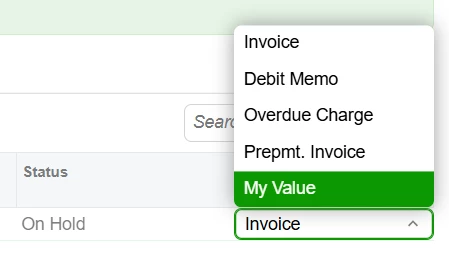
Result: