


Answer

How to dynamically change the title of a custom AskExt popup dialog in Sales Orders?

  • September 16, 2025
  • 4 replies
  • 63 views

Forum|alt.badge.img+2

Hello Community,

I have created a custom popup dialog in the Sales Order Entry screen that prompts users for additional fields, when they Save or Remove Hold on an order.

Currently, the dialog shows the default title "Details".
I would like to dynamically change the dialog title so that it gives more context to the user. For example:
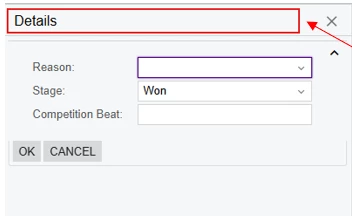
Opportunity <OpportunityID of the linked Opportunity> - Close as Won

e.g. Opportunity OP000123 - Close as Won
 

I tried using PXDialog.SetCaption(...), but I ran into the error:

CS0103: The name 'PXDialog' does not exist in the current context

This suggests that my project does not recognize the PXDialog class, even though I’ve added the code inside the AskExt initializer.

and custom dialog box is only in Code Editor & I’m, calling it from Key = Document (No Action Created)
 

I changed the name for testing

Questions:

  1. What is the correct way to override or set the caption/title of a popup shown by AskExt?

 

Best answer by MichaelShirk

@Abhishek Niikam the AskExt() method doesn’t have any overload with a message parameter for the Smart Panel header/caption, the way that the Ask() method does for the regular dialogue box. 

Since the header/caption for a Smart Panel is set in the aspx page of the form, I believe that IF it’s possible, you would need to use javascript to rename it on page load.

4 replies

MichaelShirk
Captain II
Forum|alt.badge.img+5
  • Captain II
  • Answer
  • September 16, 2025

@Abhishek Niikam the AskExt() method doesn’t have any overload with a message parameter for the Smart Panel header/caption, the way that the Ask() method does for the regular dialogue box. 

Since the header/caption for a Smart Panel is set in the aspx page of the form, I believe that IF it’s possible, you would need to use javascript to rename it on page load.


Forum|alt.badge.img+2
  • Author
  • Jr Varsity II
  • September 16, 2025

@Abhishek Niikam the AskExt() method doesn’t have any overload with a message parameter for the Smart Panel header/caption, the way that the Ask() method does for the regular dialogue box. 

Since the header/caption for a Smart Panel is set in the aspx page of the form, I believe that IF it’s possible, you would need to use javascript to rename it on page load.

Could you please guide how to correctly add JS for this task?


Forum|alt.badge.img+7
  • Captain II
  • September 16, 2025

An alternate way would be to include a String field in your DAC used by the smart panel that you could use to convey instructions to the user. 


MichaelShirk
Captain II
Forum|alt.badge.img+5
  • Captain II
  • September 16, 2025

@Abhishek Niikam I don’t have the time to figure out exactly how to accomplish your use case, but if you’re familiar with JS, here is a post that explains how to use it in a customization project. 


How to display record count in tab item with a grid | Community