Answer

how to display time in PXSelector

  • June 5, 2024
  • 5 replies
  • 127 views

Forum|alt.badge.img

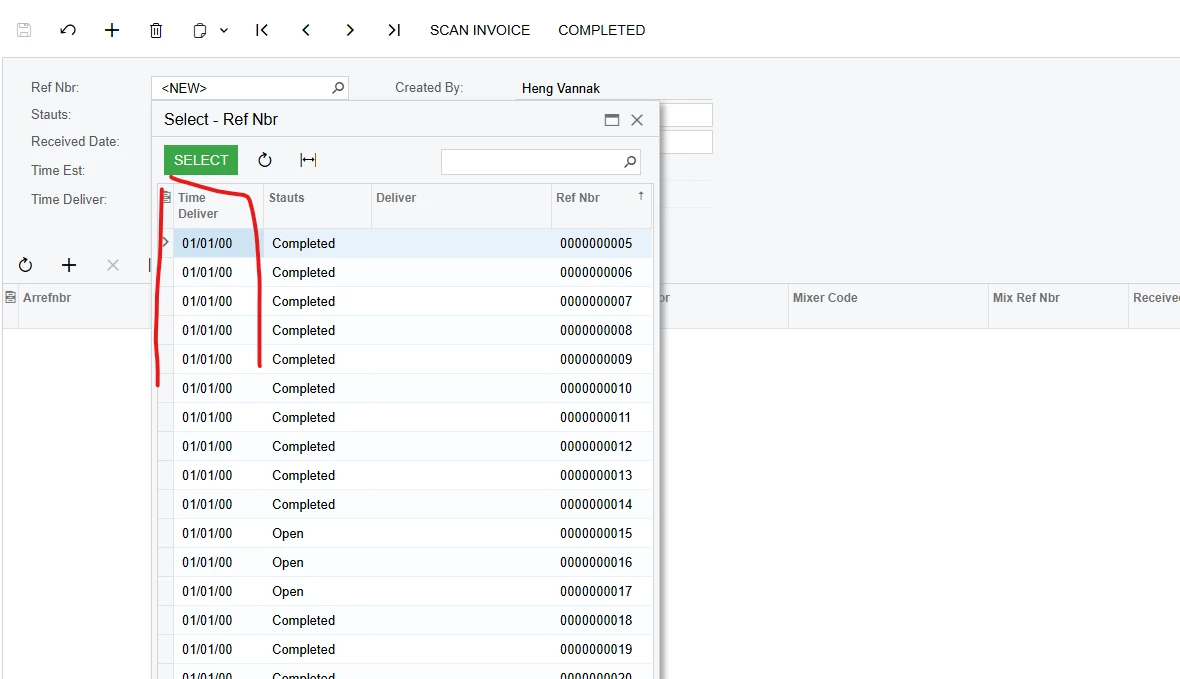
my pxselector like this: 

[PXSelector(typeof (Search<ARDeliveryHeader.refNbr>), new System.Type[] {typeof (ARDeliveryHeader.timeDeliver), typeof (ARDeliveryHeader.stauts), typeof (ARDeliveryHeader.deliver)})]


and data access class like this

[PXDBTime(DisplayMask = "t", UseTimeZone = false)]
[PXUIField(DisplayName = "Time Deliver")]
public DateTime? TimeDeliver { get; set; }

Best answer by aiwan

Hi @vannakheng66,


In your ASPX for the page ensure that you have the below code:

<px:PXDateTimeEdit runat="server" ID="CstPXDateTimeEdit20" DataField="Date" DisplayFormat="t" EditFormat="t" TimeMode="true" />

the EditFormat=”t” is what i think you were missing. There is also a drop down in the screen editor called “time mode” this is important too.


5 replies

aaghaei
Captain II
Forum|alt.badge.img+10
  • Captain II
  • June 5, 2024

Hi @vannakheng66 

Your question I guess is a little bit vague. Are those your code or you are copying from somewhere else? If it is your code then what is the issue you are facing? If you have copied those pieces of codes from somewhere else, then where do you want to use them and what is the problem that you can not?


Forum|alt.badge.img
  • Author
  • Freshman II
  • June 5, 2024

Hi @vannakheng66 

Your question I guess is a little bit vague. Are those your code or you are copying from somewhere else? If it is your code then what is the issue you are facing? If you have copied those pieces of codes from somewhere else, then where do you want to use them and what is the problem that you can not?

It is my code and the problem is when display time field in PXSelector, it show date 01/01/00. it should display time like 1:00 PM. you see the highlight 


DipakNilkanth
Pro III
Forum|alt.badge.img+13

Hi @vannakheng66 ,

You need to use PXTimeList attribute in the DAC field declaration to display HH:MM format.


Forum|alt.badge.img
  • Author
  • Freshman II
  • June 5, 2024

Hi @vannakheng66 ,

You need to use PXTimeList attribute in the DAC field declaration to display HH:MM format.

thank but do we have an other solution because I have data in database as PXDBTime or PXDBDate. So when I used PXTimeList, the data access class should PXDbint. It will cast type error or loss data


Forum|alt.badge.img+8
  • Captain II
  • Answer
  • June 17, 2024

Hi @vannakheng66,


In your ASPX for the page ensure that you have the below code:

<px:PXDateTimeEdit runat="server" ID="CstPXDateTimeEdit20" DataField="Date" DisplayFormat="t" EditFormat="t" TimeMode="true" />

the EditFormat=”t” is what i think you were missing. There is also a drop down in the screen editor called “time mode” this is important too.