

Answer

How to create a PXDBWeblink field?

  • August 16, 2023
  • 4 replies
  • 667 views

Forum|alt.badge.img

I have reviewed the article (https://community.acumatica.com/topic/show?tid=7266&fid=288) that identifies PXDBWeblink as the way to create a custom field with an URL link to click.  I have also reviewed the website field on the customer contact page and the tracking URL field on the packages tab of a shipment.  But, I can’t seem to get it to work.

First, I created a custom field and publish the customization.
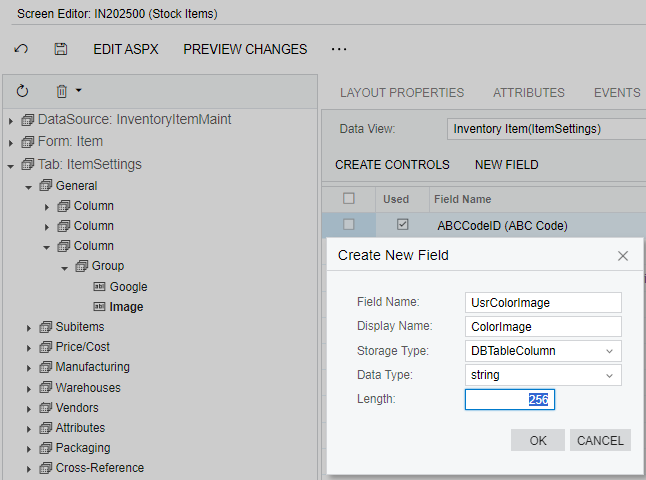
Then, I add the field to the screen.
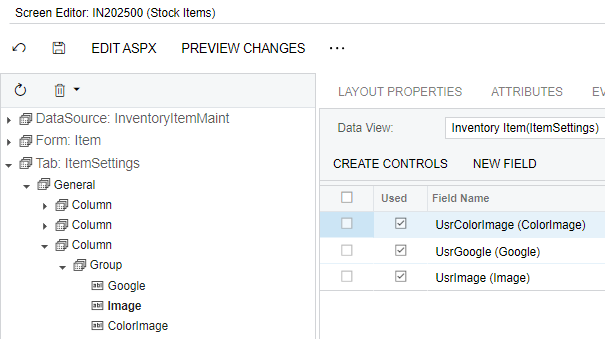
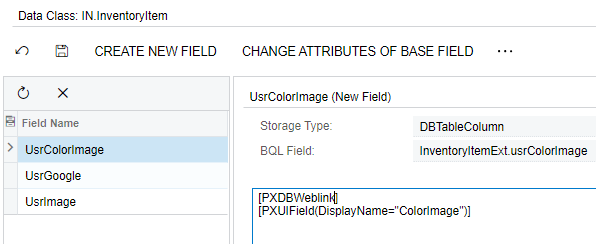
Then in the data class, I changed the PXDBString(256) to PXDBWeblink.
When I publish the customization, the Stock Item screen looks like this.
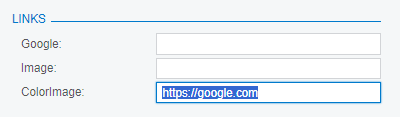
It doesn’t have the icon to open the URL like the contact website nor is it a hyperlink like the tracking URL of the shipment.

I’m working in a local 2023 R1 instance and will attach the customization package.

 

Best answer by Zoltan Febert

You need to change PXTextEdit to PXLinkEdit in the aspx file.

<px:PXLinkEdit ID="edDefContactWebSite" runat="server" DataField="WebSite" CommitChanges="True" ></px:PXLinkEdit>


4 replies

Zoltan Febert
Jr Varsity I
Forum|alt.badge.img+3
  • Jr Varsity I
  • Answer
  • August 16, 2023

You need to change PXTextEdit to PXLinkEdit in the aspx file.

<px:PXLinkEdit ID="edDefContactWebSite" runat="server" DataField="WebSite" CommitChanges="True" ></px:PXLinkEdit>


Naveen Boga
Captain II
Forum|alt.badge.img+19
  • Captain II
  • August 16, 2023

@johnw51  Here is the example for your reference. Please find the DAC and .aspx example below.


DAC Field:

#region WebSite			

[PXDBWeblink]
[PXUIField(DisplayName = "Web")]
public virtual String WebSite { get; set; }
public abstract class webSite : PX.Data.BQL.BqlString.Field<webSite> { }
#endregion

.aspx page:

<px:PXLinkEdit ID="WebSite" runat="server" DataField="WebSite" CommitChanges="True"/>


Forum|alt.badge.img
  • Author
  • Varsity I
  • August 16, 2023

Editing the aspx page was the step I was missing.  Thank you.


Has anyone been able to create a custom field that would bring a user to a file on a locally hosted server?  Basically, I need file explorer to open when clicking the link. Something that looks like this:


\\10.10.4.511\Folder\2_Folder\2024 Folder\File_Name 


I tried the [PXDBWeblink] type and it just tries to open the file path in the default web browser.

