
Answer

How to configure a custom selector for a custom table's alternate key on a custom edit screen

  • November 16, 2022
  • 17 replies
  • 1344 views

Tony Lanzer
Pro III
Forum|alt.badge.img+2

I have a custom edit screen (single record at a time) with corresponding custom table.  Similar to other edit pages, I have a primary text/search field where I want the user to enter a new value for a new record, or an existing value that selects an existing record (e.g. Stock Item or Project).  The primary key of the table is an internal identity, but the UI field is a string field and unique/alternate key.  Can someone remind me how to get the field to be more than a search and allow new values?  I was first using a PXSelector, but I couldn’t get it to allow new values.  I also then tried creating a Segmented Key with one segment for it, and then using a PXDimensionSelector and PXSegmentMask as the control, thinking it may need that to allow a new value to be entered, but that didn’t help.  When attempting to save, it is not allowing a new value -- it’s showing an error that the value doesn’t exist, which of course it shouldn’t.  The DAC field is shown below.  What am I missing in code or UI settings, or do I need to approach it completely differently?


        [PXDBString(50, IsUnicode = true, InputMask = "")]
        [PXUIField(DisplayName = "Connection Name", Required = true)]
        [PXDimensionSelector("SRCCONN", typeof(Search<AKTDataExtractionSource.name>),
            typeof(AKTDataExtractionSource.name), SupportNewValues = true
            )]
        public virtual string Name { get; set; }
        public abstract class name : PX.Data.BQL.BqlString.Field<name> { }
        #endregion
 

Best answer by Tony Lanzer

Update:  After comparing to a simpler example that works, I found the difference was that I was using FormTab as a master page, and had some empty tabs on my page.  After taking off the tabs and changing to reference FormView as master page, things started working, and even when putting the PXSelector back in.  Feels like a bug to me, but at least it’s working now.

17 replies

Forum|alt.badge.img

If this field (Name) is your key field for the DAC, then you have to mark that as key - [PXDBString(50, IsUnicode = true, InputMask = "", IsKey = true)]. 


Tony Lanzer
Pro III
Forum|alt.badge.img+2
  • Author
  • Pro III
  • November 16, 2022

@Raj Gopinathan , It’s not the primary key, though.  Similar to InventoryCD not being the primary key for InventoryItem.


Forum|alt.badge.img

@tlanzer25, yes yet at the DAC level if this field is a key, then you’ll have to set that IsKey flag.

InventoryCD is the key for inventory item DAC and InventoryID is the identity field. Please try that and let me know if it helps.


darylbowman
Captain II
Forum|alt.badge.img+15

Perhaps this will assist:

#region InventoryID
[PXDBIdentity]
[PXUIField(DisplayName = "Inventory ID", Visibility = PXUIVisibility.Visible, Visible = false)]
[PXReferentialIntegrityCheck]
public virtual Int32? InventoryID { get; set; }
public abstract class inventoryID : BqlInt.Field<inventoryID> { }
#endregion

#region InventoryCD
[PXDefault]
[InventoryRaw(IsKey = true, DisplayName = "Inventory ID")]
public virtual String InventoryCD { get; set; }
public abstract class inventoryCD : BqlString.Field<inventoryCD> { }
#endregion


Tony Lanzer
Pro III
Forum|alt.badge.img+2
  • Author
  • Pro III
  • November 16, 2022

I went ahead and moved my IsKey = true parameter from my primary identity key to the Name field.  The result when entering a value and moving off the field is that it blanks out.  Maybe I’ll try going back to a PXSelector.


Update:  Going back to PXSelector allows me to enter a value now, but it still throws the error that the value entered doesn’t exist.  Still looking for a solution.


darylbowman
Captain II
Forum|alt.badge.img+15

Could you post your DAC code and also where you’re implementing the selector?


Tony Lanzer
Pro III
Forum|alt.badge.img+2
  • Author
  • Pro III
  • November 16, 2022

My DAC fields have changed often while trying different things, but the current state of it is below:


        [PXDBIdentity(IsKey = true)]
        [PXUIField(DisplayName = "Data Extraction Source")]
        public virtual int? DataExtractionSourceID { get; set; }
        public abstract class dataExtractionSourceID : PX.Data.BQL.BqlInt.Field<dataExtractionSourceID> { }
        #endregion

        #region Name
        [PXDBString(50, IsUnicode = true, InputMask = "")]
        [PXUIField(DisplayName = "Connection Name", Required = true)]
        //[PXDimensionSelector("SRCCONN", typeof(Search<AKTDataExtractionSource.name>),
        //    typeof(AKTDataExtractionSource.name), SupportNewValues = true
        //    )]
        [PXSelector(typeof(Search<AKTDataExtractionSource.name>), 
            ValidateValue = false, 
            SubstituteKey = typeof(AKTDataExtractionSource.dataExtractionSourceID))]
        public virtual string Name { get; set; }
        public abstract class name : PX.Data.BQL.BqlString.Field<name> { }
 

...and the .aspx field looks like this:


    <px:PXSelector runat="server" ID="CstPXSegmentMask18" DataField="Name" AllowAddNew="True" />


darylbowman
Captain II
Forum|alt.badge.img+15

Your selector definition is backwards. It should be:

[PXSelector(typeof(Search<AKTDataExtractionSource.dataExtractionSourceID>), 
ValidateValue = false,
SubstituteKey = typeof(AKTDataExtractionSource.name))]
public virtual string Name { get; set; }
public abstract class name : PX.Data.BQL.BqlString.Field<name> { }

Also, as was mentioned earlier, IsKey=true should be on the string field, not the identity.


Tony Lanzer
Pro III
Forum|alt.badge.img+2
  • Author
  • Pro III
  • November 17, 2022

As I mentioned previously, I had tried many permutations, including indication of key on the string field. The error goes away, but it just blanks out the text I enter when I move off or save. Your suggestion was tried already, but thanks.


darylbowman
Captain II
Forum|alt.badge.img+15

That's not the only difference. If you look closely, you'll see that the selector needs to reference the database key field with the natural key as the description. You had it backwards.

Are you saying you tried that?


darylbowman
Captain II
Forum|alt.badge.img+15

Actually, I checked the Acumatica documentation and it appears that the Selector attribute should go on the identity field. So your code should look like this:

[PXDBIdentity(IsKey = true)]
[PXSelector(typeof(Search<AKTDataExtractionSource.dataExtractionSourceID>),
typeof(AKTDataExtractionSource.name),
ValidateValue = false,
SubstituteKey = typeof(AKTDataExtractionSource.name))]
[PXUIField(DisplayName = "Data Extraction Source")]
public virtual int? DataExtractionSourceID { get; set; }
public abstract class dataExtractionSourceID : PX.Data.BQL.BqlInt.Field<dataExtractionSourceID> { }
#endregion

#region Name
[PXDBString(50, IsUnicode = true, InputMask = "")]
[PXUIField(DisplayName = "Connection Name", Required = true)]
//[PXDimensionSelector("SRCCONN", typeof(Search<AKTDataExtractionSource.name>),
// typeof(AKTDataExtractionSource.name), SupportNewValues = true
// )]
public virtual string Name { get; set; }
public abstract class name : PX.Data.BQL.BqlString.Field<name> { }

It is not clear to me whether the Identity or substitute key should have the IsKey = true

Maybe try it both ways?

The documentation is here: Configuration of Selector controls


Tony Lanzer
Pro III
Forum|alt.badge.img+2
  • Author
  • Pro III
  • November 20, 2022

No luck yet, nothing has worked so far.  I have tried putting a PXSelector on the ID field as well with IsKey, and no luck.  When I enter a value into the field then, it shows a negative number in the field, probably the cache id prior to saving.  The existing screens that do what I’m trying to accomplish use segmented keys, so I’ll probably go back to trying that again.


Naveen Boga
Captain II
Forum|alt.badge.img+19
  • Captain II
  • November 20, 2022

Hi, @tlanzer25  As indicated by Raj and Daryl, the Selector should allow entering a new value when that field is part of the KEY field, otherwise it looks for the entered value and says Value cannot be found in the system, which the normal behavior of Selector field.

As you still facing the issue with this, can you please share the DAC file here?


Tony Lanzer
Pro III
Forum|alt.badge.img+2
  • Author
  • Pro III
  • November 20, 2022

As I mentioned, all combinations of using PXSelector are not working, so I’m trying to use a Segment Key with PXDimensionSelector again.  Here’s what I have now in the DAC...

        #region DataExtractionSourceID
[PXDBIdentity]
[PXUIField(DisplayName = "Data Extraction Source")]
public virtual int? DataExtractionSourceID { get; set; }
public abstract class dataExtractionSourceID : PX.Data.BQL.BqlInt.Field<dataExtractionSourceID> { }
#endregion

#region Name
[PXDBString(50, IsUnicode = true, InputMask = "", IsKey = true)]
[PXUIField(DisplayName = "Connection Name", Required = true)]
[PXDimensionSelector("SRCCONN", typeof(Search<AKTDataExtractionSource.name>),
typeof(AKTDataExtractionSource.name), SupportNewValues = true
)]
public virtual string Name { get; set; }
public abstract class name : PX.Data.BQL.BqlString.Field<name> { }
#endregion

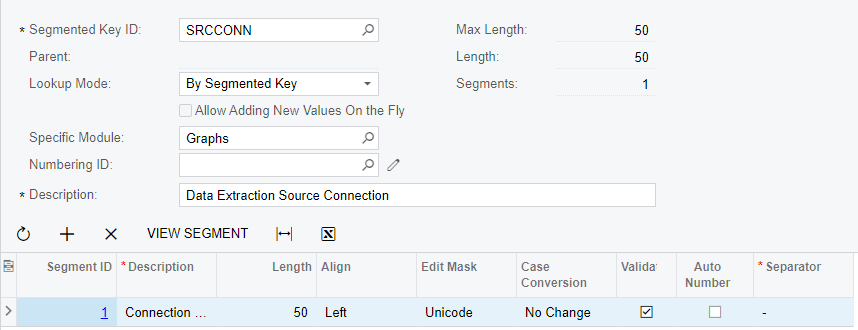
 And this is my segment key...

And this is the ASP...

<px:PXSegmentMask runat="server" ID="CstPXSegmentMask20" DataField="Name" />

The current behavior is that I enter a value and tab off the field, and it disappears.


Tony Lanzer
Pro III
Forum|alt.badge.img+2
  • Author
  • Pro III
  • November 20, 2022

I took off all selectors just to try to get it to save a record with a plain text box, and that’s not working either.  I’m going to create an Acumatica ticket and see where that gets me.


Tony Lanzer
Pro III
Forum|alt.badge.img+2
  • Author
  • Pro III
  • Answer
  • November 25, 2022

Update:  After comparing to a simpler example that works, I found the difference was that I was using FormTab as a master page, and had some empty tabs on my page.  After taking off the tabs and changing to reference FormView as master page, things started working, and even when putting the PXSelector back in.  Feels like a bug to me, but at least it’s working now.


Chris Hackett
Community Manager
Forum|alt.badge.img
  • Acumatica Community Manager
  • November 28, 2022

Thank you for sharing your solution with the community @tlanzer25 !