



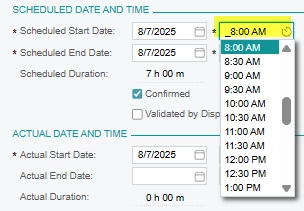
I’m customizing a standard Acumatica field so that instead of showing hours in 30-minute increments, it shows 15-minute increments.
Currently, the field uses the default PXDateTimeEdit control (with TimeMode="True") and the standard [PXDBDateAndTime] attribute. In the UI, the time picker always shows 30-minute steps.
DAC

[PXDBDateAndTime(
    UseTimeZone = true,
    PreserveTime = true,
    DisplayNameDate = "Scheduled Start Date",
    DisplayNameTime = "Scheduled Start Time",
    TimeStep = 15
)]
[PXUIField(DisplayName = "Scheduled Start DateTime")]
public virtual DateTime? ScheduledDateTimeBegin { get; set; }
public abstract class scheduledDateTimeBegin : PX.Data.BQL.BqlDateTime.Field<scheduledDateTimeBegin> { }


ASPX - xml

<px:PXDateTimeEdit ID="edScheduledStartDate" runat="server"
    DataField="ScheduledStartDate" CommitChanges="True" TimeStep="15" />
What I’m looking for: A supported way in Acumatica to change the time selection interval (in minutes) for a standard field, without creating a completely new control, ideally by modifying the DAC, using CacheAttached, or adjusting the ASPX definition.

