Question

How to Automatically Trigger Credit Card Authorization Popup (Authorize.Net) During Sales Order Workflow Without Capturing Payment?

  • June 18, 2025
  • 6 replies
  • 98 views

Our client wants to enforce a safeguard within the Acumatica Sales Order workflow to reduce manual errors and ensure that a credit card is pre-authorized (via Authorize.Net) before completing key actions like shipment creation or closing the order.

Specifically, they would like a popup to automatically appear prompting the user to enter and authorize credit card details during the Sales Order process, without capturing the payment. The actual capture will be performed manually later when the fulfillment is confirmed.

Is there a recommended way to implement this behavior in Acumatica? Ideally, we want to avoid relying on users to remember to manually click “Authorize” through the Create Prepayment panel and fill in the amount each time. Has anyone customized this flow to enforce pre-authorization as part of the Sales Order lifecycle?

Any guidance, examples, or recommended hooks/events would be appreciated.

6 replies

Dmitrii Naumov
Acumatica Moderator
Forum|alt.badge.img+7
  • Acumatica Moderator
  • June 18, 2025

Hi ​@saimadhurmallampalli85 

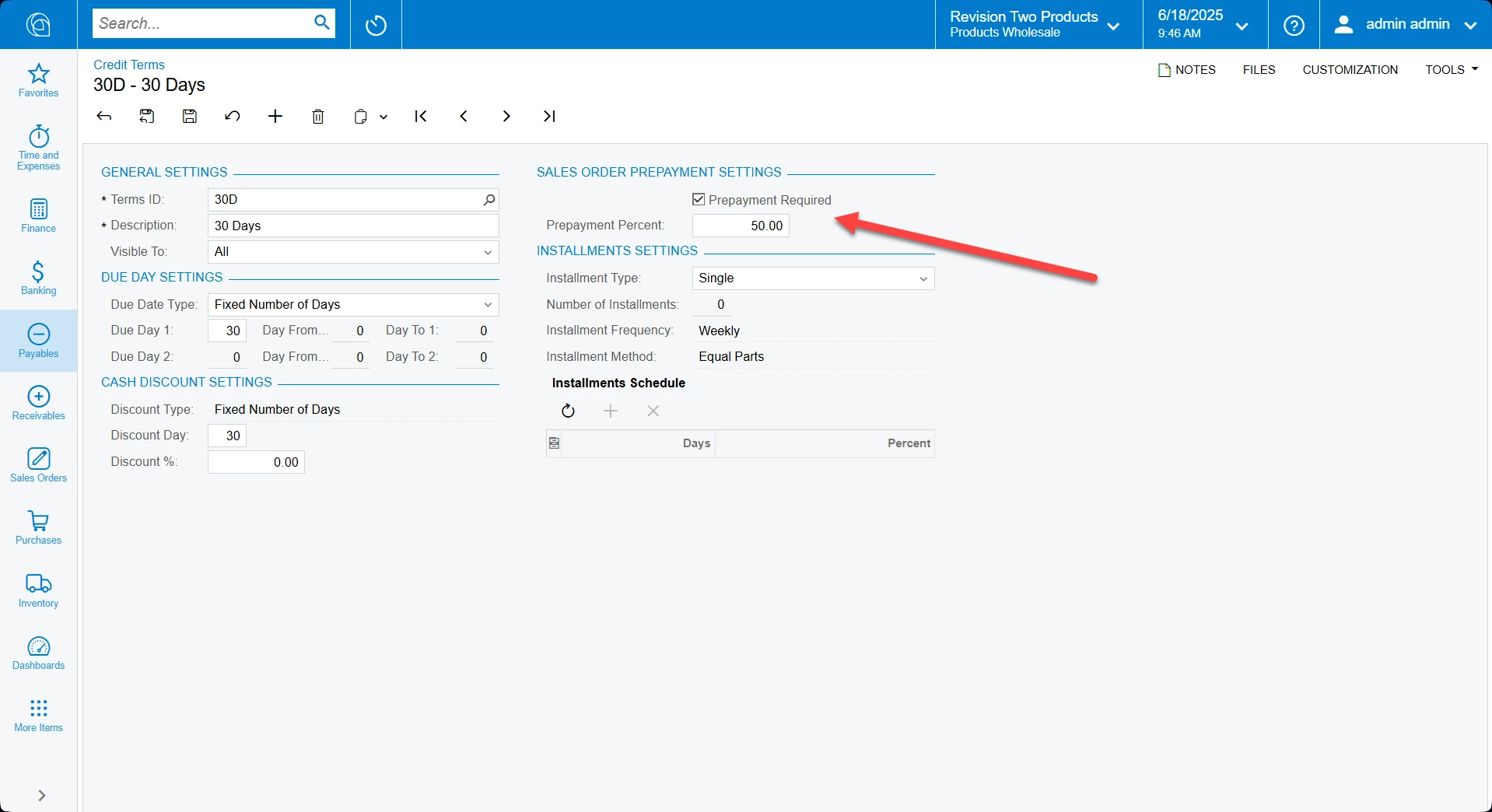
There is a setting in the OOTB product that may help. 

In the credit terms you can configure Required Prepayment Percent. It’ll prevent orders with this setting from being processed further prior to receiving payment authorization for specified %


Jeff96
Captain II
Forum|alt.badge.img+4
  • Captain II
  • June 18, 2025

Just making sure you’re aware. Acumatica is dropping support for authorize.net on June 30th. 


CherryStreet
Jr Varsity I
Forum|alt.badge.img
  • Jr Varsity I
  • June 19, 2025

Hi, we are testing our new AI Assistant and ran your scenario through it, let me know if this helps:

Yes — what your client is requesting is a common and valid customization scenario in Acumatica where:

✅ A credit card pre-authorization (not capture) must be enforced at a specific stage in the Sales Order workflow, ideally before shipment or order completion.

This behavior is not enforced by default in Acumatica, but can be implemented cleanly using documented extension points and business logic, with minimal user reliance. Here's how to do it:


Objective

Enforce that a credit card is pre-authorized (via Authorize.Net or any Acumatica-supported processor) before:

  • Creating a shipment
  • Changing order status to Completed or Closed
 

🚧 Out-of-the-Box Limitation

By default, Acumatica does:

  • Allow manual authorization via the “Create Prepayment” screen
  • Does not enforce that a pre-auth exists before shipment
  • Does not trigger a prompt or validation rule automatically for pre-auth
 

Recommended Customization Approach

🔹 Step 1: Use Sales Order Graph Extension

Target the SOOrderEntry graph and override workflow actions like:

  • Action → Create Shipment
  • RowPersisting on SOOrder where status is transitioning
  • Or intercept SOOrder.Status changes to Completed/Closed
 

🔹 Step 2: Add Pre-Authorization Check

In your graph extension, check for a valid credit card transaction where:

  • DocType = 'SO' or Payment Type = 'Pre-Auth'
  • Status = Authorized
  • Link exists to the order (via DocNbr or RefNoteID)

Use the CustomerPaymentMethod and ExternalTransaction tables.


🔹 Step 3: Trigger a Popup If Missing

If no pre-auth is found:

  • Block the operation (shipment, status change)
  • Show a PXPopupRedirectException or PXException instructing the user to complete pre-auth

Example:

if (!HasValidPreAuthorization(order))

{

    throw new PXException("This order requires a pre-authorized credit card before proceeding. Please authorize a card.");

}

You can also redirect to the Create Payment screen using:

throw new PXPopupRedirectException(

    PXGraph.CreateInstance<ARPaymentEntry>(),

    "Authorize Payment",

    true

);


🔹 Step 4: Optional UI Enhancement

To make it smoother:

  • Add a custom button on SO screen: “Authorize Credit Card”
  • This triggers a pre-auth using the default card on file
  • Use CCPaymentProcessing APIs already exposed in Acumatica

public PXAction<SOOrder> AuthorizeCard;

[PXButton(CommitChanges = true)]

[PXUIField(DisplayName = "Authorize Card")]

protected void authorizeCard()

{

    // Use CCPaymentProcessingHelper.Authorize(...)

}


Important: Use the Correct Payment Method

Ensure that the Payment Method on the Sales Order:

  • Is linked to Authorize.Net as the processing center
  • Has "Require Authorization" enabled
  • Is compatible with the customer’s saved card

📍 Path: Finance Configuration Payment Methods Processing Settings


🧠 Acumatica Framework Tips

💡 Use ExternalTransaction table to check:

  • TranType = AuthOnly
  • TranStatus = Approved
  • Active = True

💡 Block shipment creation via SOShipmentEntry.SOOrder_RowPersisting or via workflow conditions.

💡 Non-capture pre-auths remain active for 30 days (processor-dependent) unless voided.


Summary

Task

How to Do It

Enforce pre-auth before shipment

Extend SOOrderEntry and block shipment creation unless valid ExternalTransaction exists

Auto-prompt for authorization

Use PXPopupRedirectException or a custom UI action

Prevent manual error

Validate on Status change or key workflow transitions


Hi ​@Dmitrii Naumov ,
Thank you for the suggestion. We did consider the Required Prepayment Percent setting, but since we only need authorization without capturing the payment, this OOTB feature doesn't quite fit our use case. The client wants the authorization to happen at the point of exiting the Sales Order, like adding a new order, or returning back to the grid, or proceeding to create shipment, even if the order is partially backordered. We're aiming to build a safeguard to reduce manual errors. Appreciate any further thoughts you might have on customizing this flow.

Hi ​@saimadhurmallampalli85 

There is a setting in the OOTB product that may help. 

In the credit terms you can configure Required Prepayment Percent. It’ll prevent orders with this setting from being processed further prior to receiving payment authorization for specified %


Just making sure you’re aware. Acumatica is dropping support for authorize.net on June 30th. 

Hi ​@Jeff96 ,
Thanks for the heads-up! We’re aware of the upcoming deprecation of Authorize.Net and are planning a migration to another supported provider soon. In the meantime, we're finalizing this behavior using Authorize.Net as the client’s current flow depends on it.


Hi, we are testing our new AI Assistant and ran your scenario through it, let me know if this helps:

Yes — what your client is requesting is a common and valid customization scenario in Acumatica where:

✅ A credit card pre-authorization (not capture) must be enforced at a specific stage in the Sales Order workflow, ideally before shipment or order completion.

This behavior is not enforced by default in Acumatica, but can be implemented cleanly using documented extension points and business logic, with minimal user reliance. Here's how to do it:


Objective

Enforce that a credit card is pre-authorized (via Authorize.Net or any Acumatica-supported processor) before:

  • Creating a shipment
  • Changing order status to Completed or Closed
 

🚧 Out-of-the-Box Limitation

By default, Acumatica does:

  • Allow manual authorization via the “Create Prepayment” screen
  • Does not enforce that a pre-auth exists before shipment
  • Does not trigger a prompt or validation rule automatically for pre-auth
 

Recommended Customization Approach

🔹 Step 1: Use Sales Order Graph Extension

Target the SOOrderEntry graph and override workflow actions like:

  • Action → Create Shipment
  • RowPersisting on SOOrder where status is transitioning
  • Or intercept SOOrder.Status changes to Completed/Closed
 

🔹 Step 2: Add Pre-Authorization Check

In your graph extension, check for a valid credit card transaction where:

  • DocType = 'SO' or Payment Type = 'Pre-Auth'
  • Status = Authorized
  • Link exists to the order (via DocNbr or RefNoteID)

Use the CustomerPaymentMethod and ExternalTransaction tables.


🔹 Step 3: Trigger a Popup If Missing

If no pre-auth is found:

  • Block the operation (shipment, status change)
  • Show a PXPopupRedirectException or PXException instructing the user to complete pre-auth

Example:

if (!HasValidPreAuthorization(order))

{

    throw new PXException("This order requires a pre-authorized credit card before proceeding. Please authorize a card.");

}

You can also redirect to the Create Payment screen using:

throw new PXPopupRedirectException(

    PXGraph.CreateInstance<ARPaymentEntry>(),

    "Authorize Payment",

    true

);


🔹 Step 4: Optional UI Enhancement

To make it smoother:

  • Add a custom button on SO screen: “Authorize Credit Card”
  • This triggers a pre-auth using the default card on file
  • Use CCPaymentProcessing APIs already exposed in Acumatica

public PXAction<SOOrder> AuthorizeCard;

[PXButton(CommitChanges = true)]

[PXUIField(DisplayName = "Authorize Card")]

protected void authorizeCard()

{

    // Use CCPaymentProcessingHelper.Authorize(...)

}


Important: Use the Correct Payment Method

Ensure that the Payment Method on the Sales Order:

  • Is linked to Authorize.Net as the processing center
  • Has "Require Authorization" enabled
  • Is compatible with the customer’s saved card

📍 Path: Finance Configuration Payment Methods Processing Settings


🧠 Acumatica Framework Tips

💡 Use ExternalTransaction table to check:

  • TranType = AuthOnly
  • TranStatus = Approved
  • Active = True

💡 Block shipment creation via SOShipmentEntry.SOOrder_RowPersisting or via workflow conditions.

💡 Non-capture pre-auths remain active for 30 days (processor-dependent) unless voided.


Summary

Task

How to Do It

Enforce pre-auth before shipment

Extend SOOrderEntry and block shipment creation unless valid ExternalTransaction exists

Auto-prompt for authorization

Use PXPopupRedirectException or a custom UI action

Prevent manual error

Validate on Status change or key workflow transitions


Hi ​@CherryStreet Team,
This was incredibly helpful, thank you for such a well-structured and technical walkthrough. The outlined approach using SOOrderEntry extension, pre-auth validation, and PXPopupRedirectException fits closely with what we’re trying to achieve.

I’ll check out these approaches and see how well they align with our implementation.

Quick follow-up:
Do you know of a clean way to intercept the “Return to Grid” (← arrow) and the “New Order” (+) actions from the Sales Order screen? They don't seem to trigger traditional graph methods, and I'm unsure how to hook into them to insert our pre-auth enforcement logic.

Appreciate your guidance—thanks again!