Question

How to Automatically Populate Service Order Detail Line Based on Item Set in Service Order Type Screen

  • January 27, 2026
  • 9 replies
  • 95 views

Hi there!

I have a customization which I need help in refining. So in the service order screen I added logic where I select the service order type and it populates the details line with the inventory ID specified in my UDF in the service order type screen, but mine does not save correctly, it keeps popping up and disappearing.

For example I have added in the default service item in the service order type screen.
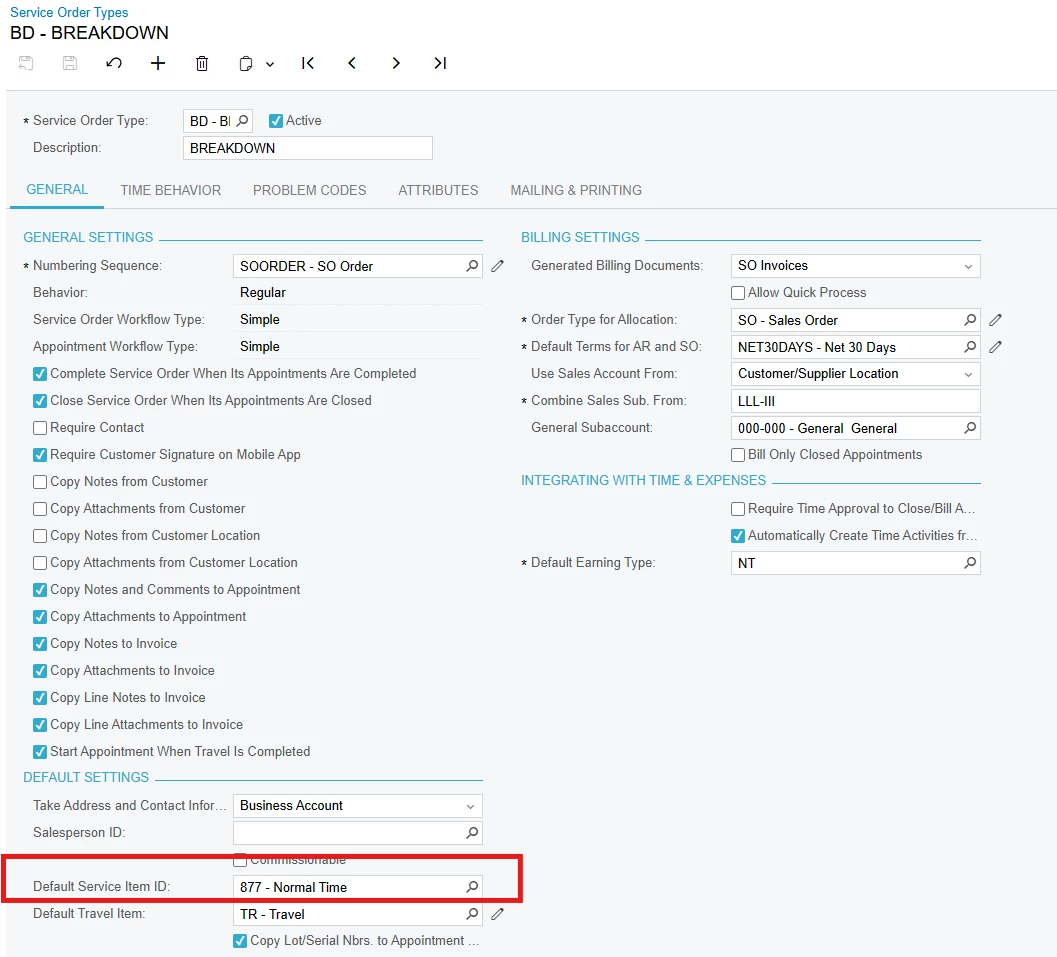
//FSSrvOrdTypeExt.usrDefaultServiceItemID

using PX.Objects.IN;
[PXDBString(50)]
[PXSelector(typeof(Search<InventoryItem.inventoryID>),
DescriptionField = typeof(InventoryItem.descr))]
[PXUIField(DisplayName="Default Service Item ID")]
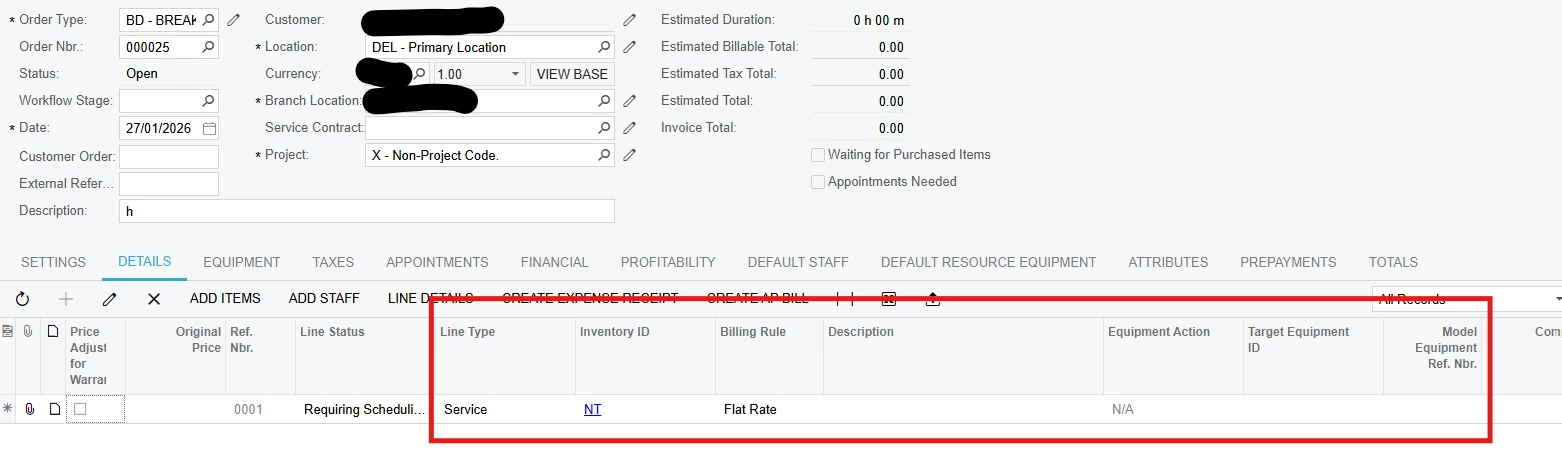
This populates but does not save correctly and the description doesn’t populate too, what is required is the line to auto populate as soon as the service order type is selected.

namespace PX.Objects.FS
{
public class ServiceOrderEntry_Extension : PXGraphExtension<PX.Objects.FS.ServiceOrderEntry>
{ protected void FSSODet_RowInserting(PXCache cache, PXRowInsertingEventArgs e, PXRowInserting InvokeBaseHandler)
{
if(InvokeBaseHandler != null)
InvokeBaseHandler(cache, e);
var row = (FSSODet)e.Row;
if (row == null) return;

FSServiceOrder serviceOrder = Base.ServiceOrderRecords.Current;
if (serviceOrder == null) return;

// Only apply default for service lines - using "SERVI" as the value
// if (row.LineType == "SERVI")
// {
// Get the Service Order Type with extension
FSSrvOrdType serviceOrderType = PXSelect<FSSrvOrdType,
Where<FSSrvOrdType.srvOrdType, Equal<Required<FSSrvOrdType.srvOrdType>>>>
.Select(Base, serviceOrder.SrvOrdType);

if (serviceOrderType != null)
{
// Access the extension field - get the inventory code (string)
string defaultServiceItemCode = PXCache<FSSrvOrdType>.GetExtension<FSSrvOrdTypeExt>(serviceOrderType)?.UsrDefaultServiceItemID;

if (!string.IsNullOrEmpty(defaultServiceItemCode) && row.InventoryID == null)
{
// Parse the string ID to integer and assign directly
if (int.TryParse(defaultServiceItemCode, out int inventoryID))
{
row.LineType = "SERVI";
row.InventoryID = inventoryID;
}
}

}

// 2. WARRANTY PRICE LOGIC
if (row.SMEquipmentID != null)
{
FSEquipment equipment = PXSelect<FSEquipment,
Where<FSEquipment.SMequipmentID, Equal<Required<FSEquipment.SMequipmentID>>>>
.Select(Base, row.SMEquipmentID);

if (equipment != null)
{
var equipmentExt = equipment.GetExtension<FSEquipmentExt>();
if (equipmentExt != null)
{
decimal? originalPrice = equipmentExt.UsrMAINUnitPrice;

// Get the line extension for tracking
var rowExt = cache.GetExtension<FSSODetExt>(row);

if (rowExt != null)
{
// Store original price
rowExt.UsrMAINOriginalPrice = originalPrice;

// Check labour warranty
DateTime today = DateTime.Today;
bool isWithinWarranty = false;

if (equipmentExt.UsrMAINLabourWarranty != null &&
equipmentExt.UsrMAINLabourWarranty >= today)
{
isWithinWarranty = true;
}

if (isWithinWarranty)
{
// Set price to 0 for warranty
row.UnitPrice = 0;
row.CuryUnitPrice = 0;
rowExt.UsrMAINPriceAdjusted = true;
}
else if (originalPrice != null)
{
// Use equipment price
row.UnitPrice = originalPrice;
row.CuryUnitPrice = originalPrice;
rowExt.UsrMAINPriceAdjusted = false;
}
}
}
}
}
// }
}

Please let me know what is needed in terms of adjustments, thank you!

9 replies

Forum|alt.badge.img+3

Hello ​@tharidhiPerera If your fields populating values & disappears then set CommitChanges = True for UDF fields & Once debug the code to make sure values for fields are showing correctly.
If not work then we can modify your snippet.


shushanna34
Freshman II
Forum|alt.badge.img
  • Freshman II
  • January 27, 2026

Hi,

As I noticed your UDF is string but InventoryID is int

Correct DAC type should be:

[PXDBInt]
[PXSelector(typeof(Search<InventoryItem.inventoryID>),
            SubstituteKey = typeof(InventoryItem.inventoryCD),
            DescriptionField = typeof(InventoryItem.descr))]
[PXUIField(DisplayName = "Default Service Item")]
public virtual int? UsrDefaultServiceItemID { get; set; }

This removes conversion issues.


Also try to Insert detail line in SrvOrdType_FieldUpdated

Add this to your ServiceOrderEntry extension: (this is just example you can modify the code based on your requirements)
 

protected void FSServiceOrder_SrvOrdType_FieldUpdated(PXCache cache, PXFieldUpdatedEventArgs e)
{
    var serviceOrder = (FSServiceOrder)e.Row;
    if (serviceOrder == null) return;

    // Clear existing lines
    Base.ServiceOrderDet.DeleteAll();

    // Read srvOrdType record
    var srvType = PXSelect<FSSrvOrdType,
        Where<FSSrvOrdType.srvOrdType, Equal<Required<FSSrvOrdType.srvOrdType>>>>
        .Select(Base, serviceOrder.SrvOrdType);

    if (srvType == null) return;

    var srvTypeExt = srvType.GetExtension<FSSrvOrdTypeExt>();
    if (srvTypeExt?.UsrDefaultServiceItemID == null) return;

    // Insert new service line properly
    var newLine = new FSSODet()
    {
        LineType = ID.LineType_Service.SERVICE, // or "SERVI" if custom
        InventoryID = srvTypeExt.UsrDefaultServiceItemID
    };

    // System defaulting logic will populate billing rule, description, etc.
    Base.ServiceOrderDet.Insert(newLine);
}


Hi ​@Abhishek Niikam and ​@shushanna34  thank you for your suggestion I set the commit change value to true in my UDF in service order type screen and also changed it to [PXDBInt] but the values are not setting. Item ID is now being stored correctly. Thanks!


Forum|alt.badge.img+3

Hello ​@tharidhiPerera Try RowUpdated event:
 

protected virtual void _(Events.RowUpdated<FSServiceOrder> e)
{
var order = e.Row;
var old = e.OldRow;
if (order == null || old == null) return;

if (order.SrvOrdType == old.SrvOrdType)
return;

var srvType = PXSelect<FSSrvOrdType,
Where<FSSrvOrdType.srvOrdType,
Equal<Required<FSSrvOrdType.srvOrdType>>>>
.Select(Base, order.SrvOrdType);

var ext = srvType?.GetExtension<FSSrvOrdTypeExt>();
if (ext?.UsrDefaultServiceItemID == null)
return;

if (Base.ServiceOrderDetails.Select().Count > 0)
return;

var line = (FSSODet)Base.ServiceOrderDetails.Cache.CreateInstance();
line.LineType = ID.LineType_Service;

line = Base.ServiceOrderDetails.Insert(line);

Base.ServiceOrderDetails.Cache.SetValueExt<FSSODet.inventoryID>(
line, ext.UsrDefaultServiceItemID);

Base.ServiceOrderDetails.Cache.Update(line);
}

I hope it helps!


Forum|alt.badge.img+2
  • Jr Varsity III
  • January 28, 2026

@tharidhiPerera ,
Hi, Can you try to write your code on RowInserted or FieldDefaulting event and for value assignment use cache.SetValueExt like this.  

cache.SetValueExt<FSSODet.lineType>(row, "SERVI");

cache.SetValueExt<FSSODet.inventoryID>(row, inventoryID);


Hi there,
I noticed that the default service item is stored as a string and then parsed to an int when assigning InventoryID. Would it make sense to store this field as PXDBInt with an Inventory selector instead?

Also, since InventoryID is being assigned directly in RowInserting, could this be why the value appears briefly but doesn’t persist and the description is not populated? Would using SetValueExt (or defaulting the line when the Service Order Type is selected) be the recommended approach here?


  • Author
  • Freshman I
  • January 28, 2026
 protected void FSSODet_RowSelected(PXCache cache, PXRowSelectedEventArgs e)
{


var row = (FSSODet)e.Row;
if (row == null) return;

// Only process rows that were just inserted and don't have values yet
if (row.InventoryID != null || row.LineType != null) return;


var status = cache.GetStatus(row);
if (status != PXEntryStatus.Inserted)
{
return;
}

var serviceOrder = Base.ServiceOrderRecords.Current;
if (serviceOrder == null || string.IsNullOrEmpty(serviceOrder.SrvOrdType)) return;

// Get service order type
FSSrvOrdType serviceOrderType = PXSelect<FSSrvOrdType,
Where<FSSrvOrdType.srvOrdType, Equal<Required<FSSrvOrdType.srvOrdType>>>>
.SelectSingleBound(Base, null, serviceOrder.SrvOrdType);

if (serviceOrderType == null) return;

var srvTypeExt = serviceOrderType.GetExtension<FSSrvOrdTypeExt>();
if (srvTypeExt?.UsrMAINServItemID == null) return;

// Use SetValueExt
cache.SetValueExt<FSSODet.lineType>(row, "SERVI");
cache.SetValueExt<FSSODet.inventoryID>(row, srvTypeExt.UsrMAINServItemID);
}

I have updated the event handler to RowSelected as per above code, this now sets the values correctly but on save it gets removed, clicking on the grid again makes it reappear. Is there a grid setting to be added as well. Thank you for all the suggestions ​@Abhishek Niikam ​@noorula77 ​@VaheGhazaryan !


Forum|alt.badge.img+2
  • Jr Varsity III
  • January 29, 2026

@tharidhiPerera ,

     Try RowInserted or FSSODet_InventoryID_FieldDefaulting . Hope this will work.


  • Freshman I
  • January 29, 2026

@tharidhiPerera,

This logic should be moved to a data-modifying event such as RowInserted, RowUpdated, or SrvOrdType_FieldUpdated, and the field values should continue to be assigned using SetValueExt so that the system defaulting and persistence logic is triggered correctly.