Hi there!
I have a customization which I need help in refining. So in the service order screen I added logic where I select the service order type and it populates the details line with the inventory ID specified in my UDF in the service order type screen, but mine does not save correctly, it keeps popping up and disappearing.
For example I have added in the default service item in the service order type screen.
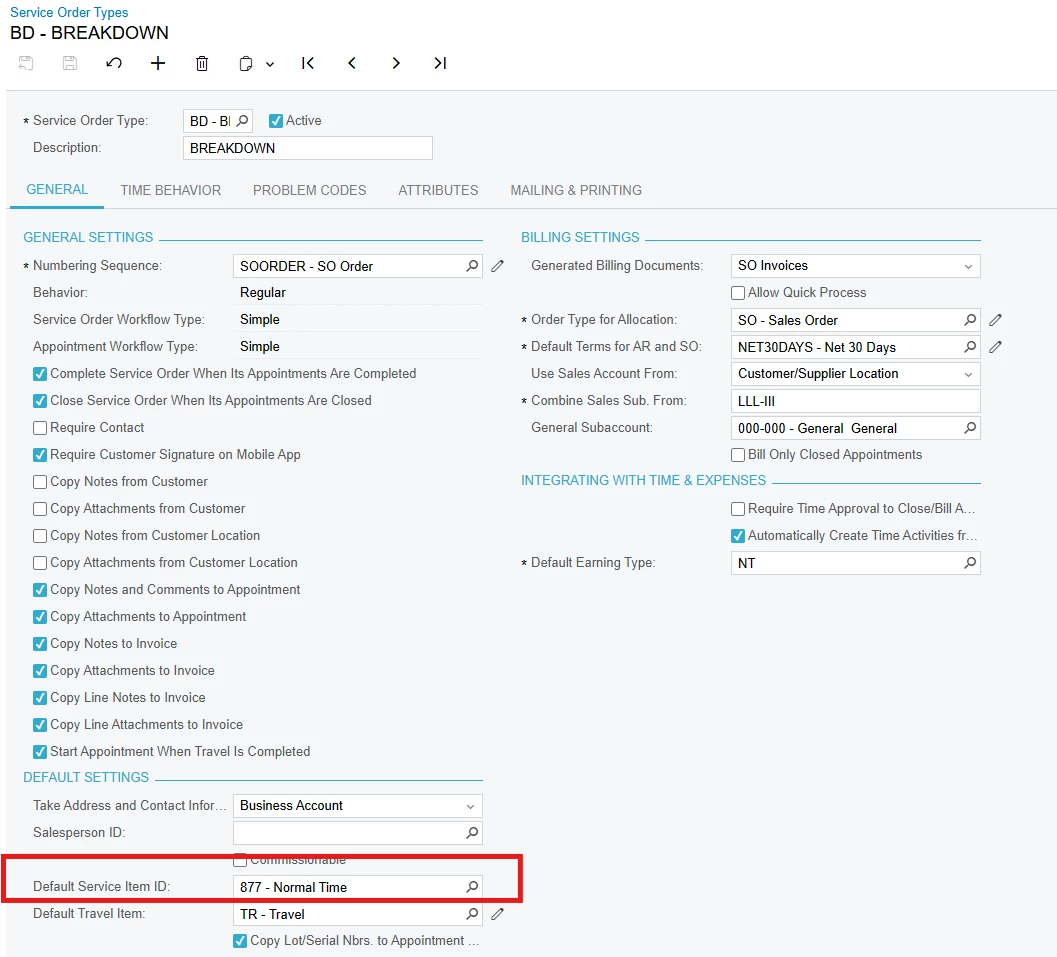
//FSSrvOrdTypeExt.usrDefaultServiceItemID

using PX.Objects.IN;
[PXDBString(50)]
 [PXSelector(typeof(Search<InventoryItem.inventoryID>),
                    DescriptionField = typeof(InventoryItem.descr))]
[PXUIField(DisplayName="Default Service Item ID")]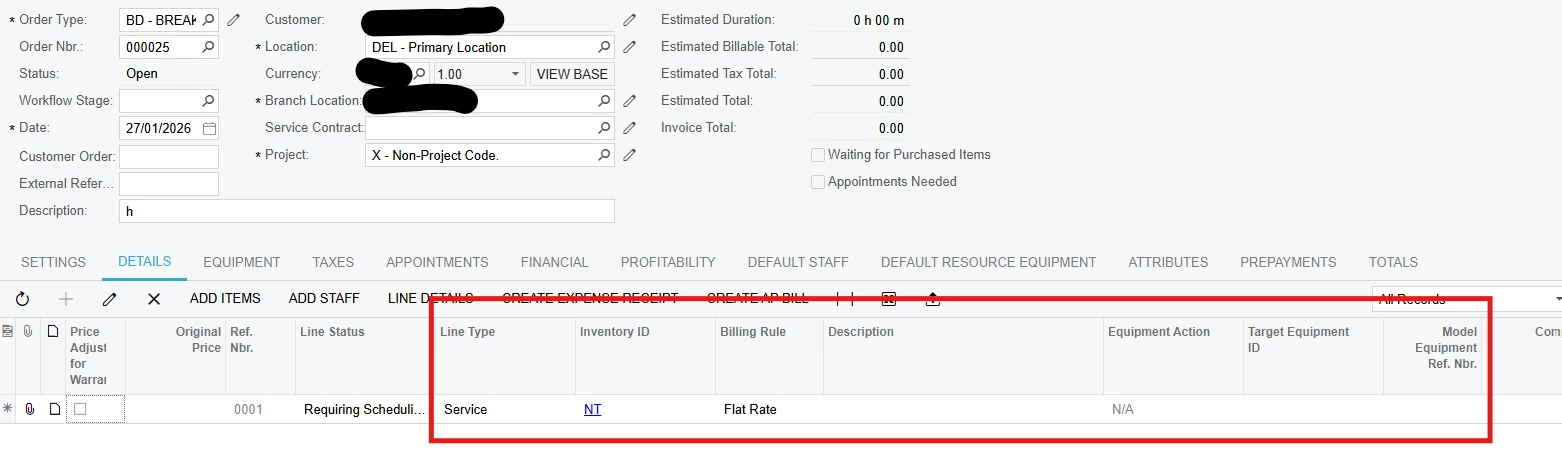
This populates but does not save correctly and the description doesn’t populate too, what is required is the line to auto populate as soon as the service order type is selected.
namespace PX.Objects.FS
{
  public class ServiceOrderEntry_Extension : PXGraphExtension<PX.Objects.FS.ServiceOrderEntry>
  {  protected void FSSODet_RowInserting(PXCache cache, PXRowInsertingEventArgs e, PXRowInserting InvokeBaseHandler)
    {
      if(InvokeBaseHandler != null)
        InvokeBaseHandler(cache, e);
      var row = (FSSODet)e.Row;
      if (row == null) return;

        FSServiceOrder serviceOrder = Base.ServiceOrderRecords.Current;
        if (serviceOrder == null) return;

        // Only apply default for service lines - using "SERVI" as the value
       // if (row.LineType == "SERVI")
       // {
            // Get the Service Order Type with extension
            FSSrvOrdType serviceOrderType = PXSelect<FSSrvOrdType,
                Where<FSSrvOrdType.srvOrdType, Equal<Required<FSSrvOrdType.srvOrdType>>>>
                .Select(Base, serviceOrder.SrvOrdType);

           if (serviceOrderType != null)
            {
                // Access the extension field - get the inventory code (string)
                string defaultServiceItemCode = PXCache<FSSrvOrdType>.GetExtension<FSSrvOrdTypeExt>(serviceOrderType)?.UsrDefaultServiceItemID;

                if (!string.IsNullOrEmpty(defaultServiceItemCode) && row.InventoryID == null)
                {
                   // Parse the string ID to integer and assign directly
                if (int.TryParse(defaultServiceItemCode, out int inventoryID))
                {
                    row.LineType = "SERVI";
                    row.InventoryID = inventoryID;
                }
                }

            }

            // 2. WARRANTY PRICE LOGIC
        if (row.SMEquipmentID != null)
        {
            FSEquipment equipment = PXSelect<FSEquipment,
                Where<FSEquipment.SMequipmentID, Equal<Required<FSEquipment.SMequipmentID>>>>
                .Select(Base, row.SMEquipmentID);

            if (equipment != null)
            {
                var equipmentExt = equipment.GetExtension<FSEquipmentExt>();
                if (equipmentExt != null)
                {
                    decimal? originalPrice = equipmentExt.UsrMAINUnitPrice;

                    // Get the line extension for tracking
                    var rowExt = cache.GetExtension<FSSODetExt>(row);

                    if (rowExt != null)
                    {
                        // Store original price
                        rowExt.UsrMAINOriginalPrice = originalPrice;

                        // Check labour warranty
                        DateTime today = DateTime.Today;
                        bool isWithinWarranty = false;

                        if (equipmentExt.UsrMAINLabourWarranty != null &&
                            equipmentExt.UsrMAINLabourWarranty >= today)
                        {
                            isWithinWarranty = true;
                        }

                        if (isWithinWarranty)
                        {
                            // Set price to 0 for warranty
                            row.UnitPrice = 0;
                            row.CuryUnitPrice = 0;
                            rowExt.UsrMAINPriceAdjusted = true;
                        }
                        else if (originalPrice != null)
                        {
                            // Use equipment price
                            row.UnitPrice = originalPrice;
                            row.CuryUnitPrice = originalPrice;
                            rowExt.UsrMAINPriceAdjusted = false;
                        }
                    }
                }
            }
        }
  //  }
}
Please let me know what is needed in terms of adjustments, thank you!