



I'm not sure if this is possible in the modern interface, but I wanted to ask.
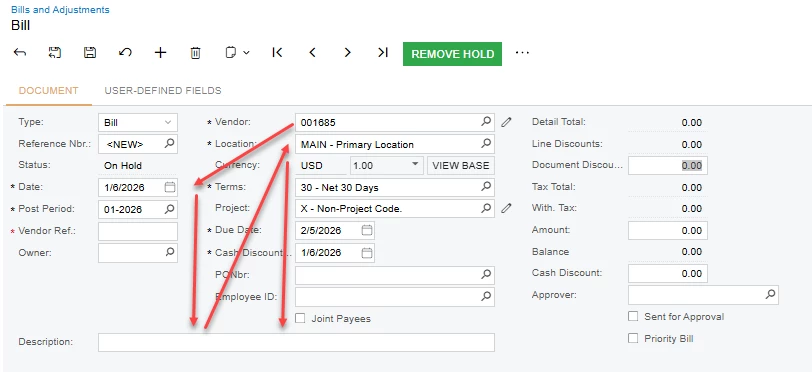
Currently, in the classic 25R2 interface, when a user creates an accounts payable invoice, the FIRST field they enter is "Vendor." Then, using the TAB key, they cycle through each field following the specific procedure we've requested. From "Vendor," the TAB key goes to "Date," then to the left, then to "Location," and finally to the middle column. See the image below of the classic 25R2 interface.
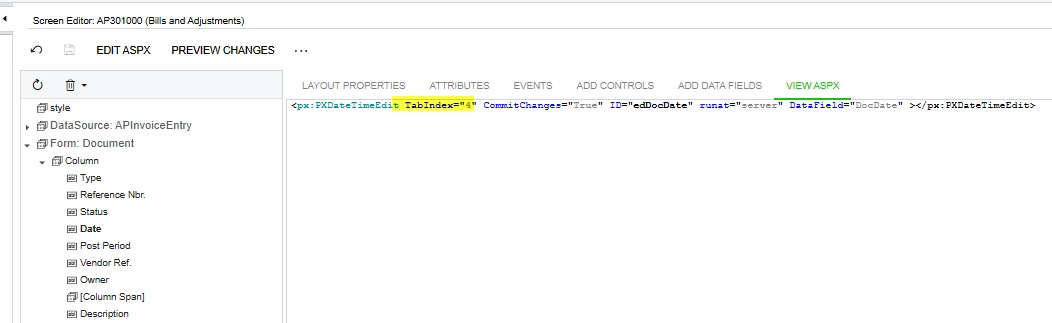
A customization has been added to the fields to specify the order when the Tab key is pressed.
But in the modern version, it's not working correctly. Could you help me with the parameters I need to use to make this work in the modern version?
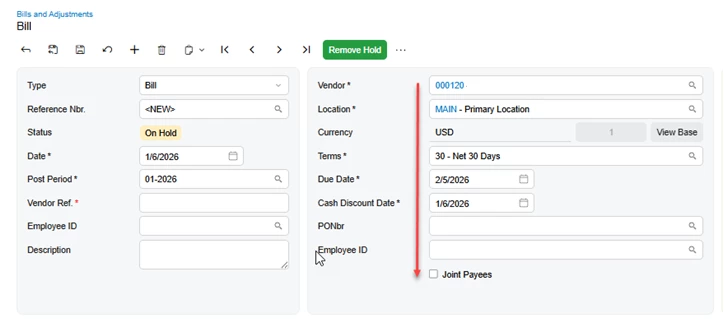
In the Modern UI, if they enter "Vendor" first and press TAB, it just goes down that middle column and never back to the first column. See below.
.html
<template>
<qp-tab after="#ContactsTab" id="ServiceRenderTab" caption="Services Rendered Tickets">
<qp-grid id="CstPXGrid1" view.bind="ServRenderedTickets"></qp-grid>
</qp-tab>
<qp-template modify="#Project_form" name="17-17-14"></qp-template>
<qp-template after="#Project_form" id="templateSKMUltipleCST01" name="1-1">
<qp-fieldset id="SlotA" slot="A" view.bind="Project">
<field name="Project.UsrInvoiceByRoad"></field>
<field name="Project.UsrHaulingIncluded"></field>
<field name="Project.UsrTaxable"></field>
<field name="UsrFlaggersNumber"></field>
<field name="UsrFlaggersIncluded"></field>
</qp-fieldset>
</qp-template>
<qp-fieldset id="fieldsetSKScaleTicket01" after="#SummaryTabSlotB03" caption="Ticket Info">
<field name="ProjectProperties.UsrOutTickType"></field>
<field name="ProjectProperties.UsrInTickType"></field>
<field name="ProjectProperties.UsrTranToSite"></field>
<field name="ProjectProperties.UsrHauItem"></field>
<field name="ProjectProperties.UsrHauRate"></field>
<field name="ProjectProperties.UsrSFuelSurch"></field>
</qp-fieldset>
<qp-fieldset id="fieldsetSKPriceIndex01" after="#SummaryTabSlotB03" caption="Price Index">
<field name="ProjectProperties.UsrSPriceIndex"></field>
<field name="ProjectProperties.UsrPRCNumber"></field>
<field name="ProjectProperties.UsrBaseIndex"></field>
<field name="ProjectProperties.UsrPCNumber"></field>
</qp-fieldset>
<qp-fieldset id="fieldsetSKSvRender01" after="#SummaryTabSlotB03" caption="Service Rendered">
<field name="ProjectProperties.UsrServRendEmail"></field>
</qp-fieldset>
<field name="ProjectProperties.UsrJobSetup" after="#Project_form FIELD[name='Status']">
<qp-button id="btnCallJSSheet" state.bind="CallJSSheet" caption="..." class="col-2"></qp-button>
</field>
<field name="ProjectProperties.UsrSalesPerson" after="#SummaryTabSlotA01 FIELD[name='CostBudgetLevel']"></field>
<field name="ProjectProperties.UsrPONumber" append="#SummaryTabSlotA01"></field>
<field name="ProjectProperties.UsrPrevailingWageJob" after="#SummaryTabSlotA01 FIELD[name='ProjectProperties.UsrPONumber']"></field>
<field after="#SiteAddressForm [name='IsValidated']" name="ProjectProperties.UsrCounty"></field>
<field after="#SiteAddressForm FIELD[name='ProjectProperties.UsrCounty']" name="ProjectProperties.UsrGeocode"></field>
</template>

