Answer

How to add "Inventory" Type of "Source" Role in "RELATIONS" Tab on Cases screen ?

  • December 12, 2023
  • 4 replies
  • 144 views

nhatnghetinh
Captain II
Forum|alt.badge.img+11

Dear Team,

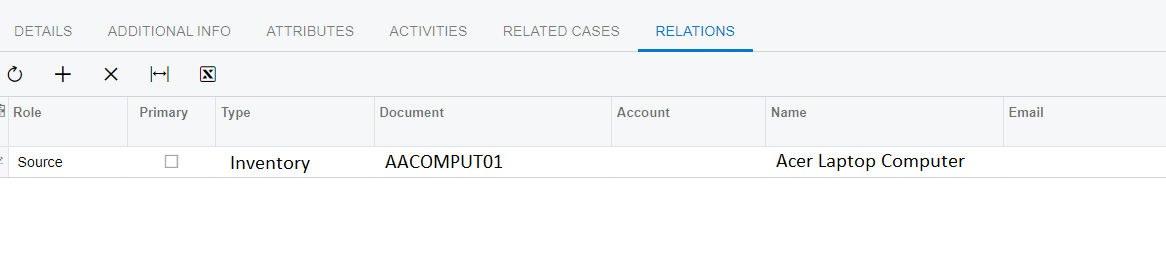
How to add "Inventory" Type of "Source" Role in "RELATIONS" Tab on Cases screen ?
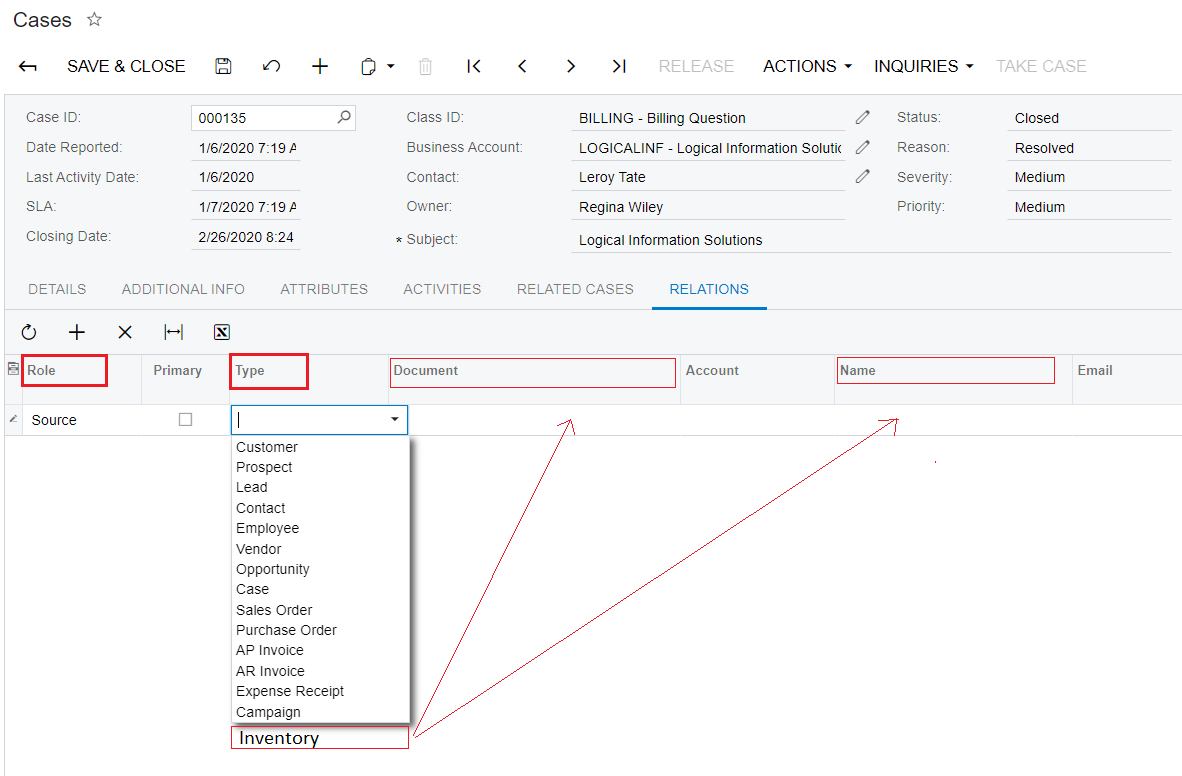
 

The expected results are as follows:
 

Best Regards,

NNT

Best answer by andriikravetskyi35

Hi,

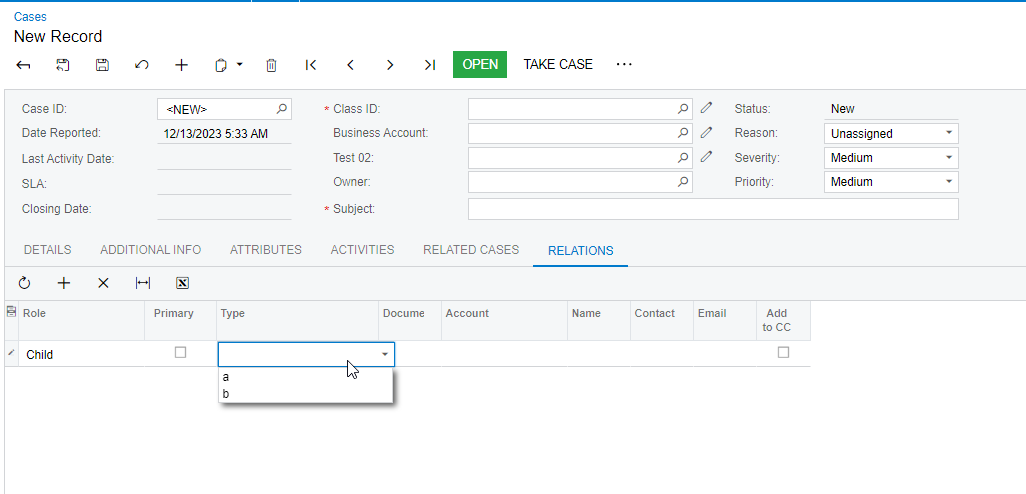
I did it in fast way and my stringList will have always the same values, but you might use my logic as template and add your custom list, that depends from type:

 public class CRCaseMaintExt : PXGraphExtension<PX.Objects.CR.CRCaseMaint> 
{
[PXMergeAttributes(Method = MergeMethod.Merge)]
[TestInheristanceClass(typeof(PX.Objects.CR.CRRelation.role))]
protected virtual void _(Events.CacheAttached<PX.Objects.CR.CRRelation.targetType> e) { }
}
public class TestInheristanceClass : PX.Objects.CR.CRRelationTypeListAttribure
{
public TestInheristanceClass(Type RoleType) : base(RoleType)
{

}

public override void FieldSelecting(PXCache sender, PXFieldSelectingEventArgs e)
{
base.FieldSelecting(sender, e);

// string text = sender.GetValue(e.Row, base.RoleType.Name) as string;
// Item targetType = GetTargetType(text);
e.ReturnState = (PXStringState)PXStringState.CreateInstance(e.ReturnState, null, null, _FieldName, null, -1, null,new string[]{ "1","2"},new string[] { "a", "b"}, true, null, null);
//if (e.Row != null)
//{
// ((PXFieldState)e.ReturnState).Enabled = ((PXFieldState)e.ReturnState).Enabled && text != null;
//}
}
}
 

4 replies

andriikravetskyi35
Jr Varsity I
Forum|alt.badge.img+1

Hi,

I did it in fast way and my stringList will have always the same values, but you might use my logic as template and add your custom list, that depends from type:

 public class CRCaseMaintExt : PXGraphExtension<PX.Objects.CR.CRCaseMaint> 
{
[PXMergeAttributes(Method = MergeMethod.Merge)]
[TestInheristanceClass(typeof(PX.Objects.CR.CRRelation.role))]
protected virtual void _(Events.CacheAttached<PX.Objects.CR.CRRelation.targetType> e) { }
}
public class TestInheristanceClass : PX.Objects.CR.CRRelationTypeListAttribure
{
public TestInheristanceClass(Type RoleType) : base(RoleType)
{

}

public override void FieldSelecting(PXCache sender, PXFieldSelectingEventArgs e)
{
base.FieldSelecting(sender, e);

// string text = sender.GetValue(e.Row, base.RoleType.Name) as string;
// Item targetType = GetTargetType(text);
e.ReturnState = (PXStringState)PXStringState.CreateInstance(e.ReturnState, null, null, _FieldName, null, -1, null,new string[]{ "1","2"},new string[] { "a", "b"}, true, null, null);
//if (e.Row != null)
//{
// ((PXFieldState)e.ReturnState).Enabled = ((PXFieldState)e.ReturnState).Enabled && text != null;
//}
}
}


Naveen Boga
Captain II
Forum|alt.badge.img+19
  • Captain II
  • December 13, 2023

@nhatnghetinh  Please refer to the below article and helps to your requirement.


https://riptutorial.com/acumatica/example/29102/modifying-marital-statuses


Vignesh Ponnusamy
Acumatica Moderator
Forum|alt.badge.img+5

@nhatnghetinh,

Quick tip: To modify the list of Type field, you have to inherit the CRRelationTypeListAttribure attribute and make changes to it. Good Luck,


Hi,

I did it in fast way and my stringList will have always the same values, but you might use my logic as template and add your custom list, that depends from type:

 public class CRCaseMaintExt : PXGraphExtension<PX.Objects.CR.CRCaseMaint> 
{
[PXMergeAttributes(Method = MergeMethod.Merge)]
[TestInheristanceClass(typeof(PX.Objects.CR.CRRelation.role))]
protected virtual void _(Events.CacheAttached<PX.Objects.CR.CRRelation.targetType> e) { }
}
public class TestInheristanceClass : PX.Objects.CR.CRRelationTypeListAttribure
{
public TestInheristanceClass(Type RoleType) : base(RoleType)
{

}

public override void FieldSelecting(PXCache sender, PXFieldSelectingEventArgs e)
{
base.FieldSelecting(sender, e);

// string text = sender.GetValue(e.Row, base.RoleType.Name) as string;
// Item targetType = GetTargetType(text);
e.ReturnState = (PXStringState)PXStringState.CreateInstance(e.ReturnState, null, null, _FieldName, null, -1, null,new string[]{ "1","2"},new string[] { "a", "b"}, true, null, null);
//if (e.Row != null)
//{
// ((PXFieldState)e.ReturnState).Enabled = ((PXFieldState)e.ReturnState).Enabled && text != null;
//}
}
}


Hello,
How did you solve the problem so that when you added the type it was related to the correct Document?