

Answer

How to add Extended DAC Field in the Sales order Create Payment popup (Smart Panel) in the Modern UI

  • June 4, 2025
  • 5 replies
  • 89 views

Forum|alt.badge.img

How to add Extended DAC Field in the Sales order screen Payment tab Create Payment popup (Smart Panel) in the Modern UI
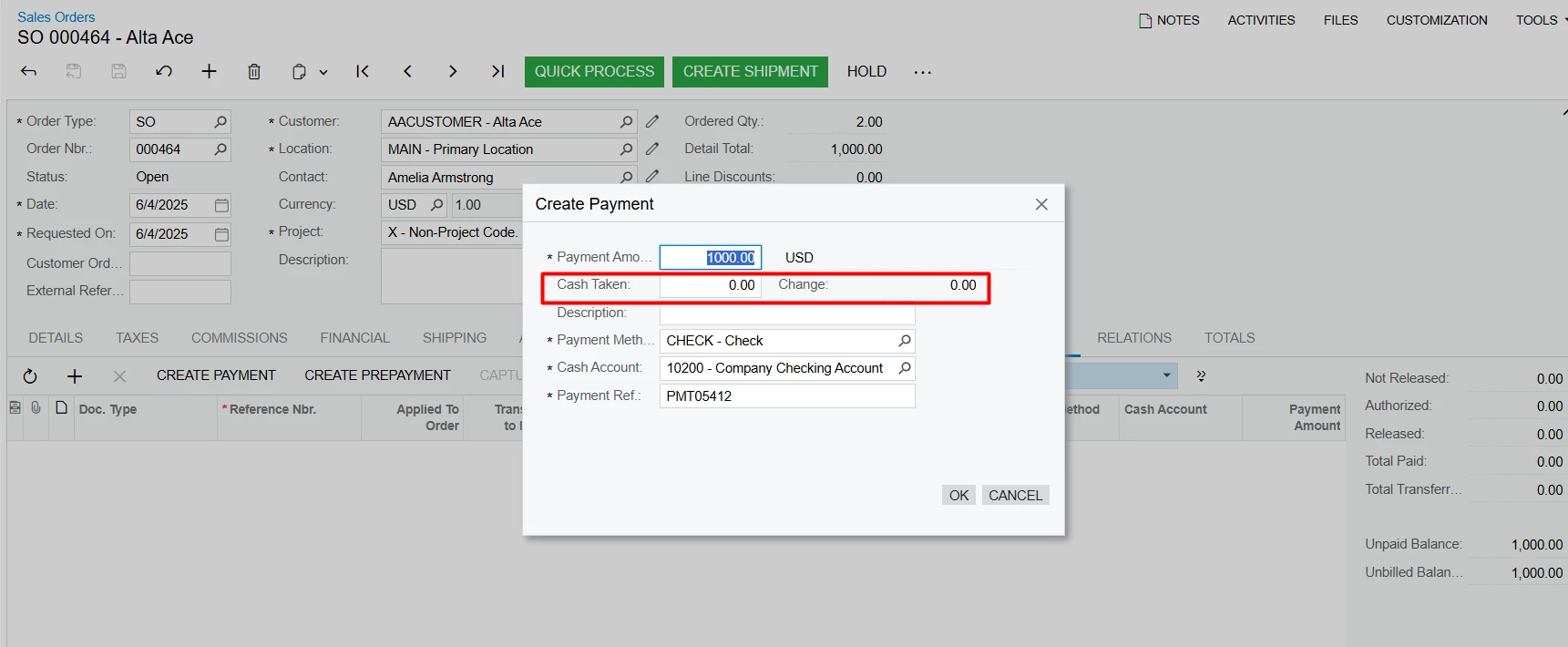


tried with below code
TS file

import { PXView, PXFieldState, PXFieldOptions } from "client-controls";
import { SOQuickPayment } from "../../common/panel-create-payment/panel-create-payment";

export interface SOQuickPayment_customfields extends SOQuickPayment { }
export class SOQuickPayment_customfields {
    UsrPSSOCashTaken: PXFieldState<PXFieldOptions.CommitChanges>;
    UsrPSSOCashChange: PXFieldState<PXFieldOptions.CommitChanges | PXFieldOptions.Disabled>;
}

HTML file

<template>
    <field after="#QuickPayment_CreatePaymentFormLayout0 [name='CuryID']" name="UsrPSSOCashTaken"></field>
    <field after="#QuickPayment_CreatePaymentFormLayout0 [name='UsrPSSOCashTaken']" name="UsrPSSOCashChange"></field>    
</template>

 

Best answer by darylbowman

In my instance of that version, panel-create-payment.html doesn’t contain a section called QuickPayment_CreatePaymentFormLayout0.

I think you’d want to use

<template>
<field after="#fsColumnA-CreatePayment [name='CuryID']" name="UsrPSSOCashTaken"></field>
<field after="#fsColumnA-CreatePayment [name='UsrPSSOCashTaken']" name="UsrPSSOCashChange"></field>
</template>

 

5 replies

kpopova
Acumatica Employee
Forum|alt.badge.img+2
  • Acumatica Employee
  • June 4, 2025

Have you tried the full path in the import directive, such as “src/screens/common/panel-create-payment/panel-create-payment”?


Forum|alt.badge.img
  • Author
  • Jr Varsity III
  • June 4, 2025

Have you tried the full path in the import directive, such as “src/screens/common/panel-create-payment/panel-create-payment”?

if put full path in the import directive getting error


darylbowman
Captain II
Forum|alt.badge.img+15

What version are you using?


Forum|alt.badge.img
  • Author
  • Jr Varsity III
  • June 4, 2025

What version are you using?

25R1 - 25.100.0054


darylbowman
Captain II
Forum|alt.badge.img+15
  • Answer
  • June 4, 2025

In my instance of that version, panel-create-payment.html doesn’t contain a section called QuickPayment_CreatePaymentFormLayout0.

I think you’d want to use

<template>
<field after="#fsColumnA-CreatePayment [name='CuryID']" name="UsrPSSOCashTaken"></field>
<field after="#fsColumnA-CreatePayment [name='UsrPSSOCashTaken']" name="UsrPSSOCashChange"></field>
</template>


