

Hi!
In Classic UI, fields are added dynamically using RowSelected event.
However, when switching to Modern UI, these dynamically added fields are not showing.
How can we dynamically add fields in Modern UI to ensure they are displayed as in classic?
Please refer the below code and screenshots.
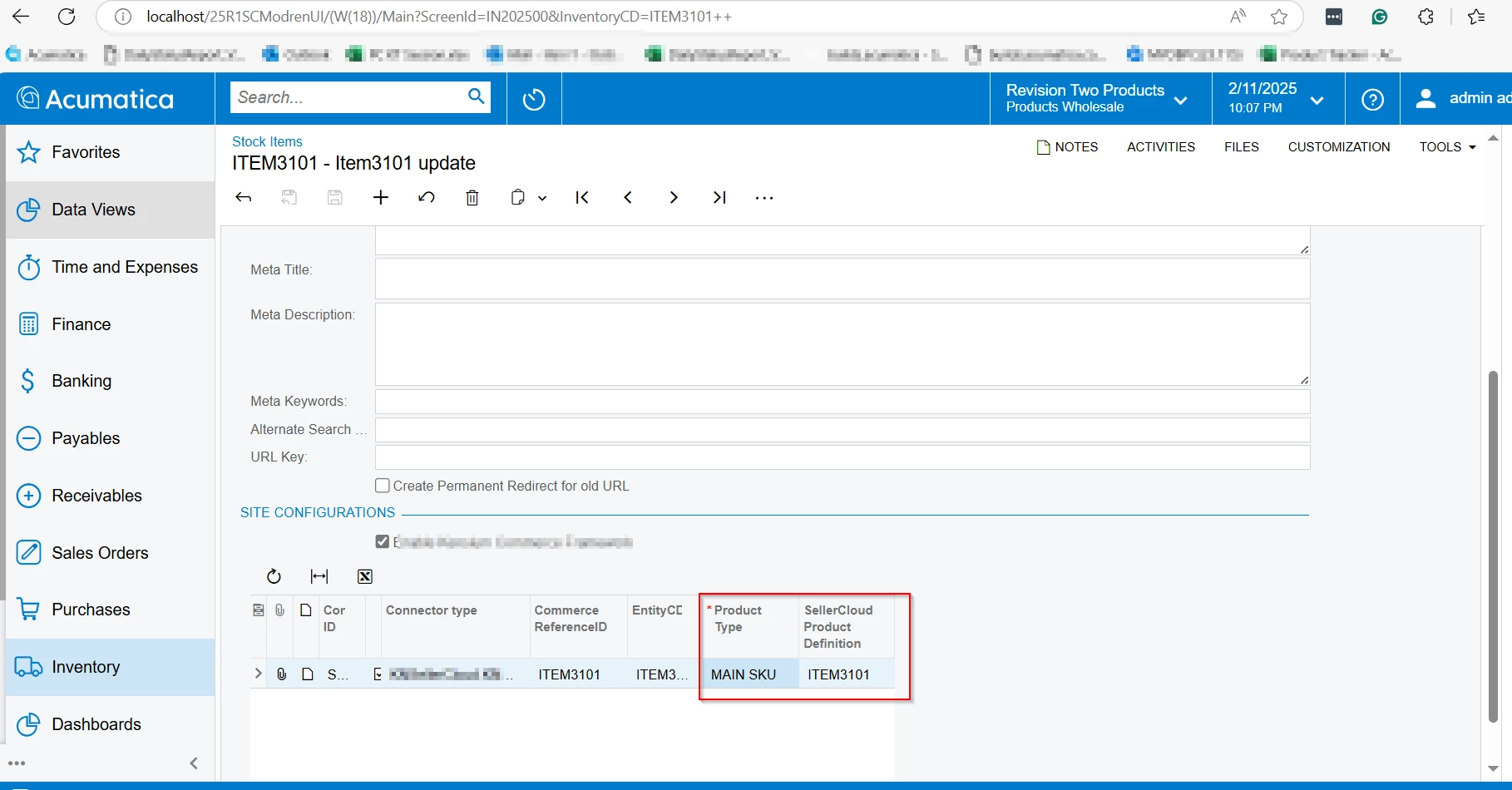
protected void InventoryItem_RowSelected(PXCache sender, PXRowSelectedEventArgs e)
{

    foreach (KeyValuePair<string, PXFieldSelecting> pair in fieldSelectingHandlers)
    {
        Base.FieldSelecting.RemoveHandler(typeof(KNCFSiteAssociation), pair.Key, pair.Value);
        KNSCCommerceConfigsSites.Cache.Fields.Remove(pair.Key);
    }
    fieldSelectingHandlers.Clear();

    {
        string fieldName = "UsrKNWHProductType";

        string displayName = "Product Type";
        PXFieldSelecting handler = new PXFieldSelecting(delegate (PXCache dsender, PXFieldSelectingEventArgs de)
        {
            KNCFSiteAssociation currentrow = de.Row as KNCFSiteAssociation;
            object value = null;
            if (currentrow != null)
            {
                value = (currentrow != null) ? currentrow.GetExtension<KNSCSiteAssociationExt>()?.UsrKNSCProductType?.ToString() : "0";
            }
            List<string> allowedValues = new List<string>();

            allowedValues.Add("MAIN SKU");
            allowedValues.Add("SHADOW SKU");

            de.ReturnState = PXStringState.CreateInstance(value, 225, true, fieldName, false, -1, string.Empty, allowedValues.ToArray(), allowedValues.ToArray(), true, null);
            //de.ReturnState = PXStringState.CreateInstance(value, 255, null, fieldName, null, null, null, null, null, false, null);
            (de.ReturnState as PXStringState).Visibility = PXUIVisibility.Dynamic;
            (de.ReturnState as PXStringState).Visible = true;
            (de.ReturnState as PXStringState).DisplayName = displayName;
            (de.ReturnState as PXStringState).Enabled = true;
            (de.ReturnState as PXStringState).Required = true;
            de.IsAltered = true;

        });
        fieldSelectingHandlers.Add(fieldName, handler);
        KNSCCommerceConfigsSites.Cache.Fields.Add(fieldName);
        Base.FieldSelecting.AddHandler(typeof(KNCFSiteAssociation), fieldName, handler);
        PXFieldUpdating fielupdatedhandler = new PXFieldUpdating(delegate (PXCache dsender, PXFieldUpdatingEventArgs de)
        {
            KNCFSiteAssociation currentrow = de.Row as KNCFSiteAssociation;
            if (currentrow != null)
            {
                currentrow.GetExtension<KNSCSiteAssociationExt>().UsrKNSCProductType = de.NewValue.ToString();
                object value = currentrow.GetExtension<KNSCSiteAssociationExt>().UsrKNSCProductType;
                KNSCCommerceConfigsSites.Cache.SetValueExt<KNSCSiteAssociationExt.usrKNSCProductType>(currentrow, value);
                KNSCCommerceConfigsSites.Cache.SetValue<KNSCSiteAssociationExt.usrKNSCProductType>(currentrow, value);
            }
        });
        Base.FieldUpdating.AddHandler(typeof(KNCFSiteAssociation), fieldName, fielupdatedhandler);


        #region ProductDefinition
        string getshadow = string.Empty;
        {
            foreach (KeyValuePair<string, PXFieldSelecting> pair1 in fieldSelectingHandlers1)
            {
                Base.FieldSelecting.RemoveHandler(typeof(KNCFSiteAssociation), pair1.Key, pair1.Value);
                KNSCCommerceConfigsSites.Cache.Fields.Remove(pair1.Key);
            }
            fieldSelectingHandlers1.Clear();
            {
                string fieldName1 = "UsrKNSCSKUDef1";

                string displayName1 = "SellerCloud Product Definition";
                PXFieldSelecting handler1 = new PXFieldSelecting(delegate (PXCache dsender, PXFieldSelectingEventArgs des)
                {
                    KNCFSiteAssociation currentrow1 = des.Row as KNCFSiteAssociation;
                    getshadow = currentrow1.GetExtension<KNSCSiteAssociationExt>()?.UsrKNSCProductType?.ToString();
                    object value1 = null;
                    if (currentrow1 != null)
                    {
                        value1 = (currentrow1 != null) ? currentrow1.GetExtension<KNSCSiteAssociationExt>()?.UsrKNSCSKUDef?.ToString() : "0";
                    }

                    des.ReturnState = PXStringState.CreateInstance(value1, 225, true, fieldName1, false, -1, string.Empty, null, null, true, null);
                    (des.ReturnState as PXStringState).Visibility = PXUIVisibility.Dynamic;
                    (des.ReturnState as PXStringState).Visible = true;
                    (des.ReturnState as PXStringState).DisplayName = displayName1;
                    (des.ReturnState as PXStringState).Enabled = true;
                    des.IsAltered = true;


                });
                {
                    fieldSelectingHandlers1.Add(fieldName1, handler1);
                    KNSCCommerceConfigsSites.Cache.Fields.Add(fieldName1);
                    Base.FieldSelecting.AddHandler(typeof(KNCFSiteAssociation), fieldName1, handler1);
                    PXFieldUpdating fielupdatedhandler1 = new PXFieldUpdating(delegate (PXCache dsender, PXFieldUpdatingEventArgs det)
                    {
                        KNCFSiteAssociation currentrow1 = det.Row as KNCFSiteAssociation;
                        if (currentrow1 != null)
                        {
                            currentrow1.GetExtension<KNSCSiteAssociationExt>().UsrKNSCSKUDef = det.NewValue.ToString();
                            object value1 = currentrow1.GetExtension<KNSCSiteAssociationExt>().UsrKNSCSKUDef;
                            KNSCCommerceConfigsSites.Cache.SetValueExt<KNSCSiteAssociationExt.usrKNSCSKUDef>(currentrow1, value1);
                            KNSCCommerceConfigsSites.Cache.SetValue<KNSCSiteAssociationExt.usrKNSCSKUDef>(currentrow1, value1);
                        }
                    });
                    Base.FieldUpdating.AddHandler(typeof(KNCFSiteAssociation), fieldName1, fielupdatedhandler1);
                }
            }
        }
        #endregion
    }


}
Thank you in advance!





