Answer

How to add a red flag error to an incorrect date.

  • October 26, 2021
  • 3 replies
  • 65 views

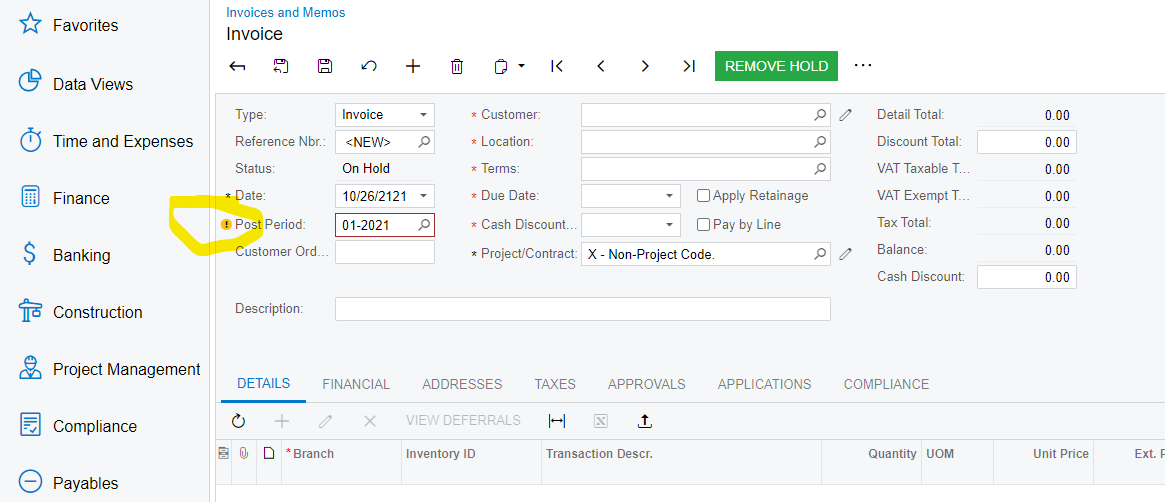
So apparently my client has had more than 1 issue with his employees imputing the wrong date in a field. Like 2120 instead of 2021. How can I create a customization that red flags this and doesn’t allow a save. Something like if date doesn’t equal 2021 -2022, red flag. I think I’d like to implement this system wide to any date field, thoughts? Thanks!

Best answer by Naveen Boga

Hi @mylescarroll22 , To hard stop the user, you can have a logic in field verifying/persisting event.

Here is the sample code for your reference.

	if (Condition)  // add the required condition here
{
sender.RaiseExceptionHandling<SOOrder.orderDate>(doc, null, new PXSetPropertyException(ErrorMessages.IncorrectDateProvided));
}


3 replies

Forum|alt.badge.img+8
  • Semi-Pro I
  • October 26, 2021

Hi @mylescarroll22 , It is better to advise the users to use a Date selector instead of keying.

Thanks


  • Author
  • Freshman I
  • October 26, 2021

Thanks Chandra, We’ve already made that suggestion, but it’s happened since, and I don’t think we’re going to teach this user a new trick. I think the modification should be easy, as the system already yellow flags the problem, I’d just like to change it from a yellow flag to a hard stop.


Naveen Boga
Captain II
Forum|alt.badge.img+19
  • Captain II
  • Answer
  • November 25, 2021

Hi @mylescarroll22 , To hard stop the user, you can have a logic in field verifying/persisting event.

Here is the sample code for your reference.

	if (Condition)  // add the required condition here
{
sender.RaiseExceptionHandling<SOOrder.orderDate>(doc, null, new PXSetPropertyException(ErrorMessages.IncorrectDateProvided));
}