Answer

How to add a GI as side panel with Parameters from Detail section of the form screen?

  • May 29, 2024
  • 4 replies
  • 388 views

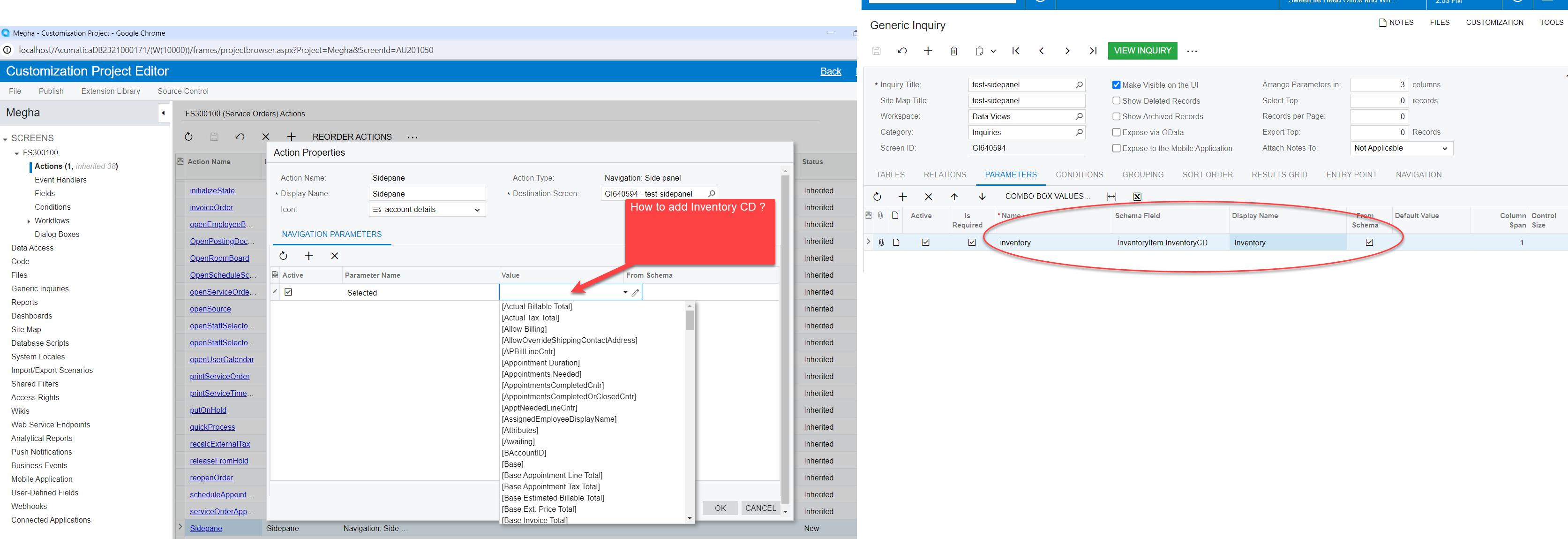
Hi, I am working on customization request to add a GI on Service Order Screen where GI parameter is the inventory ID from Service Order Detail tab. 

I am having problem in mapping the Inventory ID to side panel customization project . The client wants to see the GI ( parameter is Inventory ID) as side pane when they select the row on the Detail tab of the Service Order. So the selection of the row will feed the Inventory Id info to the GI parameter to display the list of info available on the GI related to that Inventory ID.

See attached for detail. It will be great help if you can share any info to make it possible via “Customization Project Editor” or via code?


Best answer by Vignesh Ponnusamy

Hi @mchaturvedi57,

You can create an unbound field in the Header DAC and in the graph extension in the RowSelected or FieldSelecting event you can assign the value to the unbound DAC.

Now you can use the Unbound field created as the parameter. Below is an example, I have for the Sales Order screens,

	public class SOOrderExt : PXCacheExtension<PX.Objects.SO.SOOrder>
{
#region UsrCurrentInventoryID
[PXString(50)] //Its not PXDBString, its just PXString making it an unbound field that will not be stored in the database
[PXUIField(DisplayName="CurrentInventoryID")]
public virtual string UsrCurrentInventoryID { get; set; }
public abstract class usrCurrentInventoryID : PX.Data.BQL.BqlString.Field<usrCurrentInventoryID> { }
#endregion
}


public class SOOrderEntry_Extension : PXGraphExtension<PX.Objects.SO.SOOrderEntry>
{
#region Event Handlers
protected void SOLine_RowSelected(PXCache cache, PXRowSelectedEventArgs e, PXRowSelected baseHandler)
{
baseHandler?.Invoke(cache, e);
var row = (SOLine)e.Row;
if (row == null) return;
SOOrderExt orderExt = Base.Document.Current.GetExtension<SOOrderExt>();
if (row.InventoryID == null) return;
InventoryItem currentItem = PXSelect<InventoryItem,
Where<InventoryItem.inventoryID, Equal<Required<InventoryItem.inventoryID>>>>.Select(Base, row.InventoryID);
orderExt.UsrCurrentInventoryID = currentItem.InventoryCD;
}
protected void SOLine_InventoryID_FieldSelecting(PXCache cache, PXFieldSelectingEventArgs e, PXFieldSelecting baseHandler)
{
baseHandler?.Invoke(cache, e);
var row = (SOLine)e.Row;
if (row == null) return;
SOOrderExt orderExt = Base.Document.Current.GetExtension<SOOrderExt>();
if (row.InventoryID == null) return;
InventoryItem currentItem = PXSelect<InventoryItem,
Where<InventoryItem.inventoryID, Equal<Required<InventoryItem.inventoryID>>>>.Select(Base, row.InventoryID);
orderExt.UsrCurrentInventoryID = currentItem.InventoryCD;
}
#endregion
}

Above will help you set the parameter and open the side panel as required. Unfortunately, as of now the side panel cannot be refreshed from the graph. So if the user selects and different detail lines, the side panel cannot be refreshed to show the right information.

Feel free to post back if you have any questions.! 

4 replies

  • Author
  • Freshman II
  • May 29, 2024

Hi @Chris Hackett , Tagging you here. This could be a good example to discuss in the next No Code Customizations Webinar. I wanted to Tag David but don’t know his community user name. If you do know, please tag him. Thanks! 


Vignesh Ponnusamy
Acumatica Moderator
Forum|alt.badge.img+5

Hi @mchaturvedi57,

You can create an unbound field in the Header DAC and in the graph extension in the RowSelected or FieldSelecting event you can assign the value to the unbound DAC.

Now you can use the Unbound field created as the parameter. Below is an example, I have for the Sales Order screens,

	public class SOOrderExt : PXCacheExtension<PX.Objects.SO.SOOrder>
{
#region UsrCurrentInventoryID
[PXString(50)] //Its not PXDBString, its just PXString making it an unbound field that will not be stored in the database
[PXUIField(DisplayName="CurrentInventoryID")]
public virtual string UsrCurrentInventoryID { get; set; }
public abstract class usrCurrentInventoryID : PX.Data.BQL.BqlString.Field<usrCurrentInventoryID> { }
#endregion
}


public class SOOrderEntry_Extension : PXGraphExtension<PX.Objects.SO.SOOrderEntry>
{
#region Event Handlers
protected void SOLine_RowSelected(PXCache cache, PXRowSelectedEventArgs e, PXRowSelected baseHandler)
{
baseHandler?.Invoke(cache, e);
var row = (SOLine)e.Row;
if (row == null) return;
SOOrderExt orderExt = Base.Document.Current.GetExtension<SOOrderExt>();
if (row.InventoryID == null) return;
InventoryItem currentItem = PXSelect<InventoryItem,
Where<InventoryItem.inventoryID, Equal<Required<InventoryItem.inventoryID>>>>.Select(Base, row.InventoryID);
orderExt.UsrCurrentInventoryID = currentItem.InventoryCD;
}
protected void SOLine_InventoryID_FieldSelecting(PXCache cache, PXFieldSelectingEventArgs e, PXFieldSelecting baseHandler)
{
baseHandler?.Invoke(cache, e);
var row = (SOLine)e.Row;
if (row == null) return;
SOOrderExt orderExt = Base.Document.Current.GetExtension<SOOrderExt>();
if (row.InventoryID == null) return;
InventoryItem currentItem = PXSelect<InventoryItem,
Where<InventoryItem.inventoryID, Equal<Required<InventoryItem.inventoryID>>>>.Select(Base, row.InventoryID);
orderExt.UsrCurrentInventoryID = currentItem.InventoryCD;
}
#endregion
}

Above will help you set the parameter and open the side panel as required. Unfortunately, as of now the side panel cannot be refreshed from the graph. So if the user selects and different detail lines, the side panel cannot be refreshed to show the right information.

Feel free to post back if you have any questions.! 


Chris Hackett
Community Manager
Forum|alt.badge.img
  • Acumatica Community Manager
  • May 29, 2024

Thank you for the input @mchaturvedi57! I have tagged @dgross here. 


darylbowman
Captain II
Forum|alt.badge.img+15

May be worth your time to read through this thread (not the accepted answer). https://community.acumatica.com/develop-customizations-288/can-i-add-side-panel-with-params-coming-from-so-lines-4579?tid=4579&fid=288