Answer

How to add a auto numbering sequence to a field in custom screen

  • September 24, 2024
  • 7 replies
  • 1105 views

Forum|alt.badge.img+2

I Create a new screen called material request note. I need to add a numbering sequence to its ref Number field.

Firstly’ a numbering sequence was created as bellow.
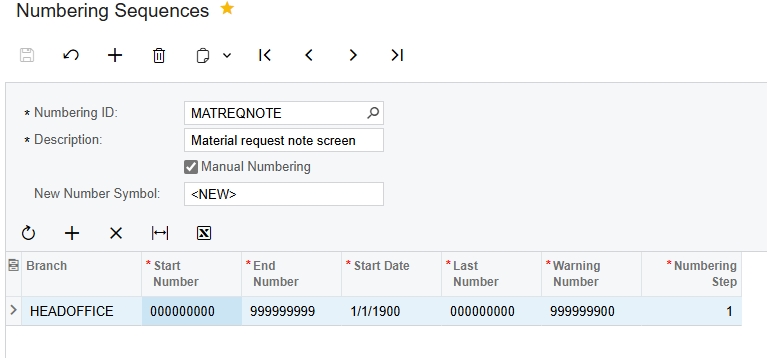
Then add a field to Inventory preferences and set its value to required numbering sequence ID

    // Acuminator disable once PX1016 ExtensionDoesNotDeclareIsActiveMethod extension should be constantly active

public class INSetupExt : PXCacheExtension<PX.Objects.IN.INSetup>
{
#region UsrCustomField
[PXDBString(15, IsUnicode = true, InputMask = "")]
[PXUIField(DisplayName = "Material Request Note Num Sequence", Required = true)]
[PXSelector(typeof(Numbering.numberingID), DescriptionField = typeof(Numbering.descr))]
public virtual string UsrMaterialRequestRefNbr{ get; set; }
public abstract class usrMaterialRequestRefNbr: PX.Data.BQL.BqlString.Field<usrMaterialRequestRefNbr> { }
#endregion
}
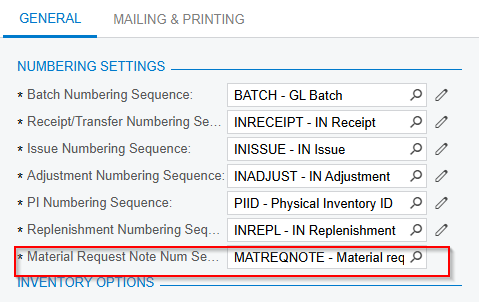
 

Finally, modify the  RefNbr field in the DAC as bellow.

  public class MRMaterialRequest : IBqlTable
{
#region RefNbr
[PXDBString(15, IsKey = true, IsUnicode = true, InputMask = "")]
[PXUIField(DisplayName = "Ref Nbr", Visibility = PXUIVisibility.SelectorVisible)]
[PXDefault(PersistingCheck = PXPersistingCheck.NullOrBlank)]
[PXSelector(typeof(MRMaterialRequest.refNbr),typeof(MRMaterialRequest.refNbr))]
[AutoNumber(typeof(INSetupExt.usrMaterialRequestRefNbr), typeof(MRMaterialRequest.createdDateTime))]

public virtual string RefNbr { get; set; }
public abstract class refNbr : PX.Data.BQL.BqlString.Field<refNbr> { }
#endregion

//.... res of fields
}

But when trying to save a material request it gives CS Error: Cannot generate the next number for the sequence.

And in my numbering sequence, I had added <NEW> as the new number symbol. But in the material request screen new number symbol displays as <SELECT>, I'm unable to understand how it happens
when doing this I referred to following article.


Implement Numbering Sequence for Customized Field
 

Best answer by darylbowman

You should be able to just make a view for INSetup:

public PXSetup<INSetup> Setup;


7 replies

Forum|alt.badge.img+8
  • Captain II
  • September 24, 2024

Hi @PDharmasena10 


You need to implement a graph constructor to your screen’s graph with INSetup.

Similar to this:

public CalibrationEntry() //Your graph name
{
//Setup DAC name
ISOSetup setup = Setup.Current;
}

Hope this helps,


Aleks


darylbowman
Captain II
Forum|alt.badge.img+15
  • Answer
  • September 24, 2024

You should be able to just make a view for INSetup:

public PXSetup<INSetup> Setup;


Forum|alt.badge.img+2
  • Author
  • Semi-Pro I
  • September 24, 2024

Hi @darylbowman & @aiwan 
I updated my graph as below. but still faced the same issue.

  public class MRMaterialRequestNoteEntry : PXGraph<MRMaterialRequestNoteEntry, MRMaterialRequest>
{
public SelectFrom<MRMaterialRequest>.View MaterialRequestView;

public SelectFrom<MRInventoryItems>
.Where<MRInventoryItems.mrrefnbr.IsEqual<MRMaterialRequest.refNbr.FromCurrent>>
.View MaterialDetailsView;

//The view for the auto-numbering of records
public PXSetup<MRMaterialRequest> AutoNumSetup;

#region Graph constructor
public MRMaterialRequestNoteEntry()
{
MRMaterialRequest setup = AutoNumSetup.Current;
}
#endregion
}


Forum|alt.badge.img+1
  • Jr Varsity I
  • September 24, 2024

Hi @PDharmasena10 


Try to use this:

[PXSelector(typeof(Search<refNbr>),
typeof(refNbr))]
[AutoNumber(typeof(INSetupExt.usrMaterialRequestRefNbr), typeof(AccessInfo.businessDate))]

And also your numbering sequence has “manual” checkbox. So uncheck it.


darylbowman
Captain II
Forum|alt.badge.img+15

You need to have the setup record (INSetup) defined in the graph you’re trying to use this field on. I meant it literally:

public PXSetup<INSetup> Setup;

You need this because you’re using INSetupExt in your auto-numbering definition.

See this answer.


hdussa
Jr Varsity I
Forum|alt.badge.img+1
  • Jr Varsity I
  • September 24, 2024

Hello @PDharmasena10 ,


I notice you are using the numbering sequence with Manual option enabled. Assuming you wanted it to generate automatically, uncheck the “Manual Numbering” checkbox and see if it works. Make sure in the extended graph, the setup DAC contains the record like other experts mentioned in the above.


Hope this helps!


Forum|alt.badge.img+2
  • Author
  • Semi-Pro I
  • September 24, 2024

@darylbowman @aiwan @taras @hdussa Thanks for all for you great support. I able to fixed the issue by make a view for INSetup as bellow inside the screen’s graph
public PXSetup<INSetup> AutoNumSetup;