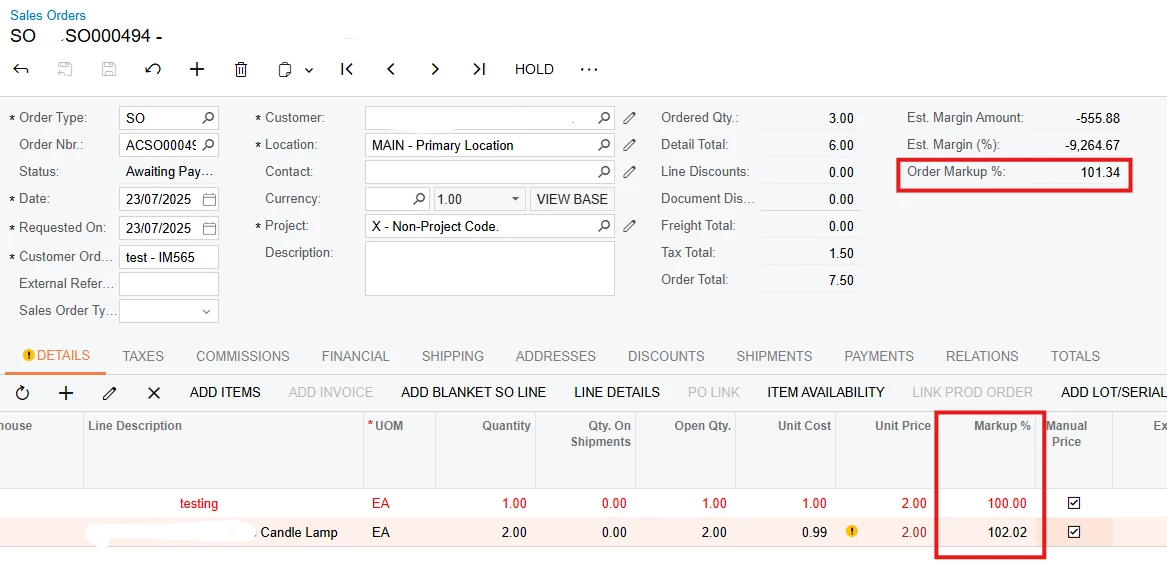


Use Case: I needed to show line-level markup % on Sales Orders based on Unit Price and Unit Cost. Here's how I added the field and got it working smoothly in SO301000 (Sales Orders).
Step 1: Create DAC Extensions
1.1: SOLineExtMarkup (Line Level)
namespace PX.Objects.SO

{

    public class SOLineExtMarkup : PXCacheExtension<SOLine>

    {

        #region UsrMarkupPct

        [PXDecimal(2)]

        [PXUIField(DisplayName = "Markup %", Enabled = false)]

        [PXFormula(typeof(Switch<

            Case<Where<SOLine.curyUnitCost, NotEqual<decimal0>>,

                Multiply<Divide<Minus<SOLine.curyUnitPrice, SOLine.curyUnitCost>, SOLine.curyUnitCost>, decimal100>>,

            decimal0>))]

        public virtual decimal? UsrMarkupPct { get; set; }

        public abstract class usrMarkupPct : PX.Data.BQL.BqlDecimal.Field<usrMarkupPct> { }

        #endregion

    }

}
1.2: SOOrderExtMarkup (Header Level)
namespace PX.Objects.SO

{

    public class SOOrderExtMarkup : PXCacheExtension<SOOrder>

    {

        #region UsrOrderMarkupPct

        [PXDecimal(2)]

        [PXUIField(DisplayName = "Order Markup %", Enabled = false)]

        public virtual decimal? UsrOrderMarkupPct { get; set; }

        public abstract class usrOrderMarkupPct : PX.Data.BQL.BqlDecimal.Field<usrOrderMarkupPct> { }

        #endregion

    }

}
Step 2: Add Field Calculation in Graph Extension
2.1: SOOrderEntry_Extension for Header Markup %
using PX.Data;

using PX.Objects.SO;
namespace PX.Objects.SO

{

    public class SOOrderEntry_Extension : PXGraphExtension<SOOrderEntry>

    {

        protected void SOOrder_RowSelected(PXCache sender, PXRowSelectedEventArgs e)

        {

            SOOrder row = (SOOrder)e.Row;

            if (row == null) return;
            decimal totalCost = 0m;

            decimal totalPrice = 0m;
            foreach (SOLine line in Base.Transactions.Select())

            {

                totalCost += (line.CuryUnitCost ?? 0) * (line.OrderQty ?? 0);

                totalPrice += (line.CuryUnitPrice ?? 0) * (line.OrderQty ?? 0);

            }
            var rowExt = PXCache<SOOrder>.GetExtension<SOOrderExtMarkup>(row);

            rowExt.UsrOrderMarkupPct = totalCost > 0

                ? ((totalPrice - totalCost) / totalCost) * 100

                : 0;

        }

    }

}
Step 3: Add Fields to the UI
Use the Customization Project Editor:
-
Open your customization project.
-
Go to the Sales Orders screen (
SO301000). -
Add:
-
UsrMarkupPctto the Document Details grid. -
UsrOrderMarkupPctto the Summary area of the form.
-
It should look like this after changes,