Question

How can I restrict a user from changing the Branch using customization?

  • February 5, 2026
  • 9 replies
  • 139 views

mos11
Freshman I
Forum|alt.badge.img

How can I customize the system to not allow a user to change the Branch if certain conditions are met?


9 replies

abhimanyuprajapati52
Jr Varsity I
Forum|alt.badge.img

Hi ​@mos11,
 

There are a few ways you can handle this depending on how strict you want the restriction to be.

If you simply want to prevent the user from editing the Branch field under certain conditions, you can control it at the UI level in the graph using RowSelected:


protected void _(Events.RowSelected<YourDAC> e)

{

    if (e.Row == null) return;

    bool restrict = /* your condition here */;

    PXUIFieldAttribute.SetEnabled<YourDAC.branchID>(e.Cache, e.Row, !restrict);

}


This will make the Branch field read-only when your condition is met.

If you want stronger enforcement (so the value cannot be changed even via import, API, etc.), you should validate it in FieldVerifying:


protected void _(Events.FieldVerifying<YourDAC.branchID> e)

{

    if (/* your condition here */)

    {

        throw new PXSetPropertyException("Branch cannot be changed under current conditions.");

    }

}

That ensures the change is blocked at the business logic level.

If the restriction is role-based rather than condition-based, you may also want to consider access rights or branch restrictions at the user role level instead of customization.

So the best approach depends on:

  • Is this purely UI behavior?

  • Or must it be enforced at system level?

For critical controls, I would recommend using FieldVerifying to ensure it cannot be bypassed.


mos11
Freshman I
Forum|alt.badge.img
  • Author
  • Freshman I
  • February 5, 2026

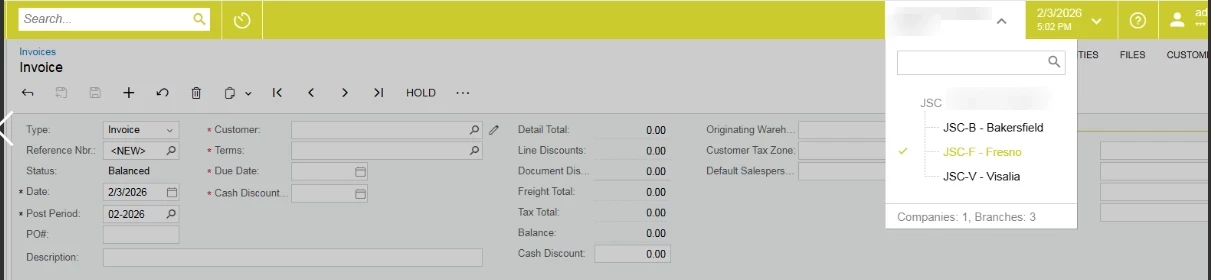
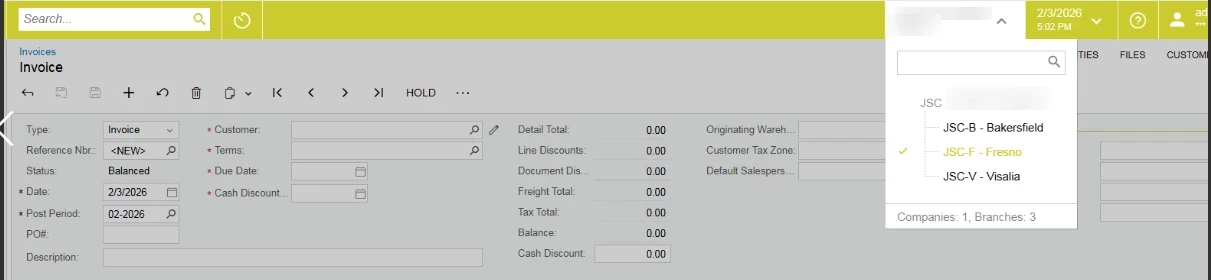
@abhimanyuprajapati52 I am talking about a system branch change.


abhimanyuprajapati52
Jr Varsity I
Forum|alt.badge.img

hi ​@mos11,
 

Thanks for clarifying — since you're referring to the system branch selector in the top-right corner (the branch context switch), that isn’t something that should be controlled via customization code.

The branch dropdown is driven by user access rights and branch restrictions. If you want to prevent a user from switching to certain branches, you should configure:

  • The branches assigned to the user

  • Role-based access rights

  • Branch access settings under Users (SM201010)

A user can only switch to branches they have access to. So the proper way to restrict this is by adjusting branch access/security configuration rather than writing customization logic.

If your requirement is conditional (for example, prevent switching branches only under certain transaction states), that would be more complex and would typically require reviewing the business process, since the branch selector is designed as a system-level context control.


mos11
Freshman I
Forum|alt.badge.img
  • Author
  • Freshman I
  • February 5, 2026

@abhimanyuprajapati52  Thank you for your answer, but I want to do it with customization.


abhimanyuprajapati52
Jr Varsity I
Forum|alt.badge.img

@mos11,

Understood. Since you specifically want to control this through customization, the important thing to know is that the branch selector in the header changes the system context (AccessInfo.BranchID) and refreshes the session. It is not a normal DAC field, so there isn’t a direct event that fires when the user clicks the branch dropdown.

Because of that, you generally cannot “disable” the branch selector itself in a clean, supported way through customization.

What you can do is enforce your business rule at the graph level.


aryanjadhav50
Jr Varsity I
Forum|alt.badge.img
  • Jr Varsity I
  • February 10, 2026

Hi ​@mos11,
 

1] Through Customization(Coding Changes)

If you simply want to prevent the user from editing the Branch field under certain conditions, you can control it at the UI level in the graph using RowSelected:


protected void _(Events.RowSelected<YourDAC> e)


{


    if (e.Row == null) return;

    bool restrict = /* your condition here */;

    PXUIFieldAttribute.SetEnabled<YourDAC.branchID>(e.Cache, e.Row, !restrict);


}


This will make the Branch field read-only when your condition is met.

If you want stronger enforcement (so the value cannot be changed even via import, API, etc.), you should validate it in FieldVerifying:


protected void _(Events.FieldVerifying<YourDAC.branchID> e)


{


    if (/* your condition here */)


    {


        throw new PXSetPropertyException("Branch cannot be changed under current conditions.");


    }


}

That ensures the change is blocked at the business logic level.

If the restriction is role-based rather than condition-based, you may also want to consider access rights or branch restrictions at the user role level instead of customization.

So the best approach depends on:

  • Is this purely UI behavior?

  • Or must it be enforced at system level?

For critical controls, I would recommend using FieldVerifying to ensure it cannot be bypassed.
By this way you can restrict the Branch change through customization level.


2] Way (Through Website itself)

The branch dropdown is driven by user access rights and branch restrictions. If you want to prevent a user from switching to certain branches, you should configure:

  • The branches assigned to the user

  • Role-based access rights

  • Branch access settings under Users (SM201010)

A user can only switch to branches they have access to. So the proper way to restrict this is by adjusting branch access/security configuration rather than writing customization logic.

If your requirement is conditional (for example, prevent switching branches only under certain transaction states), that would be more complex and would typically require reviewing the business process, since the branch selector is designed as a system-level context control.

By this you can restrict a specific role to change the branch 

If you want any specific condition for branch changing restriction then please let me know.


mos11
Freshman I
Forum|alt.badge.img
  • Author
  • Freshman I
  • February 10, 2026

@aryanjadhav50 What is the DAC of the Acumatica system BranchID? Why can this code disable the main Branch dropdown in Acumatica?
PXUIFieldAttribute.SetEnabled<YourDAC.branchID>(e.Cache, e.Row, !restrict);


aryanjadhav50
Jr Varsity I
Forum|alt.badge.img
  • Jr Varsity I
  • February 10, 2026

Hi ​@mos11,

STEP 1 — Create a Graph Extension

This extension will run on all screens.

File: DisableBranchSelector.cs

using PX.Data;using PX.Objects.GL;namespace Customization{    public class DisableBranchSelector : PXGraphExtension<PXGraph>    {        public override void Initialize()        {            base.Initialize();            DisableBranch();        }        private void DisableBranch()        {            // Disable branch selector globally            PXContext.SetSlot<bool>("DisableBranchSelector", true);        }    }}


This sets a global context flag.

STEP 2 — Disable the Branch field using PXContext

Now we intercept the Branch selector UI behavior.

File: BranchSelectorDisabler.cs


using PX.Data;
using PX.Objects.GL;

namespace Customization
{
    public class BranchSelectorDisabler : PXGraphExtension<PXGraph>
    {
        protected void _(Events.RowSelected<Branch> e)
        {
            if (e.Row == null)
                return;

            bool disableBranch = PXContext.GetSlot<bool>("DisableBranchSelector");

            if (disableBranch)
            {
                PXUIFieldAttribute.SetEnabled(e.Cache, e.Row, false);
            }
        }
    }
}


What this code does

  • Runs when any screen loads

  • Detects the Branch selector

  • Makes it read-only

  • User can see the branch

  • User cannot change it

No error messages, no popups — just locked.

STEP 3 — Publish the customization

  1. Save the customization project

  2. Publish

  3. Log in as a normal user

  4. Open any screen

  5. Try changing Branch → it will be disabled

Important notes (real-world behavior)

  • This is UI-only

  • It does not replace branch security

  • Admin users will also see it locked unless excluded

  • Works across all screens consistently

Optional: Exclude Admin users

If you want admins to still change branches, modify the code:


if (PXAccess.GetUserName() == "admin")
    return;


Add that check before disabling the field.


Look like this you can make the branch readonly so the users are restricted to change branch but have access of warehouse. 
Please let me know any specific condition was there. 


mos11
Freshman I
Forum|alt.badge.img
  • Author
  • Freshman I
  • February 11, 2026

@aryanjadhav50 Thank you for your answer. This does not work for me. I tried this, but the function is not being called. I tried to debug it, and it doesn’t enter this function.

 public class BranchSelectorDisabler : PXGraphExtension<PXGraph>
    {
        protected void _(Events.RowSelected<Branch> e)
        {
            if (e.Row == null)
                return;

            bool disableBranch = PXContext.GetSlot<bool>("DisableBranchSelector");

            if (disableBranch)
            {
                PXUIFieldAttribute.SetEnabled(e.Cache, e.Row, false);
            }
        }
    }