Hello Community,
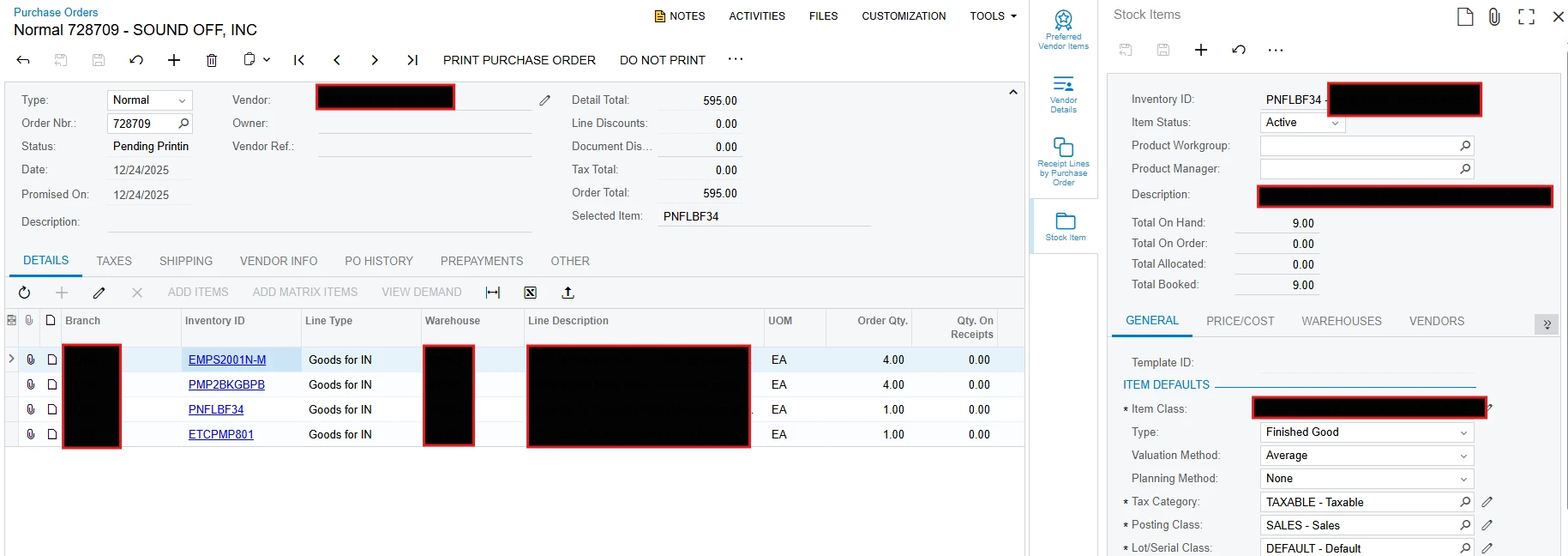
I am working on a small customization to simply pull up the Stock Items screen in a side panel when changing the detail row. It seemed like I couldn’t accomplish this on the POLine level and only choose header fields when adding the side panel, so I went with an unbound field on POOrder. How can I make it when changing the detail selection to successfully update the unbound field “Selected Item” below? You’ll notice I have the side panel popped up and open to the PNF item, but I have the EMP item selected. Any ideas? I did try forcing a “Note” update on change to refresh UI, but no luck. It does update by changing the side panel to something else and then back to stock item. See below for my code and screenshot:
        #region UsrReadInventoryNbr
        [PXString(60)]
        [PXUIField(DisplayName = "Selected Item", Enabled = false)]
        public string UsrReadInventoryNbr { get; set; }
        public abstract class usrReadInventoryNbr : PX.Data.BQL.BqlString.Field<usrReadInventoryNbr> { }
        #endregion
protected virtual void _(Events.RowSelected<POLine> e)
{
var line = (POLine)e.Row;
if (line == null || line.InventoryID == null) return;
// Fetch InventoryItem record using InventoryID
InventoryItem item = SelectFrom<InventoryItem>
.Where<InventoryItem.inventoryID.IsEqual<@P.AsInt>>
.View.ReadOnly.Select(Base, line.InventoryID);
if (item == null) return;
// Set InventoryCD to the unbound string field on the parent
POOrder order = Base.Document.Current;
if (order == null) return;
POOrderExt orderExt = PXCache<POOrder>.GetExtension<POOrderExt>(order);
orderExt.UsrReadInventoryNbr = item.InventoryCD;
Base.Document.Cache.SetValueExt<POOrderExt.usrReadInventoryNbr>(order, item.InventoryCD);
//Base.Document.Cache.SetStatus(order, PXEntryStatus.Updated);
Base.Document.Cache.SetValueExt<POOrder.noteID>(order, order.NoteID);
}
protected void POLine_RowSelected(PXCache sender, PXRowSelectedEventArgs e)
{
var line = (POLine)e.Row;
if (line?.InventoryID == null) return;
InventoryItem item = SelectFrom<InventoryItem>
.Where<InventoryItem.inventoryID.IsEqual<@P.AsInt>>
.View.ReadOnly.Select(Base, line.InventoryID);
if (item == null) return;
var order = Base.Document.Current;
if (order == null) return;
var orderCache = Base.Document.Cache;
var orderExt = orderCache.GetExtension<POOrderExt>(order);
string newInventoryCD = item.InventoryCD;
if (orderExt.UsrReadInventoryNbr != newInventoryCD)
{
// Update the unbound field
orderExt.UsrReadInventoryNbr = newInventoryCD;
Base.Document.Cache.SetValueExt<POOrder.noteID>(order, order.NoteID);
// Force UI to recognize the change
orderCache.RaiseFieldUpdated<POOrderExt.usrReadInventoryNbr>(order, null);
orderCache.RaiseFieldUpdated<POOrder.noteID>(order, null);
orderCache.SetStatus(order, PXEntryStatus.Updated);
}
}Thanks,
Adam