Help Pick Our Next Open-Source Enhancement: Tell Us Your Biggest Daily Pain Point

  • June 25, 2025
  • 8 replies
  • 357 views

garrettrochell
Freshman I

Hi Community,


Our Sprinterra dev team is setting aside a sprint to build an Acumatica add-on that fixes a pain point many of you hit every day. We will then release it on GitHub under an MIT license (free to use, fork, or modify) for all to use.


What we need from you:

  • Describe the problem in one or two sentences.
  • Tell us where it shows up (screen, module, version).
  • Explain the impact: time lost, errors, extra clicks, etc.
  • Feel free to add mock-ups, sample data, or links to forum threads that show the issue.

Example submission
“On the Shipments screen it takes five clicks to print a label for each package. A batch-print button that grabs all open shipments would save 30 minutes per day in our warehouse.”


How we’ll choose

  • Short-list the top three based on community up-votes + impact.
  • Announce the winner here on Monday, 22 July.
  • Deliver the working solution (source + install package) on GitHub within a month of announcing the winner.
  • The entire build (spec, code, and docs) will remain open source so anyone can extend it.

We’ll post progress updates on LinkedIn. Thanks in advance for helping us pick something that will save all of us clicks, keystrokes, and headaches!


 

8 replies

Glen Martin
Acumatica Moderator
Forum|alt.badge.img+1
  • Acumatica Moderator
  • July 15, 2025

Each time I create a time card (weekly), I have to re-enter the standard lines that I typically use on every time card. If I use “Preload From Previous Time Card”, a line is created for each project task, but the description is blank. I would like a template that can be preloaded with:

  1. Multiple rows with descriptions for the same project and task.
  2. Time entries for each day for standard tasks.

This is on the Employee Time Cards screen (EP305000) on all currently supported versions (currently 25 R1 SP1).

This is not a big item, but taking into account multiple employees, the time wasted re-entering the same time card every week adds up.


Forum|alt.badge.img+1
  • Varsity I
  • July 16, 2025

Manufacturers with configurable, serialized items would benefit from transfer of Attributes values from BOM Attributes > Production Order Attributes > Item Lot/Serial Attributes.

Consider our use case: we manufacture build-to-order trailers.  Our product has multiple attributes such as Year, Model, VIN #, Color, Length, Width, Height, Tailgate style, Fenders style, Tarp, etc.  Every order is slightly different so we have to know the exact specs on each build, and display these specs in BOM Attributes, Production Order Attributes, and then finally Item Lot/Serial Attributes.  But we have to duplicate the data entry every time.

I think as long as the Attribute IDs match between the BOM and Production Order, the Attribute Values can be copied to the Production Order.  Same way from Production Order to Item Lot/Serial Attributes, the values that have an Attribute ID match can be copied to Item Lot/Serial Attributes.

Having the build specs at each stage (BOM, Prod Ord, Item Lot/Serial) would be extremely valuable to us.  Because the values don’t transfer, we choose not to enter the data and instead use workarounds.

Perhaps there could be a prompting dialog box for the following events:

  • When a Production Order is created that contains any matching Attribute IDs to the BOM Attributes, ask if values should be copied.
  • When a Serial Number (Item) is put into inventory from the Production Order, if any matching Attribute IDs exist from the Item Lot/Serial to the Production Attributes, ask if values should be copied.

Bonus: we sell and rent trailers.  When we convert a “for sale” trailer to a “rental” trailer, we convert to a different Inventory ID using an Adjustment transaction but keep the same serial #, and the attributes overlap between the two Inventory IDs (for example, the color of the trailer does not change when you convert from a “for sale” to a “rental”).  The prompting dialog could work in the exact manner as described above.

Thanks for your consideration!


  • Freshman I
  • August 7, 2025

Problem:

Too many clicks when entering a bill and doing the payment(ACH) at the same time.

Screen: Bills and adjustments

  • Way too many clicks; having to pick release etc each time in bills and then also checks and payments

Thanks for your consideration


garrettrochell
Freshman I
  • Author
  • Freshman I
  • August 8, 2025

Thank you for your submissions! We are reviewing and will have an update out soon regarding which project(s) we are moving forward with. If there are any additional submissions, please share them here and we will review as well. We may be able to deliver several projects, depending on scope, so we will continue reviewing submissions. 


Forum|alt.badge.img
  • Semi-Pro III
  • August 8, 2025

If its not to late.
MCP Server


garrettrochell
Freshman I
  • Author
  • Freshman I
  • August 20, 2025

Thank you for your submissions! All four submissions have great merit and we see potential with each. We will be moving forward immediately with the timecard template submission from Glen Martin as well as the Bills and Adjustments to Payment process submitted by username: awendlandt. The submissions regarding manufacturing and an MCP server are still under review. We may be reaching out with additional questions on these to finalize scope. 


We’re happy to share that the Timecard Template idea, originally submitted by Glen Martin, has been completed and is now available for download here.

This release supports Acumatica 25R1, with an upgrade path to 25R2 and the Modern UI coming soon.

We hope this customization serves as a valuable contribution to the Acumatica community.

If you have any questions or feedback, please feel free to reach out. Detailed setup instructions are available at the link above.


Hi @awendlandt,

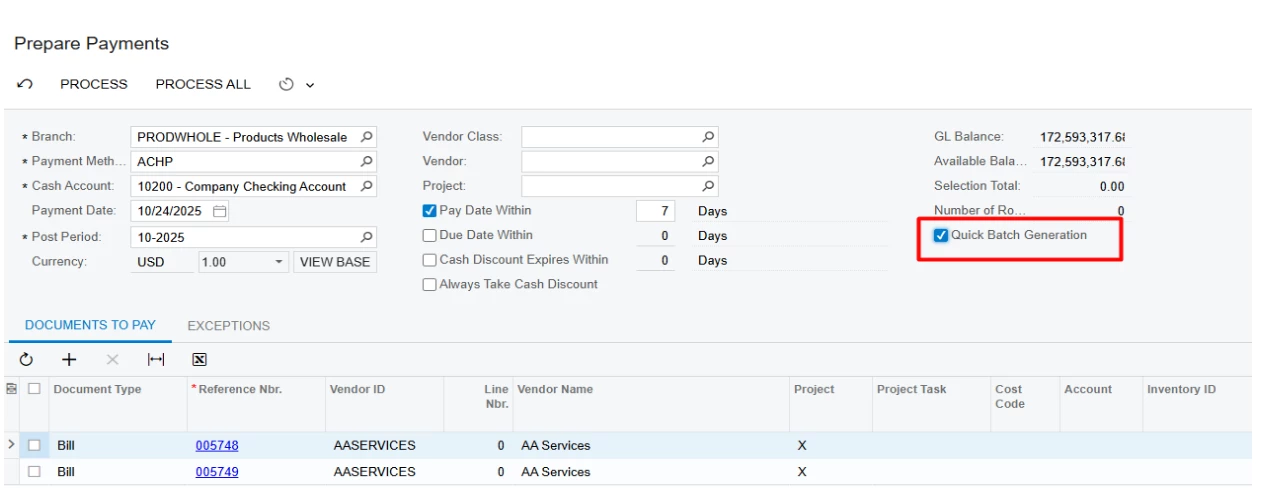
Regarding the Bills and Adjustments idea - there’s a standard Acumatica feature that may already cover this need: the Prepare Payments process (AP503000). It allows you to select multiple released bills and generate payments in a single step, without manually opening and releasing each bill.

To streamline the workflow, enable Quick Batch Generation in Payment Methods (CA204000) under Allowed Cash Accounts, and also on the Prepare Payments screen (AP503000). With this setup, payment batches are created automatically when payments are prepared, reducing manual steps.

If this doesn’t fully meet your needs, could you share more details about your expected workflow?