I have a custom field that interacts with a query to count the number of production order materials with negative quantity requirements. We are using this to indicate byproducts.
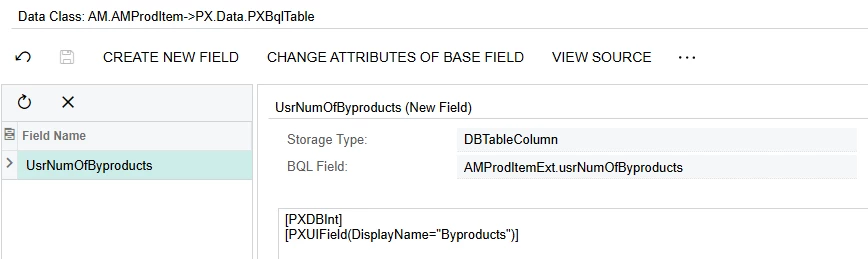
Here is the DAC for the custom field:
Here is the code for ProdMaint:
namespace PX.Objects.AM { public class ProdMaint_Extension : PXGraphExtension<PX.Objects.AM.ProdMaint> { public PXSelect<AMProdMatl, Where<AMProdMatl.orderType, Equal<Current<AMProdItem.orderType>>, And<AMProdMatl.prodOrdID, Equal<Current<AMProdItem.prodOrdID>>>>> ProdMaterials;
AMProdItem prodItem = (AMProdItem)Base.ProdMaintRecords.Current; var amProdItemExtVar = PXCache<AMProdItem>.GetExtension<AMProdItemExt>(prodItem);
var inventoryIDletters = "";
foreach (AMProdMatl material in ProdMaterials.Select()) { if(material.QtyReq < 0) { inventoryIDletters += material.InventoryID.ToString().Substring(0, 1); } } if (inventoryIDletters.Length != 0) { e.Cache.SetValueExt<AMProdItemExt.usrNumOfByproducts>(row, inventoryIDletters.Length); }else{ e.Cache.SetValueExt<AMProdItemExt.usrNumOfByproducts>(row, 0); } return; }
#endregion } }
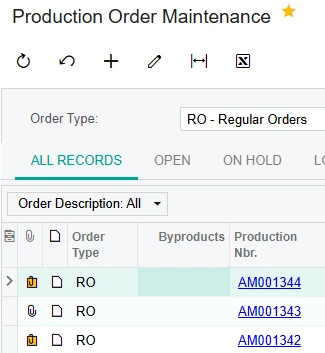
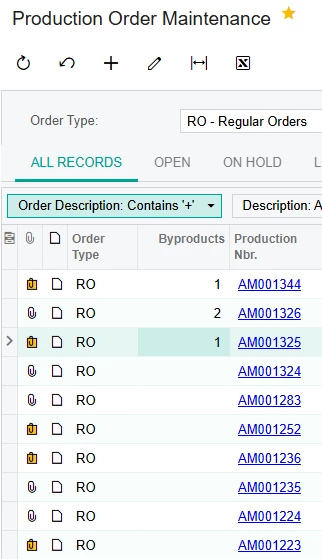
This is the current result of the Production Order Maintenance generic inquiry:
Most of these should have zero, AM001344 should have 1, but right now they are all blank.
Best answer by u662
I needed to update my cache after changing the database value.
Here is my final code:
using System; using PX.Data; using PX.Objects.IN; using PX.Objects.CS; using System.Collections; using System.Collections.Generic; using System.Text; using PX.Objects.AM.GraphExtensions; using PX.Common; using PX.Objects.Common; using PX.Objects.SO; using PX.Objects.AM.Attributes; using System.Linq; using PX.Objects.AM.CacheExtensions; using PX.Data.BQL.Fluent; using PX.Data.BQL; using PX.Objects.AR; using PX.Objects.CR; using PX.Objects.GL; using PX.Objects; using PX.Objects.AM;
namespace PX.Objects.AM { public class ProdMaint_Extension : PXGraphExtension<PX.Objects.AM.ProdMaint> {
public PXSelect<AMProdMatl, Where<AMProdMatl.orderType, Equal<Current<AMProdItem.orderType>>, And<AMProdMatl.prodOrdID, Equal<Current<AMProdItem.prodOrdID>>>>> ProdMaterials;
#region Event Handlers
protected void AMProdItem_StatusID_FieldUpdated(PXCache cache, PXFieldUpdatedEventArgs e) { var row = (AMProdItem)e.Row; if (row == null) return;
this.updateByproductCount(); }
public PXAction<PX.Objects.AM.AMProdItem> UpdateByproductCount;
Have you checked whether your custom field is saving values to the database? If it is being saved correctly in the database, it should also be visible in the Generic Inquiry (GI).
Have you checked whether your custom field is saving values to the database? If it is being saved correctly in the database, it should also be visible in the Generic Inquiry (GI).
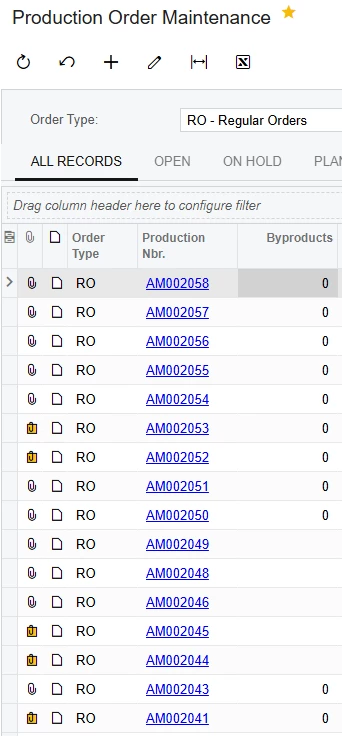
On a different environment with more production orders and the same code, there are some that do and don’t show up with numbers in the field. I suspect a saving issue of some kind.
Have you checked whether your custom field is saving values to the database? If it is being saved correctly in the database, it should also be visible in the Generic Inquiry (GI).
On a different environment with more production orders and the same code, there are some that do and don’t show up with numbers in the field. I suspect a saving issue of some kind.
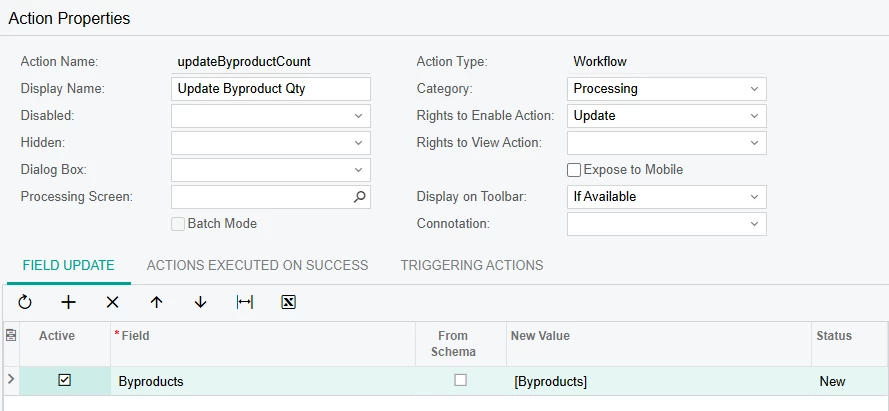
I made an action that just does a field update like so:
And for each form, it does correctly update the GI field:
Is it possible to recreate this field update in code?
Have you checked whether your custom field is saving values to the database? If it is being saved correctly in the database, it should also be visible in the Generic Inquiry (GI).
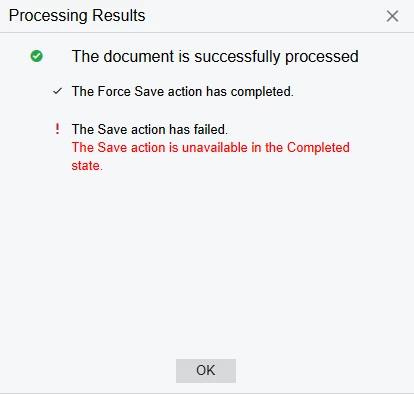
I think the main thing that is happening is the AMProdItem form itself is preventing saving. I made a Force Save action, and all it does is call Save. This is the result.
I needed to update my cache after changing the database value.
Here is my final code:
using System; using PX.Data; using PX.Objects.IN; using PX.Objects.CS; using System.Collections; using System.Collections.Generic; using System.Text; using PX.Objects.AM.GraphExtensions; using PX.Common; using PX.Objects.Common; using PX.Objects.SO; using PX.Objects.AM.Attributes; using System.Linq; using PX.Objects.AM.CacheExtensions; using PX.Data.BQL.Fluent; using PX.Data.BQL; using PX.Objects.AR; using PX.Objects.CR; using PX.Objects.GL; using PX.Objects; using PX.Objects.AM;
namespace PX.Objects.AM { public class ProdMaint_Extension : PXGraphExtension<PX.Objects.AM.ProdMaint> {
public PXSelect<AMProdMatl, Where<AMProdMatl.orderType, Equal<Current<AMProdItem.orderType>>, And<AMProdMatl.prodOrdID, Equal<Current<AMProdItem.prodOrdID>>>>> ProdMaterials;
#region Event Handlers
protected void AMProdItem_StatusID_FieldUpdated(PXCache cache, PXFieldUpdatedEventArgs e) { var row = (AMProdItem)e.Row; if (row == null) return;
this.updateByproductCount(); }
public PXAction<PX.Objects.AM.AMProdItem> UpdateByproductCount;