

Answer

Grid Double Click Select

  • June 12, 2025
  • 1 reply
  • 54 views

Forum|alt.badge.img+1

Hi, I’ve created a smart panel containing a grid and an OK and Cancel button. You select a row on the grid, then hit OK and the selected item is added to a sales order. 

It looks like this:
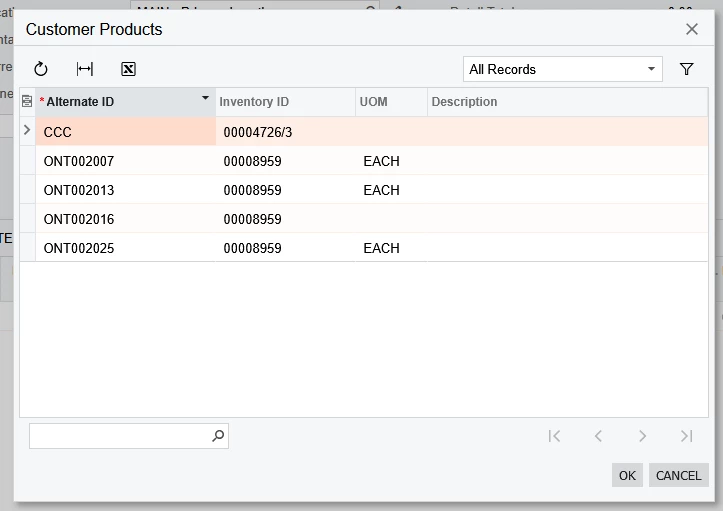
Whilst it all works fine, I would like to improve it a little by allowing the user to double click on a row and not have to press the OK button. This would be similar to using a PXSelector where you only need to double click on the row to select it, as shown below
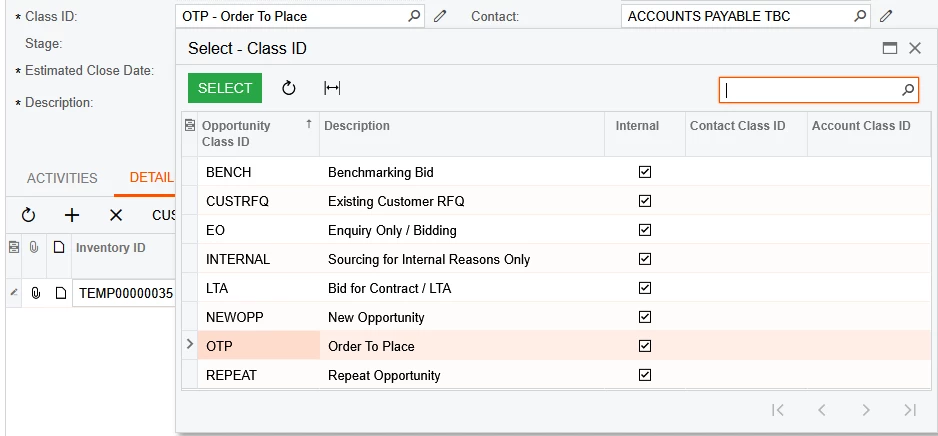
I’m hoping it’s just a property against the grid but I cannot find one.

Any ideas?

Best answer by svwk05

@stephenward03 

I'm not entirely sure if there's a built-in property in PXGrid to enable row double-click selection, but I found a workaround in goggle that might help.

You can try with JavaScript to trigger double-click selection button.

<px:PXGrid ...>
    <AutoCallBack Commands="RowDblClick" />
    <ClientEvents RowDblClick="onGridRowDoubleClick" />
</px:PXGrid>

<script type="text/javascript">
    function onGridRowDoubleClick(grid, row, e) {
        grid.selectRow(row); // Ensure the clicked row is selected
        var okButton = document.getElementById('ctl00_phF_smartPanel_btnOK'); // Update with your actual button ID
        if (okButton) {
            okButton.click();
        }
    }
</script>
Hope this helps!!!

1 reply

Forum|alt.badge.img+1
  • Semi-Pro III
  • Answer
  • June 15, 2025

@stephenward03 

I'm not entirely sure if there's a built-in property in PXGrid to enable row double-click selection, but I found a workaround in goggle that might help.

You can try with JavaScript to trigger double-click selection button.

<px:PXGrid ...>
    <AutoCallBack Commands="RowDblClick" />
    <ClientEvents RowDblClick="onGridRowDoubleClick" />
</px:PXGrid>

<script type="text/javascript">
    function onGridRowDoubleClick(grid, row, e) {
        grid.selectRow(row); // Ensure the clicked row is selected
        var okButton = document.getElementById('ctl00_phF_smartPanel_btnOK'); // Update with your actual button ID
        if (okButton) {
            okButton.click();
        }
    }
</script>
Hope this helps!!!
