Question

GI - Unable to add unbound field in Condition

  • November 28, 2024
  • 6 replies
  • 142 views

Forum|alt.badge.img

Hi,

Any idea why we are unable to add an unbound field when setting conditions for a GI. It used to be working in 2022 R1 , but not anymore after upgrading to 2023r1.

Error : “The CurrentBAccount field cannot be used because the table with the CurrentPlaceholders alias is not joined with other tables on the Relations tab.” , did try adding the unbound field in relations tab but still getting the error.

 

6 replies

saifalisabri
Jr Varsity II
Forum|alt.badge.img
  • Jr Varsity II
  • November 28, 2024

AI was used to create this answer

The issue you're encountering when adding an unbound field as a condition in a Generic Inquiry (GI) after upgrading to Acumatica 2023 R1 likely relates to changes in the validation of table relationships and aliases within the GI's relational structure.

In Acumatica 2023 R1, stricter enforcement of relational integrity between tables in GIs has been introduced. This means that any field (bound or unbound) you wish to use in a condition must now strictly adhere to the following:

  1. Table Joins: The table containing the unbound field must be explicitly joined to the main table or other related tables in the Relations tab.

  2. Alias Matching: The alias specified for the table in the Relations tab must correctly match the table's alias where the unbound field is being referenced.

Error Breakdown

The error message, “The CurrentBAccount field cannot be used because the table with the CurrentPlaceholders alias is not joined with other tables on the Relations tab,” indicates that:

  • The alias CurrentPlaceholders for the table containing CurrentBAccount is not correctly joined or recognized in the Relations tab.
  • The unbound field (CurrentBAccount) depends on a valid and recognized alias.

Suggested Fix

To resolve this:

  1. Go to the Relations tab of the GI.
  2. Add or ensure the table (or the alias) for the unbound field is present and properly joined with the required tables.
    • Ensure the Join Type is correct (e.g., Inner Join, Left Join).
    • Verify the Join Conditions accurately link the tables.
  3. Check if the unbound field is using an alias. If yes:
    • Verify that the alias matches exactly as used in the Relations tab.
    • Update the alias if necessary for consistency.

Additional Notes

  • If the unbound field is calculated using DAC attributes or formula logic, ensure that these are defined properly in the corresponding table or DAC extension.
  • Any changes in table structure or alias handling from 2022 R1 to 2023 R1 should be accounted for by reviewing release notes or consulting updated developer documentation.

If the issue persists, please ensure the GI aligns with any updated best practices introduced in 2023 R1.


darylbowman
Captain II
Forum|alt.badge.img+15
  • December 11, 2024

If you haven't solved this yet, could you screenshot the Relations tab and the join statement for that table?


Forum|alt.badge.img
  • Author
  • July 10, 2025

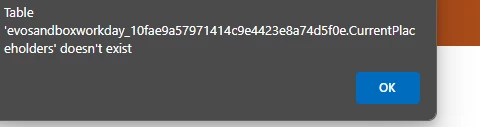
@darylbowman , have added as table and made the joins and conditions but while opening the GI screen get this error.


mohammadnawaz51
Jr Varsity I
Forum|alt.badge.img+4

@ vib1980 Can you re validate the Joins once?


Forum|alt.badge.img
  • Author
  • July 10, 2025

@mohammadnawaz51 , I have checked couple of times, deleted and re-added them not sure what else needs to be done.


Forum|alt.badge.img
  • Author
  • July 10, 2025

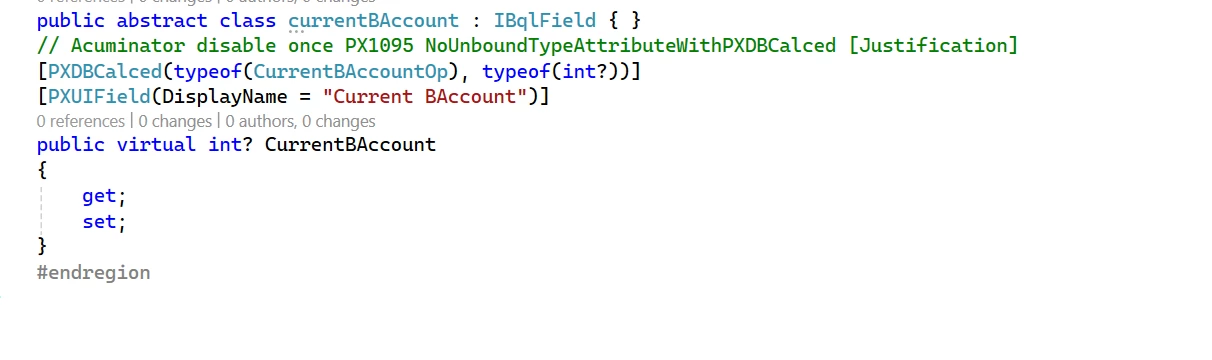
This is the DAC for one of the unbound field