Getting Current User Details via Modern UI

  • July 30, 2026
  • 7 replies
  • 63 views

Forum|alt.badge.img+9

Hello Everyone,


I recently stumbled onto the requirement of injecting current user data into HTML to render it as an iframe within the Modern UI.


It took me a while (and some AI assistance) to get there so I thought I would share the approach I took.


Firstly, in the Classic UI, you can do this via the PageLoad event in the .aspx.cs file. The easiest way that I found with the Modern UI was to have a custom .ashx IHttpHandler in /Frames and which is called via fetch() within the activate() method that Aurelia uses.


TS:

export class CO301000 extends PXScreen {
MasterView = createSingle(MasterViewClass);
iframeSrc: string = "about:blank";

async activate(): Promise<void> {
const app = window.location.pathname.split("/").filter(Boolean)[0];

const siteRoot = window.location.origin + (app ? "/" + app : "");
const userUrl = siteRoot + "/Frames/User.ashx";

try {
const res = await fetch(userUrl);

const [username] = await res.text();
if (!username) {
console.error("Username not found");
return;
}

this.iframeSrc = siteRoot + "/Endpoint" +
"?user=" + encodeURIComponent(username);
} catch (e) {
console.error("Username: " + userUrl + " failed", e);
}
}
}

.ashx:

public void ProcessRequest(HttpContext context)
{
var username = context.User?.Identity?.Name;

context.Response.ContentType = "text/plain";
context.Response.Cache.SetCacheability(HttpCacheability.NoCache);
context.Response.Write(username ?? " ");
context.Response.Flush();
}


If anyone has any better ways to do this, please let me know!

7 replies

darylbowman
Captain II
Forum|alt.badge.img+17

Since ASHX is part of the ASP.NET family, I suspect this will stop working when Acumatica moves away from ASP.NET.

I don’t think I’m fully understanding your use-case because I’m confused in what situation this would be necessary. Why couldn’t you place a field on the screen and update the content from the graph?


Forum|alt.badge.img+9
  • Author
  • Captain II
  • July 30, 2026

Thanks Daryl!


I just double checked and yes it won’t work with .NET Core.


The use case was to get data before the screen actually loads any data so that I could inject it into HTML, the first approach I actually took was using a DAC field, but with Aurelia’s lifecycle the graph data wasn’t loaded by the time the HTML needed the data.


darylbowman
Captain II
Forum|alt.badge.img+17

Try this instead: UI Events: Handling of Large Binary Data

You can set up a C# method that gets called by the frontend and do something with the result. It actually sounds pretty similar to what you’re already doing, but with ongoing support.


MichaelShirk
Captain II
Forum|alt.badge.img+6

@aiwan I think a CustomDataHandler might be the ticket. 
It has worked perfectly for me. It’s purpose built for this type of use case.

https://beacon.acumatica.com/r/UI-Development-Guide/Handling-UI-Events/UI-Events-Handling-of-Data-That-Is-Unrelated-to-Any-View


Forum|alt.badge.img+9
  • Author
  • Captain II
  • July 31, 2026

Try this instead: UI Events: Handling of Large Binary Data

You can set up a C# method that gets called by the frontend and do something with the result. It actually sounds pretty similar to what you’re already doing, but with ongoing support.

I tried that one but couldn’t get it to work when I was first attempting this.


@aiwan I think this might be the ticket. 
I’ve used this and it works perfectly. It’s purpose built for getting data unrelated to a view.

https://beacon.acumatica.com/r/UI-Development-Guide/Handling-UI-Events/UI-Events-Handling-of-Data-That-Is-Unrelated-to-Any-View

Thanks ​@MichaelShirk 


Both, I will give them both a try and see where I get to, thank you for your help!


darylbowman
Captain II
Forum|alt.badge.img+17

@aiwan I think a CustomDataHandler might be the ticket.

Ha, I got confused. This is what I meant.


Forum|alt.badge.img

@aiwan Hi,

I hope, you are following right direction but I am not sure.

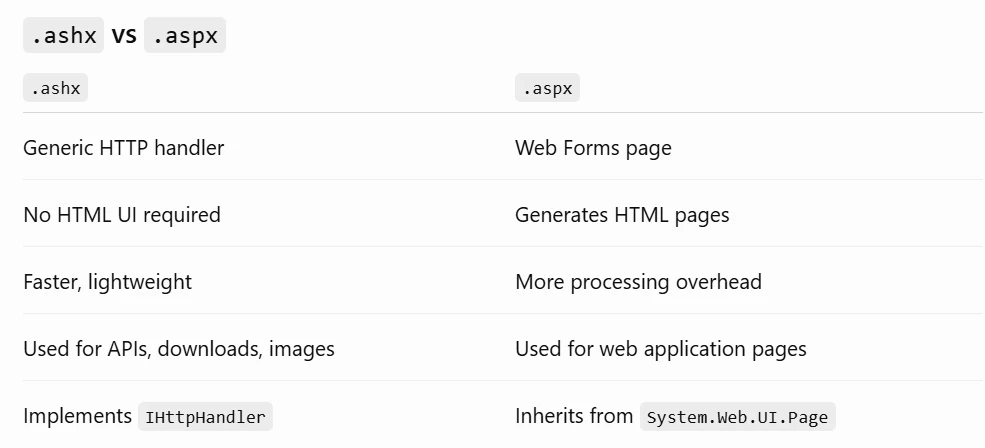
As we know web forms are not work in modern UI, here with .ashx may not be problem as we know it is not webform.
 

you may already know about .ashx but I am adding some info below for your reference :
An .ashx file is an ASP.NET Generic Handler. It is used to process HTTP requests directly without going through the full ASP.NET Web Forms page lifecycle.
 

What it does

An .ashx handler is useful for tasks such as:

  • Returning JSON or XML for APIs
  • Serving dynamically generated images or files
  • Handling file uploads/downloads
  • Processing AJAX requests
  • Implementing lightweight endpoints