

Answer

Get values from Custom Form to appear on Line Level according to Item and Customer in Sales Order Form

  • July 20, 2021
  • 7 replies
  • 164 views

Forum|alt.badge.img+2

Made a custom form with Item, Customer and Packaging Option.
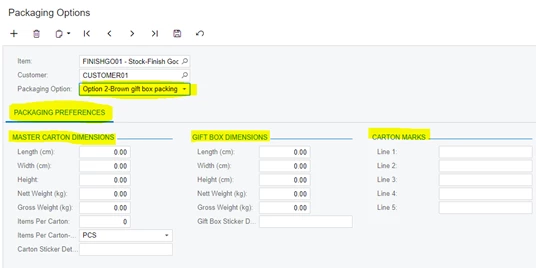
I need to have a line level field in the Sales Order form called packaging option which has the given packaging option for that item and customer, how can I achieve this customization?
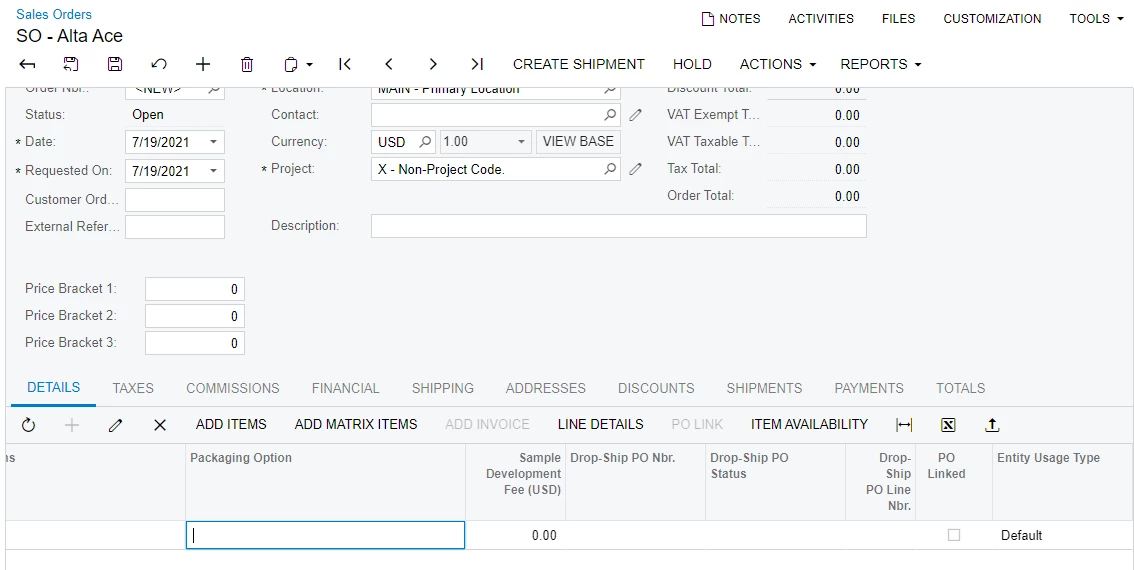
packaging option which is linked to custom form’s item, customer and packaging option


Best answer by Naveen Boga

Okay... I understood.

  • Create a new Textbox Field in SOLine level - Read Only field
  •  Please write a “Inventory ID field updated” event, and based on the Inventory ID fetch the “Packaging Option” from your custom table and assign this value to the newly created field.

7 replies

Naveen Boga
Captain II
Forum|alt.badge.img+19
  • Captain II
  • July 20, 2021

Hi @TharidhiP Please find the code below for Multi Checkbox


  protected virtual void DACName_FieldName_FieldSelecting(PXCache cache, PXFieldSelectingEventArgs e)
        {
            DACName row = e.Row as DACName;
            List<string> ItemClassLabels = new List<string>();
            List<string> ItemClassValues = new List<string>();
            foreach (INItemClass item in PXSelectReadonly<INItemClass>.Select(this))
            {
                ItemClassValues.Add(item.ItemClassID.ToString());
                ItemClassLabels.Add(item.ItemClassCD.Trim().ToString());
            }
            e.ReturnState = PXStringState.CreateInstance(e.ReturnState, 10, true,
                typeof(DACName.FieldName).Name, false, -1, string.Empty, ItemClassValues.ToArray(), ItemClassLabels.ToArray(), false, null);
            ((PXStringState)e.ReturnState).MultiSelect = true;
        }


Naveen Boga
Captain II
Forum|alt.badge.img+19
  • Captain II
  • July 20, 2021

@TharidhiP Please ignore the above comment.


Naveen Boga
Captain II
Forum|alt.badge.img+19
  • Captain II
  • July 20, 2021

@TharidhiP  You wanted to load the Packaging Option dropdown from custom screen, based on the selection of an item ?

If yes, please write a “InventoryID field updated” event, and based on the Inventory ID fetch the “Packaging Option” from your custom table.


Forum|alt.badge.img+2
  • Author
  • Pro III
  • July 20, 2021

Hi @Naveen B , the requirement is that whatever packaging option selected in the custom form for the given item and customer should come in the packaging option line level field in SO form. No dropdown field required, just the specific option.


Naveen Boga
Captain II
Forum|alt.badge.img+19
  • Captain II
  • Answer
  • July 20, 2021

Okay... I understood.

  • Create a new Textbox Field in SOLine level - Read Only field
  •  Please write a “Inventory ID field updated” event, and based on the Inventory ID fetch the “Packaging Option” from your custom table and assign this value to the newly created field.


Forum|alt.badge.img+2
  • Author
  • Pro III
  • July 20, 2021
protected void SOLine_InventoryID_FieldUpdated(PXCache cache, PXFieldUpdatedEventArgs e)
{
SOLine row = (SOLine)e.Row;

if (row == null) return;
PKCFPackagingOption pkgOption = PXSelect<PKCFPackagingOption,
Where<PKCFPackagingOption.item,
Equal<Required<PKCFPackagingOption.item>>>>.Select(Base, row.inventoryID);
var rowExt = PXCache<SOLine>.GetExtension<SOLineExt>(row);
if(rowExt != null ){
rowExt.usrPackagingOptionFromCF = pkgOption.packagingOption;
}
}

Attempted this approach, what are the corrections to be done? @Naveen B


Naveen Boga
Captain II
Forum|alt.badge.img+19
  • Captain II
  • July 20, 2021

Hi @TharidhiP This should work.. any issue you are facing with this code?

Are you getting the values in pkgOption object?

