Answer

Force close of Purchase Order via Custom SQL Script

  • June 13, 2024
  • 12 replies
  • 235 views

Forum|alt.badge.img

Hi,

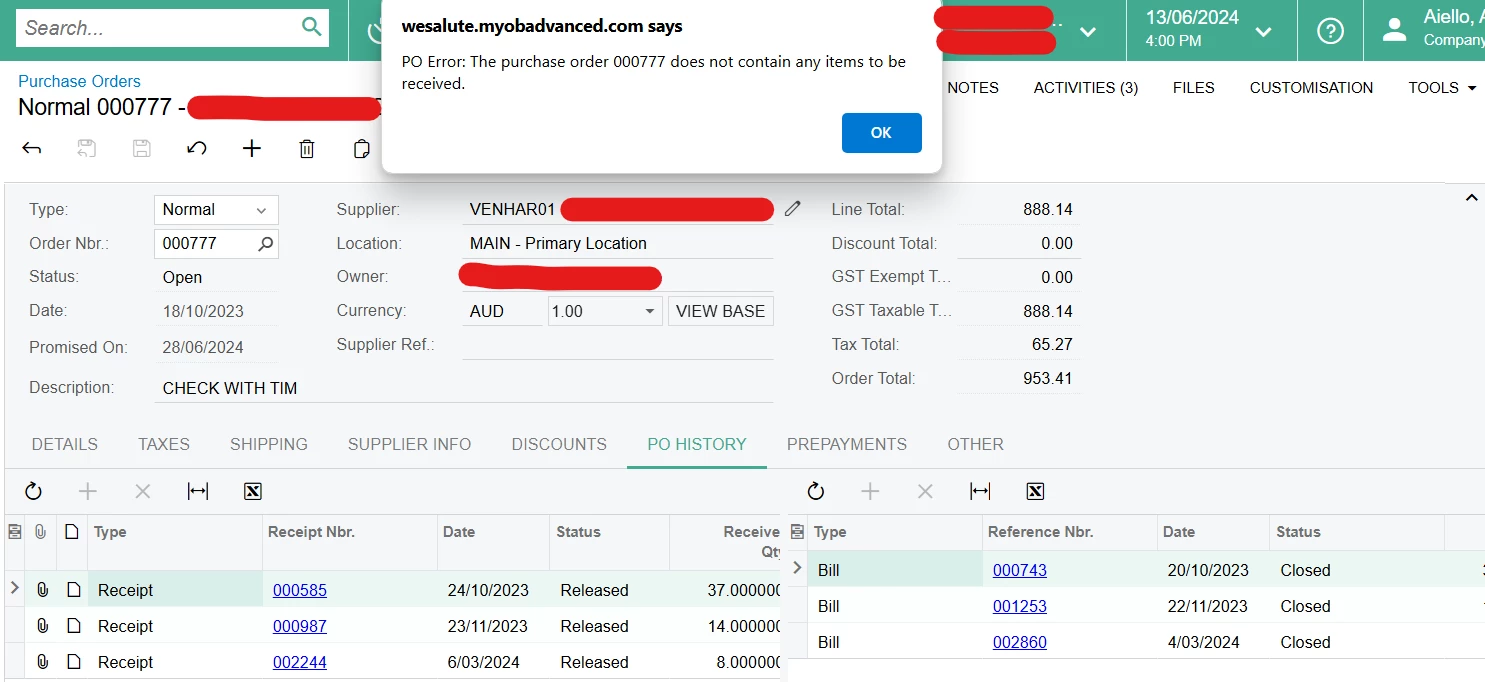
A client is having an issue where purchase receipts have been created for a purchase order, and it is fully receipted, but the purchase order is not able to be closed as it is still thinking it needs to be receipted, as shown in the image below.

I was thinking a way to close this purchase order would be to publish a custom sql script, and then remove this customisation after the script has run successfully. However, I am not sure how to update the status field via SQL. The dropdown values for the Status field show that the Closed option has a value of ‘C’, so would I set the status to ‘C’ or ‘Closed’ in the SQL query?

Let me know if I can clarify anything.

Kind regards,

Andrew
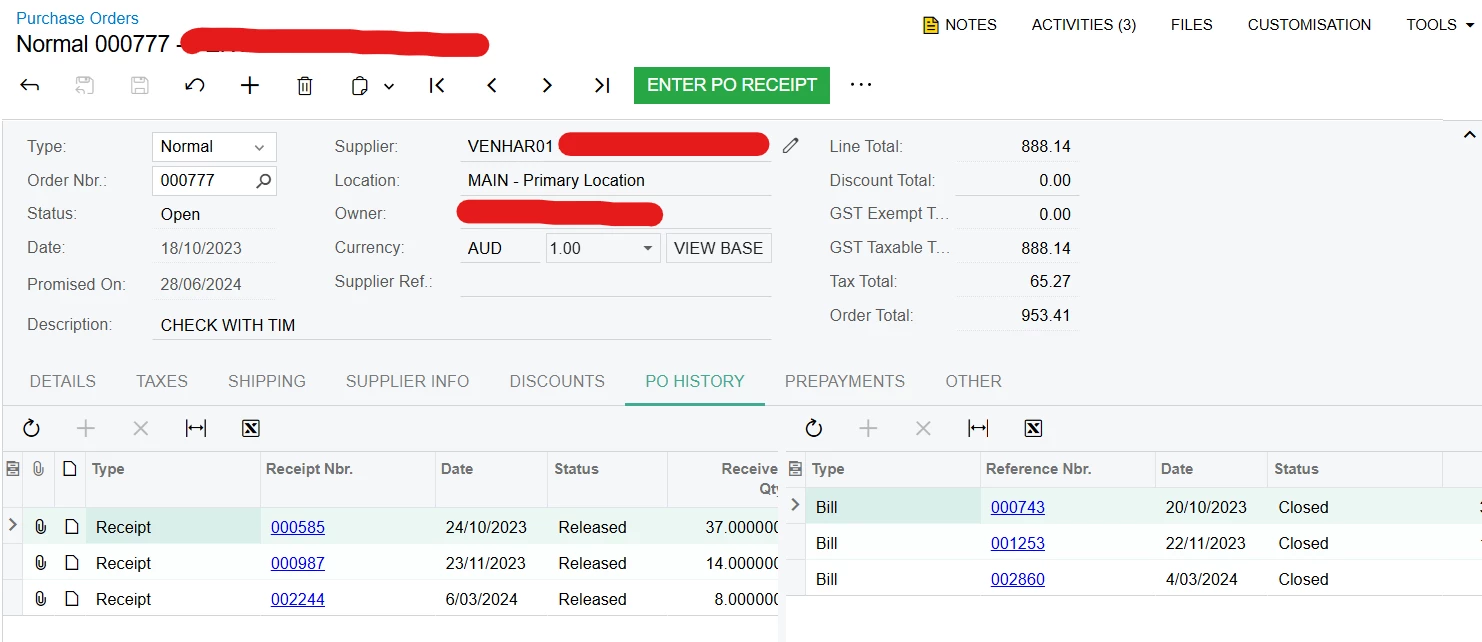
 

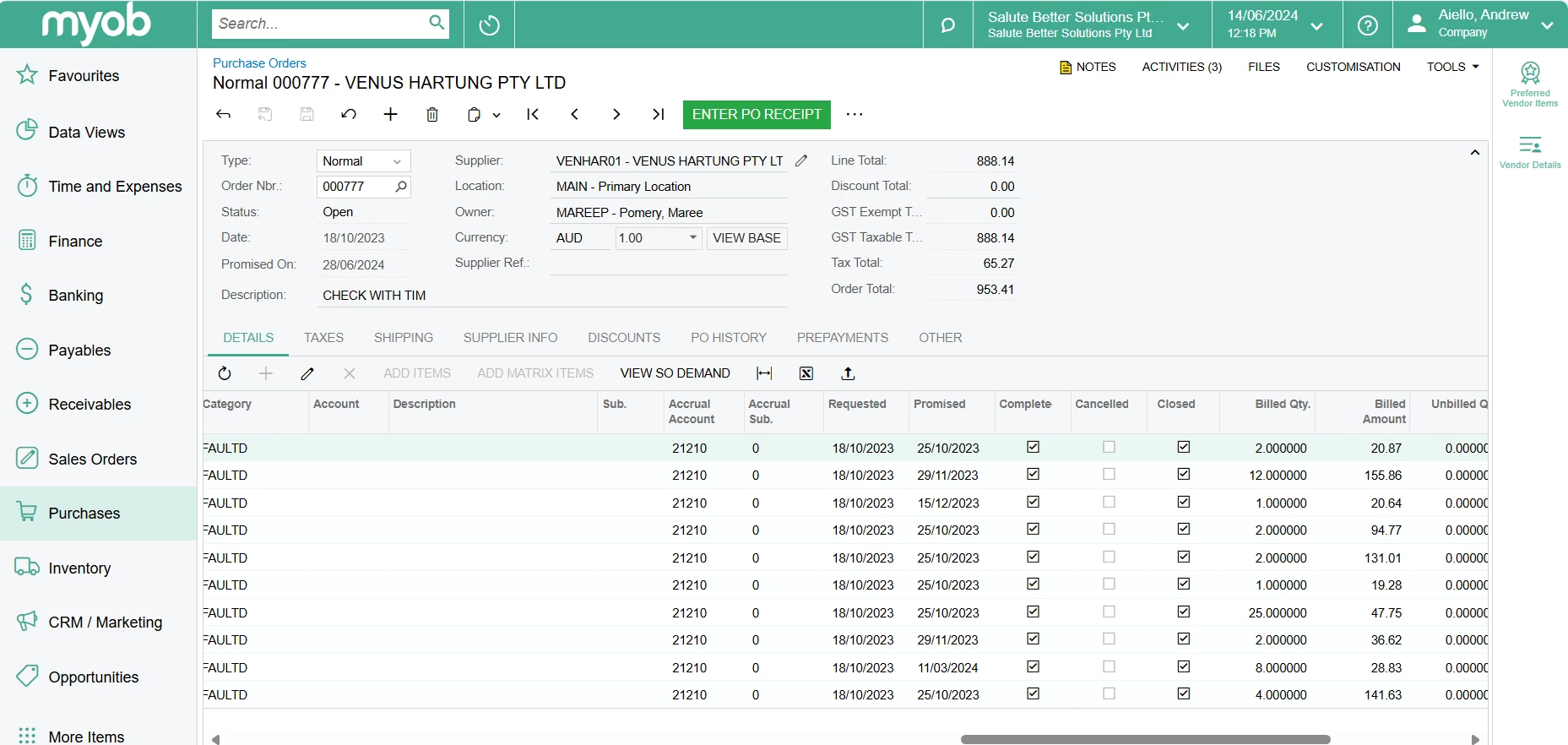
Enter PO Receipt button still showing despite order being fully receipted and billed


After the Enter PO Receipt button was clicked


Best answer by aiwan

Hi @AndrewA 
 

It has happened in the past so it won’t help with this one, however it should make things easier for if this happens again.


something that could work is, writing a RowSelected event handler to set the PXUIField to enabled for the status field. 
Then change the field to closed, save the changes, then unpublish and delete the customisation which made the change.


Alternatively, you could add a new transition into the workflow for an action to change the status to closed from open and that could help.


I also recommend looking through the source code and any event handlers that may be causing this.

Again, this is only from experience as we went live with Acumatica in April ‘23 and since June we have been struggling with issues where PO’s won’t go to closed, however, for vastly different reasons and bad habits from excel based reporting…

12 replies

Manikanta Dhulipudi
Captain II
Forum|alt.badge.img+15

Hi @AndrewA 

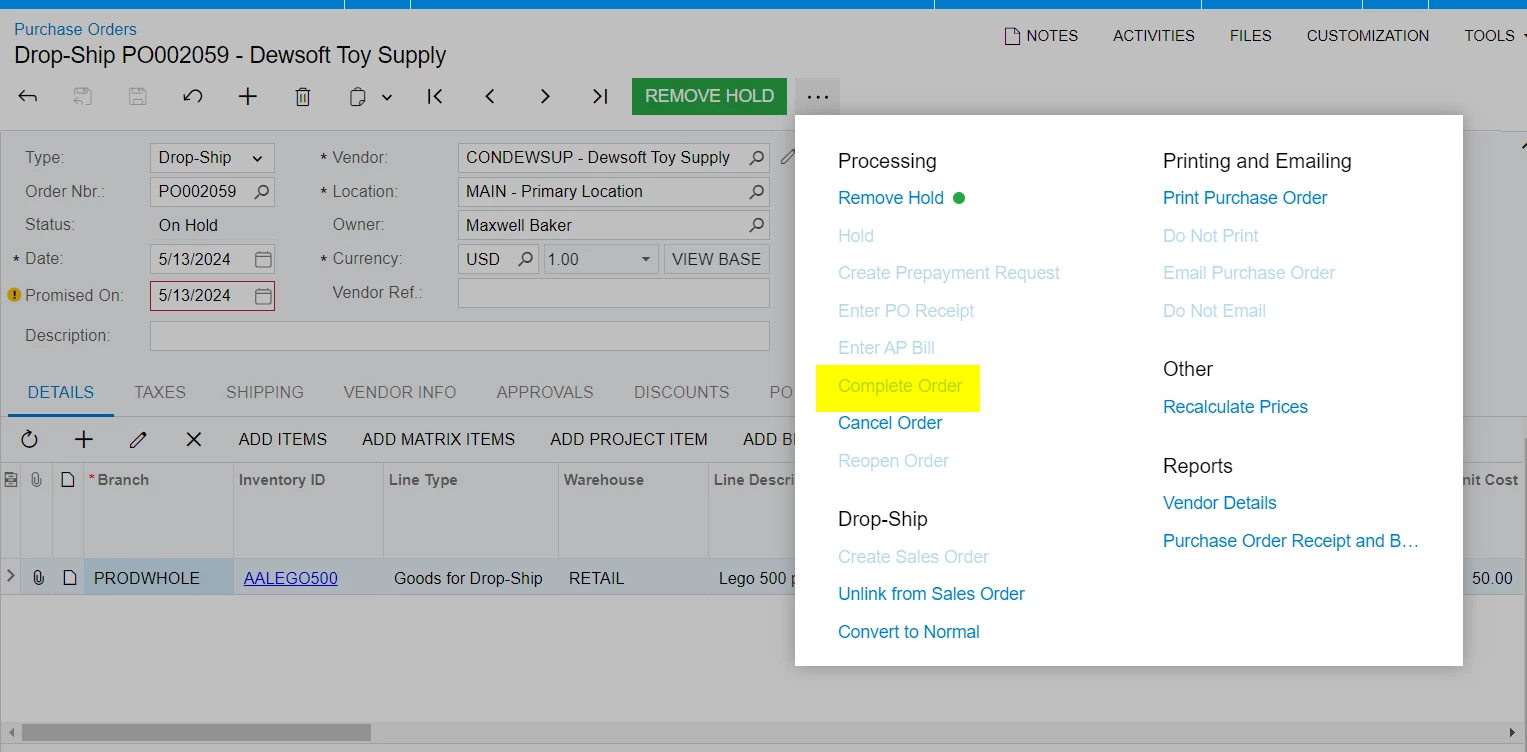
Did you verify the complete order action in PO 


Forum|alt.badge.img+8
  • Captain II
  • June 13, 2024

Hi @AndrewA,


I would recommend checking your PO Accruals GL Account, you might be in for a surprise, we have had the same issue.


If you just want the status to be closed, there is a tickbox in the POLine which is called closed, you can tick this and it will close the line and the PO.


Forum|alt.badge.img
  • Author
  • Varsity I
  • June 14, 2024

Hi @Manikanta Dhulipudi and @aiwan ,

Thanks for your responses. The Complete Order action doesn't seem to do anything at all for this order, the order just stays as it is. I imagine it is because all lines are already closed, as shown below, so there is nothing else to complete.

Would an SQL query work in this case? If so, how should the status field be updated to ensure this order is set to closed in the database?

Kind regards,

Andrew


Forum|alt.badge.img+8
  • Captain II
  • June 14, 2024

Hi @AndrewA 

The PO should, and that’s the key word ‘Should’, close itself when all line are satisfied.


I.E., the PO has been completely receipted and billed.


An issue we have encountered is that the receipts and the bills weren’t a carbon copy of each other as in they contained the same inventoryID, qty and cost/price. However, the bill had 1 line and the receipt had 3 lines therefore the PO would sit at open because the system thinks you have billed for one line at an excessive quantity rather than 3 lines combined.

Could you please examine the billed vs. the receipted qty or share a screenshot with us please?


Forum|alt.badge.img
  • Author
  • Varsity I
  • June 17, 2024

Hi @aiwan , thanks for that suggestion. I have examined the billed vs receipted qty and everything looks good to me. The quantities match up and all the lines are the same in each, so it is unclear why the system is refusing to close this order.

So, as a last resort, do you think an SQL query would work to force this PO to close?


Forum|alt.badge.img+8
  • Captain II
  • June 18, 2024

Hi @AndrewA 


Apologies for the back and forth, before we start considering that, could you please examine the ‘Purchase Accrual Balance by Period’ Custom Inquiry for that PO, if anything isn’t closed out it will show there.

If that is all closed out in that inquiry, then I think considering closing it with a script might be an option.


Forum|alt.badge.img
  • Author
  • Varsity I
  • June 19, 2024

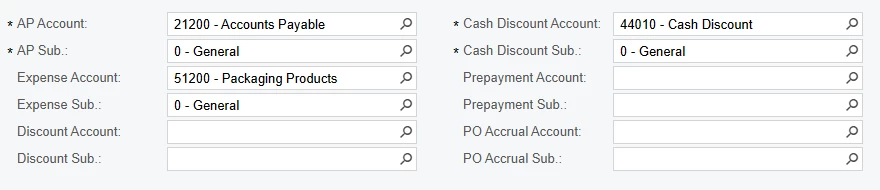
Hi @aiwan , thanks for your assistance on this issue. The supplier doesn’t have a PO Accrual account set up, as shown below, and since the Account field is mandatory for this inquiry, I am not sure which account I should use instead. Do you have any ideas of how this could work?

If I am unable to run this inquiry as a result of how this supplier is set up, I might just try the SQL script and see how that goes.

Kind regards,

Andrew


Forum|alt.badge.img+8
  • Captain II
  • June 20, 2024

Hi @AndrewA 


No problem at all, that’s where my knowledge ends unfortunately, a script would probably work, however I do not have much experience in the database side.


If the supplier doesn’t have an accruals account allocated then we go back to the PO.

In one of the screenshots provided, the accrual account allocated on the PO was 21210, I would recommend using that one.


Again, I have little experience with the database side of things however, I would try to do as little as possible with using SQL to modify orders. The data displayed can be different to the server and cause data corruption.


Aleks


Forum|alt.badge.img
  • Author
  • Varsity I
  • June 21, 2024

Thanks for that @aiwan , I will steer clear of the SQL for now as I don’t want to risk any data corruption. I will talk to them about adding an accrual account and see if that helps.

Kind regards,

Andrew


Forum|alt.badge.img+8
  • Captain II
  • Answer
  • June 22, 2024

Hi @AndrewA 
 

It has happened in the past so it won’t help with this one, however it should make things easier for if this happens again.


something that could work is, writing a RowSelected event handler to set the PXUIField to enabled for the status field. 
Then change the field to closed, save the changes, then unpublish and delete the customisation which made the change.


Alternatively, you could add a new transition into the workflow for an action to change the status to closed from open and that could help.


I also recommend looking through the source code and any event handlers that may be causing this.

Again, this is only from experience as we went live with Acumatica in April ‘23 and since June we have been struggling with issues where PO’s won’t go to closed, however, for vastly different reasons and bad habits from excel based reporting…


Forum|alt.badge.img
  • Author
  • Varsity I
  • June 26, 2024

Thanks for those suggestions @aiwan ! I will give them a go and see which one works.


Forum|alt.badge.img+8
  • Captain II
  • July 1, 2024

Hi @AndrewA 


Did any of those suggestions work/help?