Answer

Fields cannot be editable at anytime.

  • February 3, 2025
  • 7 replies
  • 156 views

Forum|alt.badge.img

Hi,

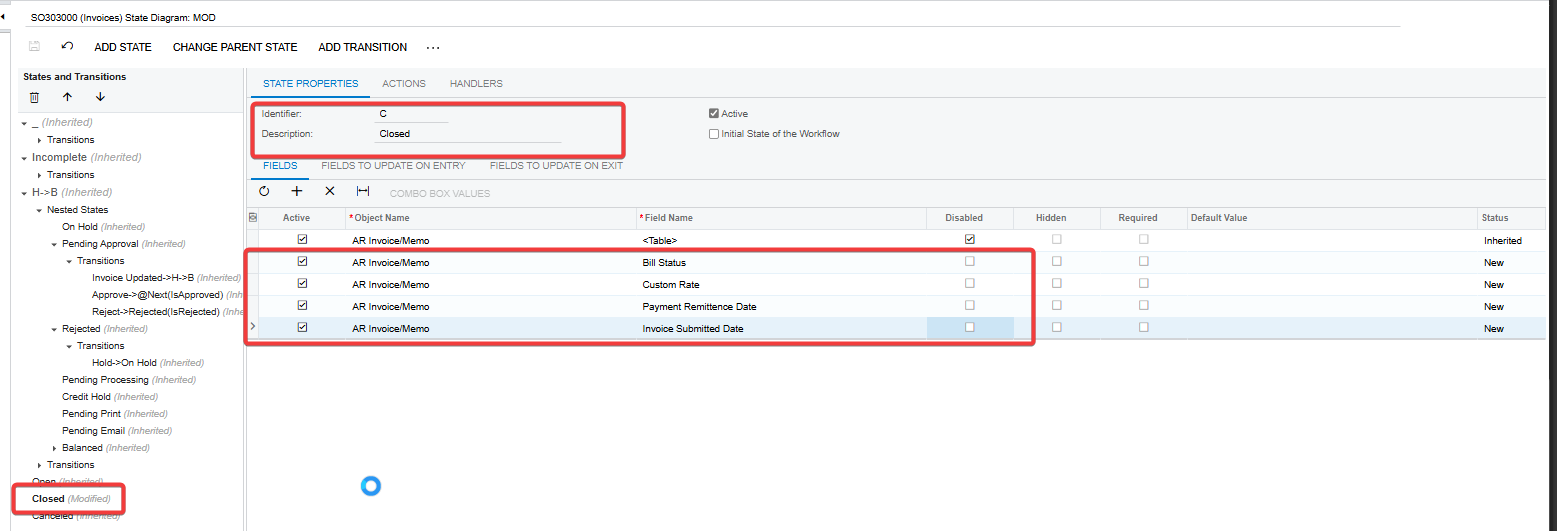
I have created few custom fields on Invoices form and allowed them to update through the code. then added them to the workflow to set them as editable at any time.

below is the DAC field and the extended graph code.
 

// DAC field  
public class ARRegisterExt : PXCacheExtension<PX.Objects.AR.ARRegister>
{
#region UsrBillStatus
[PXDBString(4)]
[PXUIField(DisplayName = "Bill Status", Enabled = true)]
[PXStringList(
new string[]
{
BillStatus.WorkInProgress,
BillStatus.BillAtProduction,
BillStatus.BillAtSubcontract,
BillStatus.ForwardToFinance,
BillStatus.PaymentReceived,
BillStatus.ReturnToProduction,
BillStatus.JobDeleted
},
new string[]
{
TextValues.WorkInProgress,
TextValues.BillAtProduction,
TextValues.BillAtSubcontract,
TextValues.ForwardToFinance,
TextValues.PaymentReceived,
TextValues.ReturnToProduction,
TextValues.JobDeleted
}
)]
public virtual string UsrBillStatus { get; set; }
public abstract class usrBillStatus : PX.Data.BQL.BqlDecimal.Field<usrBillStatus> { }
#endregion
}


// Event handler to allow update
public class SOInvoiceEntry_Extension : PXGraphExtension<PX.Objects.SO.SOInvoiceEntry>
{
#region Event Handlers

protected virtual void ARRegister_RowSelected(PXCache cache, PXRowSelectedEventArgs e, PXRowSelected InvokeBaseHandler)
{
// Invoke base handler
InvokeBaseHandler?.Invoke(cache, e);

ARRegister row = e.Row as ARRegister;
if (row != null)
{
// to cache allows updates
cache.AllowUpdate = true;

// Enable the custom fields
PXUIFieldAttribute.SetEnabled<ARRegisterExt.usrBillStatus>(cache, row, true);
}
}

#endregion
}

then added them to the workflow by extending the DEFAULT Workflow.



But these fields cannot be edit on closed Invoices.
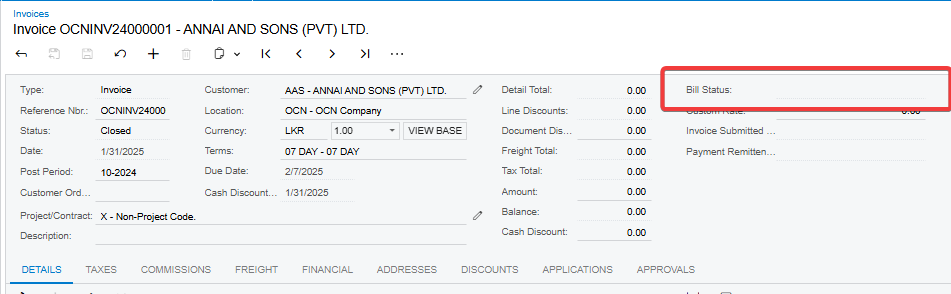


What am I missing here. any help would be greatly appreciated.

Regards.

Best answer by taras

Hi ​@RManathungage94 
 You were moving in right direction. Just change RowSelected event to 

ARInvoice_RowSelected
//for example
protected virtual void ARInvoice_RowSelected(PXCache cache, PXRowSelectedEventArgs e)
{
var doc = (ARInvoice)e.Row;
if (doc != null)
PXUIFieldAttribute.SetEnabled<ARInvoice.usrCustomField>(cache, doc);
}


7 replies

DipakNilkanth
Pro III
Forum|alt.badge.img+13

Hi ​@RManathungage94,
Try to select the Allow Users to Modify Type checkbox.

Hope, it helps!


Forum|alt.badge.img
  • Author
  • Freshman II
  • February 3, 2025

Hi ​@Nilkanth Dipak, I have selected this checkbox and still the fields cannot be edited. :(


Forum|alt.badge.img+8
  • Captain II
  • February 3, 2025

HI ​@RManathungage94 


The field is locked down in the workflow api once the document goes to closed.


You could achieve this through a workflow code customisation. T270 course details more on this.


Alternatively, you could modify the workflow of the bill to be similar to your statuses in that custom field, which you can do through the workflow engine.


Aleks


dcomerford
Captain II
Forum|alt.badge.img+15
  • Captain II
  • February 3, 2025

@RManathungage94 This post might help you will need to allow them to be editable in workflow as you have done but also in the code


Forum|alt.badge.img+1
  • Jr Varsity I
  • Answer
  • February 3, 2025

Hi ​@RManathungage94 
 You were moving in right direction. Just change RowSelected event to 

ARInvoice_RowSelected
//for example
protected virtual void ARInvoice_RowSelected(PXCache cache, PXRowSelectedEventArgs e)
{
var doc = (ARInvoice)e.Row;
if (doc != null)
PXUIFieldAttribute.SetEnabled<ARInvoice.usrCustomField>(cache, doc);
}


RohitRattan88
Acumatica Moderator
Forum|alt.badge.img+4
  • Acumatica Moderator
  • February 3, 2025

Hi ​@RManathungage94 
 You were moving in right direction. Just change RowSelected event to 

ARInvoice_RowSelected
//for example
protected virtual void ARInvoice_RowSelected(PXCache cache, PXRowSelectedEventArgs e)
{
var doc = (ARInvoice)e.Row;
if (doc != null)
PXUIFieldAttribute.SetEnabled<ARInvoice.usrCustomField>(cache, doc);
}


Came here to say this. Changing RowSelected to ARInvoice might help.


Forum|alt.badge.img

Hi ​@Nilkanth Dipak, ​@aiwan, ​@dcomerford, ​@taras, ​@RohitRattan88, really appreciate you taking a look at this. Changing the RowSelected Event fixed the issue. now it's working fine. 

Thanks again.
:)