Answer

Fetch Custom Fields from BOM Material (AMBomMatl) to Production Material (AMProdMatl) Automatically — Screen IDs: AM208000, AM201000

  • November 3, 2025
  • 6 replies
  • 89 views

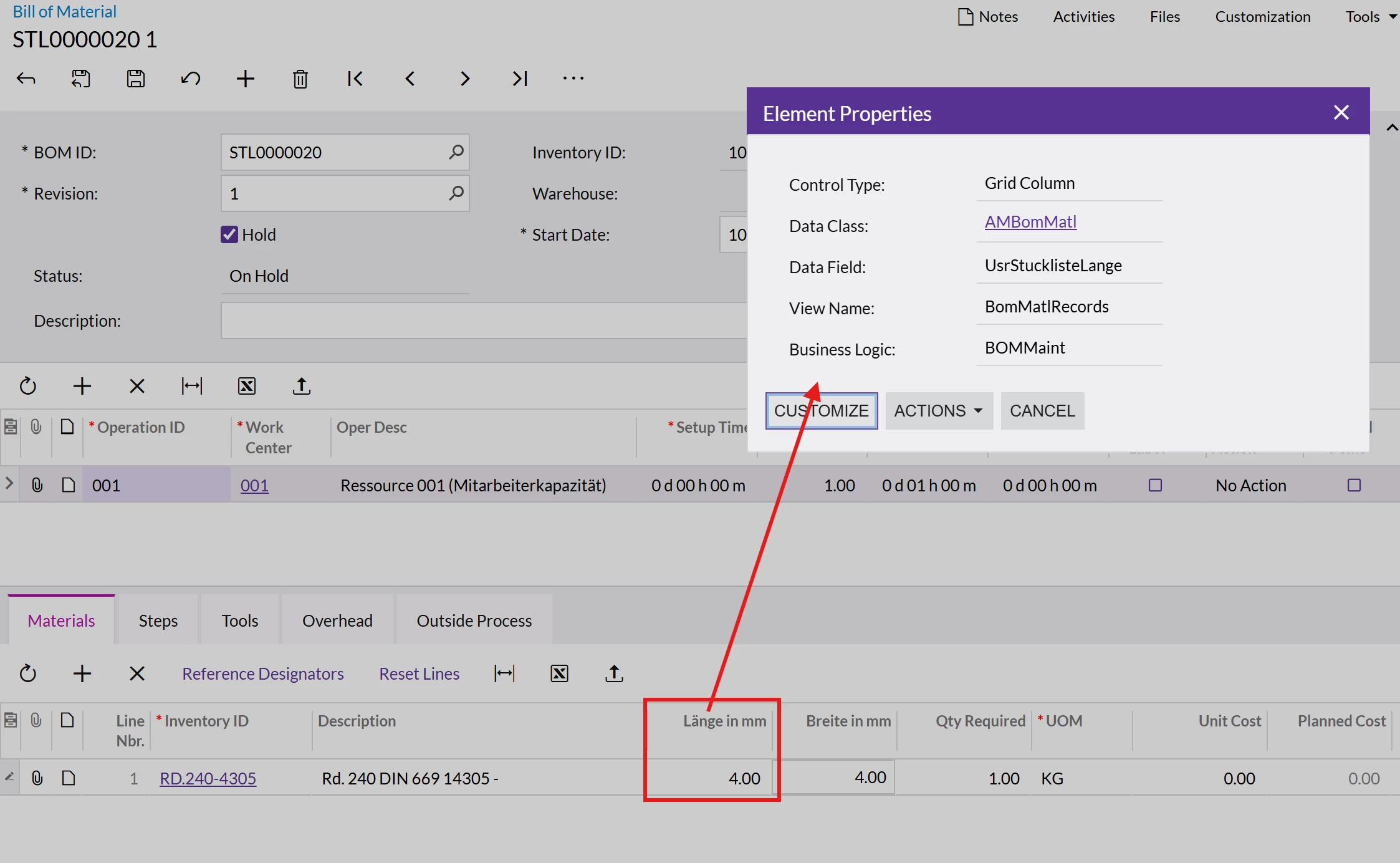
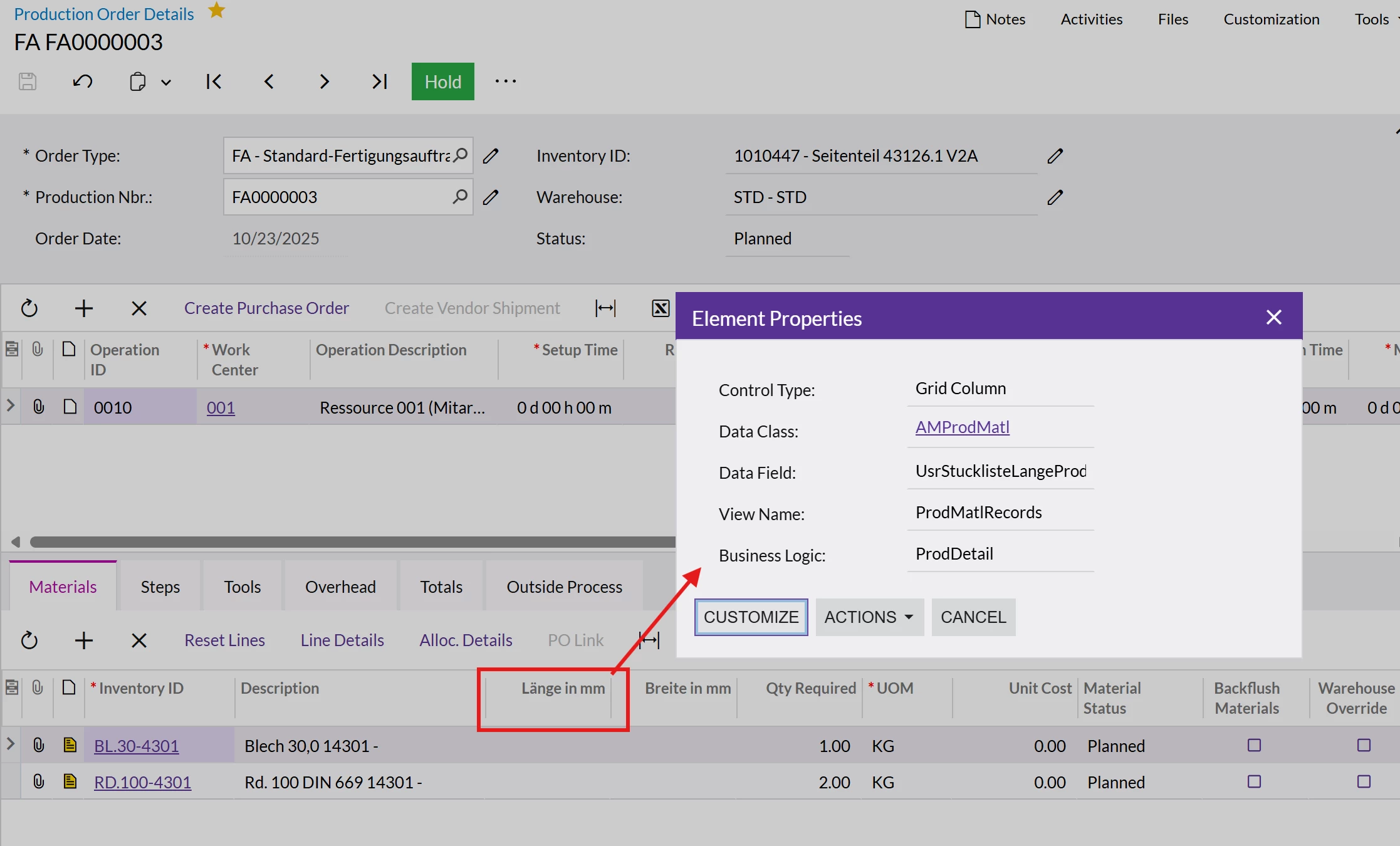
I am working on a customization and need assistance with automatically fetching custom field values from BOM Material AM208000 (AMBomMatl) records to Production Material (AMProdMatl) records when creating production material lines from a BOM in the Production Details AM209000 (ProdDetail) screen.

Goal: Value from Materials tab in AM208000 to Materials tab in AM209000


the customfields are made without code. I tried adding a new graph extension for ProdDetail:
but thats not working.

Best answer by mgati

Hi, I just made it work! but with another approach. that one did not worked:
I had to override the CopyBomToProductionDetails method in a ProdMaint graph extension — that’s the exact function Acumatica uses to copy data from BOM to Production Order. After calling the base method, I looped through the material lines, matched each one to its BOM counterpart using OperationID and item keys, copied the custom fields, and updated the record. Now it copies perfectly every time.


namespace PX.Objects.AM
{
public class ProdMaint_Extension : PXGraphExtension<ProdMaint>
{
public delegate void CopyBomToProductionDetailsDelegate(AMProdItem row);

[PXOverride]
public void CopyBomToProductionDetails(AMProdItem row, CopyBomToProductionDetailsDelegate baseMethod)
{
baseMethod(row);

foreach (AMProdMatl prodMatl in Base.ProdMatlRecords.Select())
{
var result = PXSelect<AMBomMatl,
Where<AMBomMatl.bOMID, Equal<Required<AMBomMatl.bOMID>>,
And<AMBomMatl.revisionID, Equal<Required<AMBomMatl.revisionID>>,
And<AMBomMatl.operationID, Equal<Required<AMBomMatl.operationID>>,
And<AMBomMatl.inventoryID, Equal<Required<AMBomMatl.inventoryID>>,
And<AMBomMatl.subItemID, Equal<Required<AMBomMatl.subItemID>>>>>>>>
.Select(Base, row.BOMID, row.BOMRevisionID, prodMatl.OperationID, prodMatl.InventoryID, prodMatl.SubItemID);

if (result == null || result.Count == 0) continue;

AMBomMatl bomMatl = (AMBomMatl)result[0];

var bomExt = bomMatl.GetExtension<AMBomMatlExt>();
var prodExt = prodMatl.GetExtension<AMProdMatlExt>();

prodExt.UsrStucklisteBreiteProd = bomExt.UsrStucklisteBreite;
prodExt.UsrStucklisteLangeProd = bomExt.UsrStucklisteLange;

Base.ProdMatlRecords.Update(prodMatl);
}
}
}
}

 

6 replies

Forum|alt.badge.img+3

Can you please clarify what exactly you mean by “when creating production material lines from a BOM”?
Do you refer to a simple manual record insertion, or is there some specific workflow involved?

Also, what should be the connection rules between AMProdMatl and AMBomMatl lines according to your requirements?

If you mean just populating the value after the record is inserted, you can try the following approach (I’ve created a graph extension, and it works — it populates the value).
However, depending on your requirements, you might need to move your logic to the FieldUpdated event handler instead.
 

public class ProdDetail_Extension : PXGraphExtension<PX.Objects.AM.ProdDetail>
{
    protected virtual void _(Events.RowInserted<AMProdMatl> e)
    {
        if (e.Row is not AMProdMatl row) return;
        
        var myValue = /* define your logic to select the AMBomMatl record and get the value from a custom field */;

        e.Cache.SetValue<AMProdMatlExt.usrMyField>(row, myValue);
    }
}


  • Author
  • Freshman II
  • November 3, 2025

Thank you for the Reply.
When I say “creating production material lines from a BOM,” I mean the system automatically adds material lines (AMProdMatl) to a new production order based on the BOM (AMBomMatl). So I don’t mean manual entry — it’s the automatic process that happens when a production order is created from a BOM. and yes i mean just populating the value after the record is inserted and i want to apply it to the custom fields.
Also, just to clarify: the custom fields I mentioned were created directly through the Acumatica Customization interface, not by code. so thats should be fine right?


Forum|alt.badge.img+3

Do you create production orders using the Production Order Maintenance screen (AM201500)? If so, you can solve your task by creating the following graph extension along with a RowInserted event handler, as shown below:

using PX.Data;
using PX.Data.BQL;
using PX.Data.BQL.Fluent;

namespace PX.Objects.AM
{
public class ProdMaint_Extension : PXGraphExtension<PX.Objects.AM.ProdMaint>
{
#region Event Handlers

protected virtual void _(Events.RowInserted<AMProdMatl> e)
{
if (!(e.Row is AMProdMatl row)) return;

var bomMatl = new SelectFrom<AMBomMatl>
.Where<AMBomMatl.bOMID.IsEqual<@P.AsString>
.And<AMBomMatl.inventoryID.IsEqual<@P.AsInt>>>
.View(Base)
.SelectSingle(row.PhtmBOMID, row.InventoryID);

var bomMatlExt = bomMatl?.GetExtension<AMBomMatlExt>();

e.Cache.SetValue<AMProdMatlExt.usrTest>(row, bomMatlExt?.UsrTest);
}

#endregion
}
}

Make sure your custom fields are defined in the AMBomMatlExt and AMProdMatlExt DAC extensions.
If not, replace the DAC extension names in the code above with the correct ones.

Also, replace the usrTest and UsrTest field names with your own field names.

Hope this helps!


Forum|alt.badge.img+3

Have you tried this approach?


  • Author
  • Freshman II
  • Answer
  • November 6, 2025

Hi, I just made it work! but with another approach. that one did not worked:
I had to override the CopyBomToProductionDetails method in a ProdMaint graph extension — that’s the exact function Acumatica uses to copy data from BOM to Production Order. After calling the base method, I looped through the material lines, matched each one to its BOM counterpart using OperationID and item keys, copied the custom fields, and updated the record. Now it copies perfectly every time.


namespace PX.Objects.AM
{
public class ProdMaint_Extension : PXGraphExtension<ProdMaint>
{
public delegate void CopyBomToProductionDetailsDelegate(AMProdItem row);

[PXOverride]
public void CopyBomToProductionDetails(AMProdItem row, CopyBomToProductionDetailsDelegate baseMethod)
{
baseMethod(row);

foreach (AMProdMatl prodMatl in Base.ProdMatlRecords.Select())
{
var result = PXSelect<AMBomMatl,
Where<AMBomMatl.bOMID, Equal<Required<AMBomMatl.bOMID>>,
And<AMBomMatl.revisionID, Equal<Required<AMBomMatl.revisionID>>,
And<AMBomMatl.operationID, Equal<Required<AMBomMatl.operationID>>,
And<AMBomMatl.inventoryID, Equal<Required<AMBomMatl.inventoryID>>,
And<AMBomMatl.subItemID, Equal<Required<AMBomMatl.subItemID>>>>>>>>
.Select(Base, row.BOMID, row.BOMRevisionID, prodMatl.OperationID, prodMatl.InventoryID, prodMatl.SubItemID);

if (result == null || result.Count == 0) continue;

AMBomMatl bomMatl = (AMBomMatl)result[0];

var bomExt = bomMatl.GetExtension<AMBomMatlExt>();
var prodExt = prodMatl.GetExtension<AMProdMatlExt>();

prodExt.UsrStucklisteBreiteProd = bomExt.UsrStucklisteBreite;
prodExt.UsrStucklisteLangeProd = bomExt.UsrStucklisteLange;

Base.ProdMatlRecords.Update(prodMatl);
}
}
}
}



Chris Hackett
Community Manager
Forum|alt.badge.img
  • Acumatica Community Manager
  • November 6, 2025

Thank you for sharing your solution with the community ​@mgati!