

Answer

Export as XML and Import From XML on a maintenance screen

  • May 25, 2022
  • 2 replies
  • 346 views

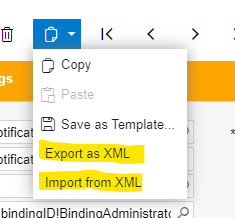
Various standard screens (Notification Templates for example) on the copy icon have an “Export as XML” and “Import from XML” option on them.


I have a custom maintenance form with table/DAC/Graph.   The copy/paste/save as template are all there and work great.  How do you get the Export and XML and Import From XML to show up and work?


Best answer by MoulaliShaik79

Hi @JEFSMI ,

Please do the following to get the required options under Clipboard:

You need to make sure there is an XML file with the structure definition in ‘\App_Data\XmlExportDefinitions’ folder. 

The name of the file should be [screenID].xml


Note: In the above location there are some XML files available, you can copy-paste and rename as per your requirement.


Thanks,

Moulali Shaik.

2 replies

Forum|alt.badge.img+7
  • Captain II
  • May 25, 2022

This post from a few days ago lists some suggestions and options on how to implement that.  Hopefully that helps.


Forum|alt.badge.img+1

Hi @JEFSMI ,

Please do the following to get the required options under Clipboard:

You need to make sure there is an XML file with the structure definition in ‘\App_Data\XmlExportDefinitions’ folder. 

The name of the file should be [screenID].xml


Note: In the above location there are some XML files available, you can copy-paste and rename as per your requirement.


Thanks,

Moulali Shaik.
