Answer

Error when debugging in Visual Studio

  • December 5, 2024
  • 9 replies
  • 127 views

Forum|alt.badge.img

Hello, after doing T200 and T210 trainings I started my own project. I’ve added a tab to Opportunities page and added PXTextEdit and PXButton to it. When debugging it using VS it gives me an error whenever I try to see a value of any variable.
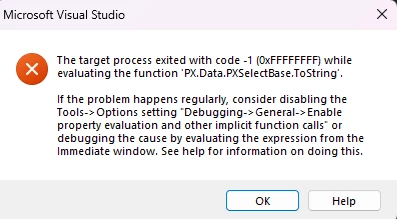
The debugging session stops.

I tried to add my code to T200 project and was able to debug it there. I can’t see what is the difference between those two projects.

My project is attached.

Thanks
Best answer by DipakNilkanth

Hi ​@Scholaster,

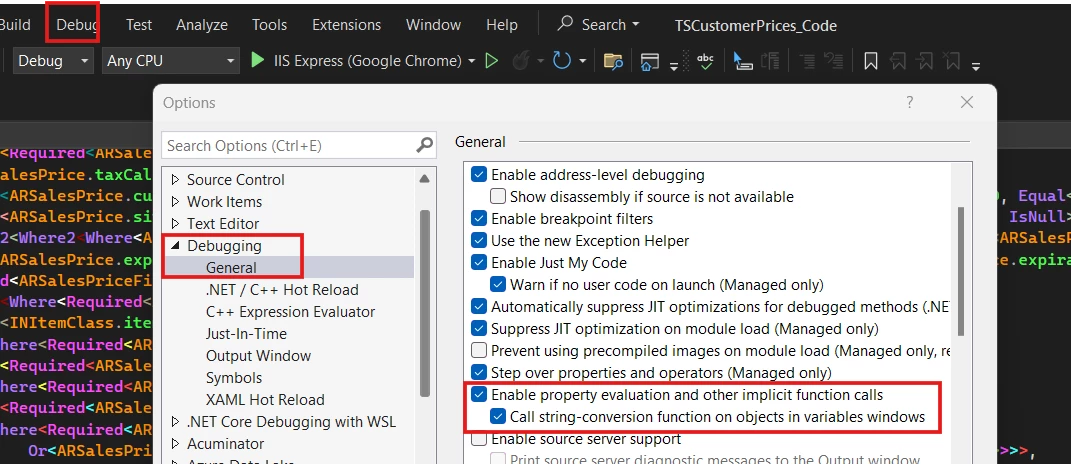
By Seeing your error, I believe you need to disable the Enable Property Evaluation and Other implicit Function Calls Property.


Try to disable the Above options from VS.

Hope, it helps!


9 replies

Forum|alt.badge.img+7
  • Captain II
  • December 5, 2024

I get this message from time to time. Usually a reboot of my workstation will settle whatever issue it was having. Hopefully someone has a more permanent solution.


Forum|alt.badge.img
  • Author
  • Freshman I
  • December 5, 2024

Thanks ​@Django , unfortunately reboot doesn’t work in my case.


DipakNilkanth
Pro III
Forum|alt.badge.img+13

Hi ​@Scholaster,

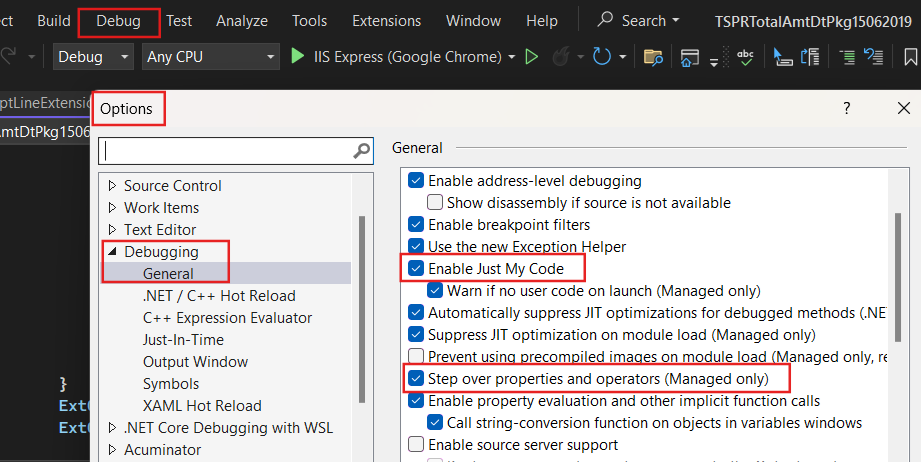
Did you setup the Debugger settings as below screenshot?
 

Check for the Enable Just My Code is selected.
 

Hope, it helps!


Forum|alt.badge.img
  • Author
  • Freshman I
  • December 6, 2024

Hi ​@Dipak Nilkanth ,

Yes, I already have both options selected. The problem must be somewhere else.


Forum|alt.badge.img
  • Author
  • Freshman I
  • December 9, 2024

No one else is experiencing this problem? 

Any other idea how to fix it?


DipakNilkanth
Pro III
Forum|alt.badge.img+13
  • Pro III
  • Answer
  • December 9, 2024

Hi ​@Scholaster,

By Seeing your error, I believe you need to disable the Enable Property Evaluation and Other implicit Function Calls Property.


Try to disable the Above options from VS.

Hope, it helps!


Forum|alt.badge.img
  • Author
  • Freshman I
  • December 9, 2024

Hi ​@Dipak Nilkanth ,

By disabling Enable Property Evaluation and Other implicit Function Calls I can’t see value of any variable during debugging. So it is quite useless.

But I tried to disable Call string-conversion function on objects in variables windows and it helped.

I am able to debug again! Thanks!


DipakNilkanth
Pro III
Forum|alt.badge.img+13

@Scholaster , thank you for sharing.


jedmunds36
Jr Varsity III
Forum|alt.badge.img
  • Jr Varsity III
  • January 31, 2025

I will just add it here, we get this error more recently now in 24R2 when floating over a graph variable while debugging and the session crashes.  As a temporary aid, we add the following code into an area of code we are inspecting to get at the contents of the graph:

            var allCaches = graph.Caches.Select(s => s.Value).ToList();                            // List of Caches
            var dirtyCache = graph.Caches.Select(s => s.Value).Where(s => s.IsDirty).ToList();     // list of DirtyCaches
            var currents = allCaches.Where(s => s.Current != null).ToList();                       // List of Currents

Unchecking the Options in Visual Studio only worked in some cases (?) for us but I believe we still crashed in other areas of code.