Answer

Error or Warning Message on Grid Row

  • October 18, 2023
  • 6 replies
  • 610 views

Forum|alt.badge.img

Hi, 

Need to know how to show an error or warning message on grid row. Can someone help me out?

Here is my sample code

public PXAction<HMRCVendorRegisterDetail> VerifyVendors;
        [PXButton(CommitChanges = true)]
        [PXUIField(DisplayName = "Verify Vendors", MapEnableRights = PXCacheRights.Select, MapViewRights = PXCacheRights.Select, Enabled = false)]
        protected virtual IEnumerable verifyVendors(PXAdapter adapter)
        {            
            foreach (HMRCVendorRegisterDetail vendorRegisterDetail in VendorRegisterDetail.Select())
            {                
                if(vendorRegisterDetail.UsrSelect == false)
                {
                    //Need to show a error message on paricular row
                }
                else
                {
                    //Logic
                }                   
                
            }

            return adapter.Get();
        }

Thanks


Best answer by Vignesh Ponnusamy

@bhagyat25, If you are not implementing the functionality in the graph extension, try usings the View name directly(like Transactions.Select and Transactions.Cache). 

6 replies

Forum|alt.badge.img+9
  • Semi-Pro III
  • October 18, 2023

Hi @bhagyat25 ,

You can use below code to display an error message.

throw new PXSetPropertyException(errorMsg, PXErrorLevel.Error);

Regards,

Sweta


Forum|alt.badge.img
  • Author
  • Jr Varsity II
  • October 18, 2023

Hi @bhagyat25 ,

You can use below code to display an error message.

throw new PXSetPropertyException(errorMsg, PXErrorLevel.Error);

Regards,

Sweta

Hi @sweta68 

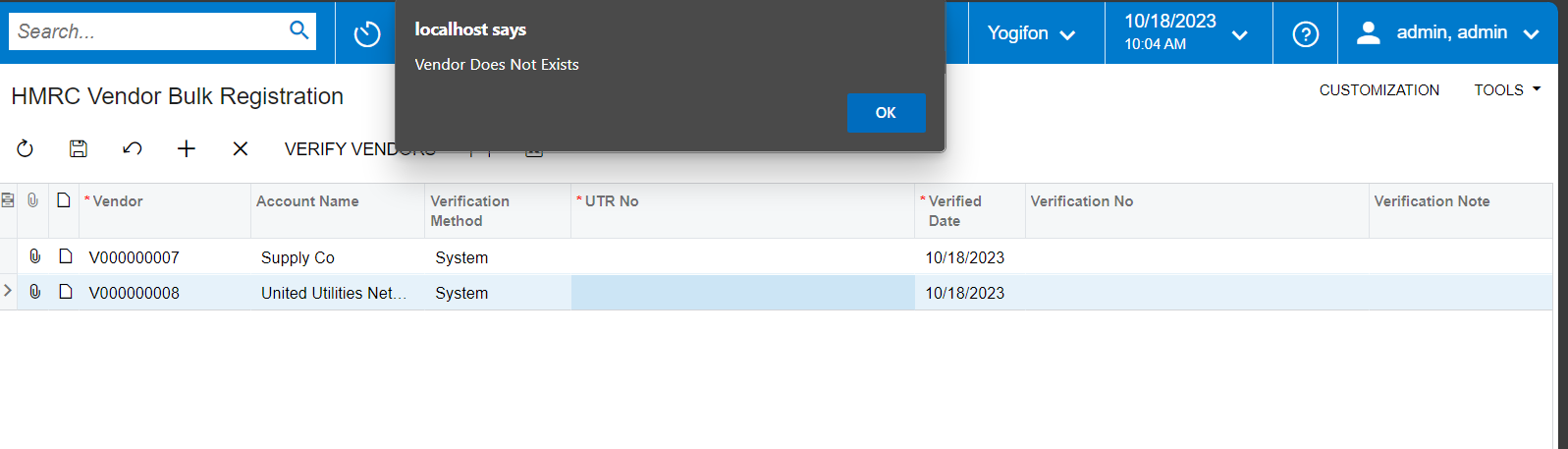
I tried your code but the problem is it is not working for the other records. As per the below example I have two invalid records. But only for one record message comes. I need to process the next record too.

public PXAction<HMRCVendorRegisterDetail> VerifyVendors;
        [PXButton(CommitChanges = true)]
        [PXUIField(DisplayName = "Verify Vendors", MapEnableRights = PXCacheRights.Select, MapViewRights = PXCacheRights.Select, Enabled = false)]
        protected virtual IEnumerable verifyVendors(PXAdapter adapter)
        {            
            foreach (HMRCVendorRegisterDetail vendorRegisterDetail in VendorRegisterDetail.Select())
            {                
                if(vendorRegisterDetail.UsrSelect == false)
                {
                    throw new PXSetPropertyException(msg, PXErrorLevel.Error);
                }
                else
                {
                    //Logic
                }                   
                
            }

            return adapter.Get();
        }

Thanks


Vignesh Ponnusamy
Acumatica Moderator
Forum|alt.badge.img+5

Hi @bhagyat25,

When you use throw the program exits the method and it will not check the other records.

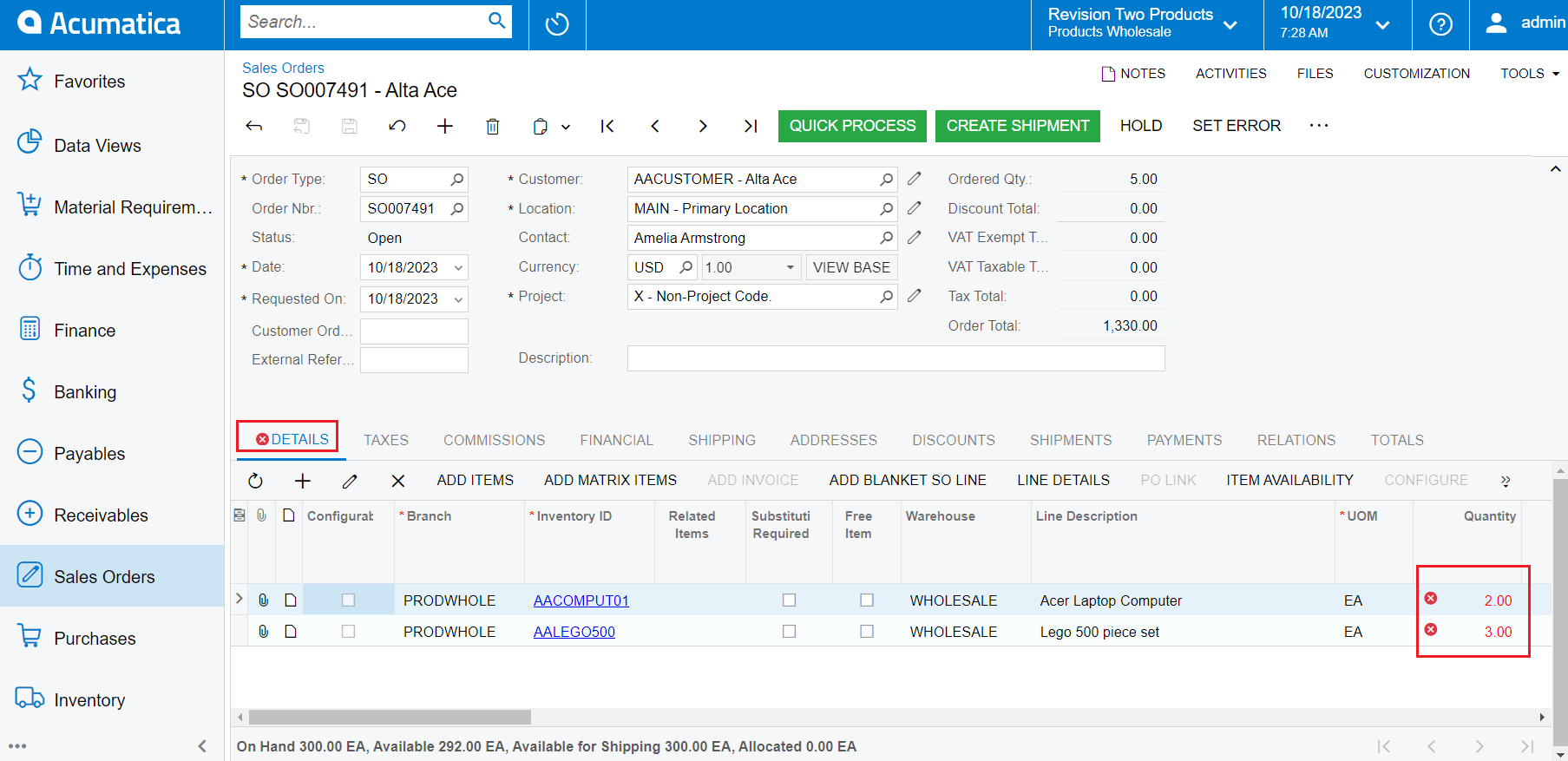
You can use to Cache.RaiseExceptionHandling to set exception for field in the grid. Below is an example you refer to do it,

    public class SOOrderEntry_Extension : PXGraphExtension<PX.Objects.SO.SOOrderEntry>
{
#region Event Handlers
public PXAction<SOOrder> setError;
[PXUIField(DisplayName = "Set Error")]
[PXButton]
protected IEnumerable SetError(PXAdapter adapter)
{
foreach (SOLine line in Base.Transactions.Select())
{
if (line.OrderQty > 0)
{
Base.Transactions.Cache.RaiseExceptionHandling<SOLine.orderQty>(line, line.OrderQty, new PXSetPropertyException("Error"));
}
}
return adapter.Get();
}
#endregion
}

Exception will be set like below at the field level,


Similarly, you can set exception for each vendor that fails the required validation. Good Luck.! 


Forum|alt.badge.img
  • Author
  • Jr Varsity II
  • October 18, 2023

Hi @bhagyat25,

When you use throw the program exits the method and it will not check the other records.

You can use to Cache.RaiseExceptionHandling to set exception for field in the grid. Below is an example you refer to do it,

    public class SOOrderEntry_Extension : PXGraphExtension<PX.Objects.SO.SOOrderEntry>
{
#region Event Handlers
public PXAction<SOOrder> setError;
[PXUIField(DisplayName = "Set Error")]
[PXButton]
protected IEnumerable SetError(PXAdapter adapter)
{
foreach (SOLine line in Base.Transactions.Select())
{
if (line.OrderQty > 0)
{
Base.Transactions.Cache.RaiseExceptionHandling<SOLine.orderQty>(line, line.OrderQty, new PXSetPropertyException("Error"));
}
}
return adapter.Get();
}
#endregion
}

Exception will be set like below at the field level,


Similarly, you can set exception for each vendor that fails the required validation. Good Luck.! 

Hi @Vignesh Ponnusamy ,

In my version Base is not recognizing. 


Vignesh Ponnusamy
Acumatica Moderator
Forum|alt.badge.img+5

@bhagyat25, If you are not implementing the functionality in the graph extension, try usings the View name directly(like Transactions.Select and Transactions.Cache). 


Naveen Boga
Captain II
Forum|alt.badge.img+19
  • Captain II
  • October 18, 2023

@bhagyat25  In addition to Vignesh,  I just modified your code this code helps !!  


Please modify the highlighted text below  (Red Color)


        public PXAction<HMRCVendorRegisterDetail> VerifyVendors;
        [PXButton(CommitChanges = true)]
        [PXUIField(DisplayName = "Verify Vendors", MapEnableRights = PXCacheRights.Select, MapViewRights = PXCacheRights.Select, Enabled = false)]
        protected virtual IEnumerable verifyVendors(PXAdapter adapter)
        {            
            foreach (HMRCVendorRegisterDetail vendorRegisterDetail in VendorRegisterDetail.Select())
            {                
                if(vendorRegisterDetail.UsrSelect == false)
                {
                    //Need to show a error message on paricular row
                    
                    
                    VIEWNAME.Cache.RaiseExceptionHandling<HMRCVendorRegisterDetail.fieldName>(vendorRegisterDetail, vendorRegisterDetail.FIELDNAME, new PXSetPropertyException("Error Message"));
                }
                else
                {
                    //Logic
                }                   
                
            }

            return adapter.Get();
        }