Solved

Error creating a new project in 25R2

  • October 17, 2025
  • 29 replies
  • 466 views

Joe Schmucker
Captain II
Forum|alt.badge.img+3

I am trying to create a new project in VS on a 25R2 instance. (first time working in 25R2).

I open the project and simply try to compile it.  I have not added anything to the project...just the default that was created.

I get this error:

Unable to find package Microsoft.Bcl.AsyncInterfaces. No packages exist with this id in source(s): Microsoft Visual Studio Offline Packages, TestSDK
I see that there was a similar error a couple of years ago, but it did not address my issue.


From the above link, I tried removing Microsoft.Bcl.AsyncInterfaces from my csproj file.  It compiles after doing that.  But then the site will not load.

After killing the site, I can get it back up by upgrading the site only using the installation tool.

Note that simply attempting to compile my project in VS, it kills the site.

Could not load file or assembly 'Microsoft.Extensions.Options.ConfigurationExtensions' or one of its dependencies. The located assembly's manifest definition does not match the assembly reference. (Exception from HRESULT: 0x80131040)


I “think” this might have something to do with the TestSDK I installed for 24R2.  

I looked under Extensions in Visual Studio, but I don’t see anything custom other than Acuminator.

I tried disabling the Acuminator extension.  Still have an error (site is killed).

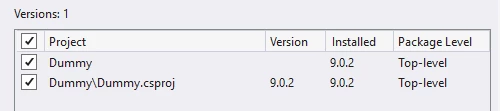
In the Nuget package manager, it looks like this version is installed in my project:

That dll is not listed in my project references
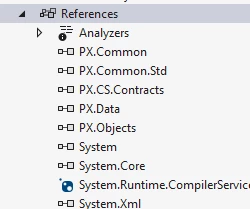
 

In all the projects I’ve done prior to 25R2, that dll is listed.


I thought I’d ask here before submitting a support ticket in case it is an easy fix.

Best answer by Vignesh Ponnusamy

Hi All, 

We are able to reproduce the issue with customization project extension in 25R2 and have reported it our engineering team. To workaround the issue, you can edit the project .csproj file(using Notepad) to add <Private>False</Private> to all the Acumatica dlls(example below), 

    <Reference Include="PX.Common">
<HintPath>..\..\..\..\Bin\PX.Common.dll</HintPath>
<Private>False</Private>
</Reference>
<Reference Include="PX.Common.Std">
<HintPath>..\..\..\..\Bin\PX.Common.Std.dll</HintPath>
<Private>False</Private>
</Reference>
<Reference Include="PX.CS.Contracts">
<HintPath>..\..\..\..\Bin\PX.CS.Contracts.dll</HintPath>
<Private>False</Private>
</Reference>
<Reference Include="PX.Data">
<HintPath>..\..\..\..\Bin\PX.Data.dll</HintPath>
<Private>False</Private>
</Reference>
<Reference Include="PX.Objects">
<HintPath>..\..\..\..\Bin\PX.Objects.DLL</HintPath>
<Private>False</Private>
</Reference>

After updating the .csproj file, copy the Microsoft.Extensions.Options.ConfigurationExtensions.dll from new/different 25R2 site to the site with the issue. This should allow you to compile the customization project extension without any issues. Hope that helps!


Good Luck,

29 replies

DrewNisley
Pro I
Forum|alt.badge.img+4
  • Pro I
  • October 20, 2025

@Joe Schmucker Check in your bin folder of the website and see if that dll is in there. If it is, open your web.config and see what version it is supposed to be and make sure the versions match. I had this issue with a different package last week I believe. 


Joe Schmucker
Captain II
Forum|alt.badge.img+3
  • Author
  • Captain II
  • October 20, 2025

If I mess with the DLL’s in the web site and launch it I get an error about the manifest.

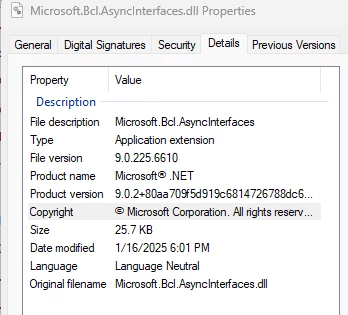
I checked the version of the file in file explorer.  This is what it shows:


I tried right clicking the file in VS but there is no option to see properties.

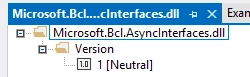
If I double click the dll, I get this


This is what is in the web confiig.

       <assemblyIdentity name="Microsoft.Bcl.AsyncInterfaces" publicKeyToken="cc7b13ffcd2ddd51" culture="neutral" />
       <bindingRedirect oldVersion="0.0.0.0-9.0.0.2" newVersion="9.0.0.2" />

I don’t know if it is the correct version or not.  I think if I mess with dll’s on the site, I will get a broken manifest error.

If I remove the dll reference from my projcs file, I can compile.  But it still breaks the site.

Also, if I upgrade site only and get the site working, open the project, try to add my dummy.dll to the project, it does not show up.

This is seriously broken.  I’m submitting a support request.  I have a client starting on their sandbox today and they need this project updated.


DrewNisley
Pro I
Forum|alt.badge.img+4
  • Pro I
  • October 20, 2025

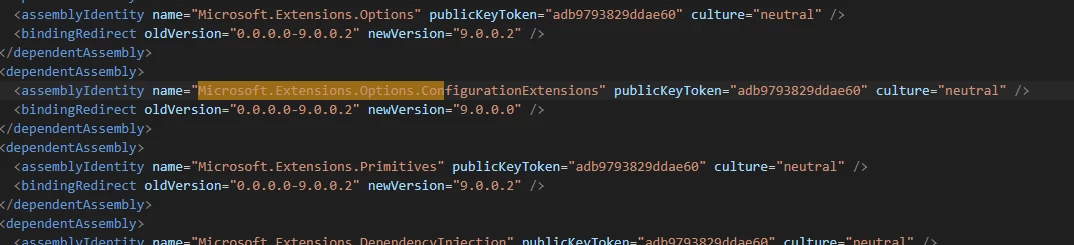
@Joe Schmucker Actually this was the same issue with my site. Remove it from your project, compile, and go into your web config and change the “Microsoft.Extensions.Options.ConfigurationExtensions” key version to 9.0.0.0 as shown below


DrewNisley
Pro I
Forum|alt.badge.img+4
  • Pro I
  • October 20, 2025

@Chris Hackett Can we make support aware that something is wrong with the version of this assembly in 25R2?


Joe Schmucker
Captain II
Forum|alt.badge.img+3
  • Author
  • Captain II
  • October 20, 2025

@Joe Schmucker Actually this was the same issue with my site. Remove it from your project, compile, and go into your web config and change the “Microsoft.Extensions.Options.ConfigurationExtensions” key version to 9.0.0.0 as shown below


Hi ​@DrewNisley 

what should I remove from my project?

So far, I just changed web.config.  I still get the error.  I think the “remove” needs to be done but I don’t know what that means.


DrewNisley
Pro I
Forum|alt.badge.img+4
  • Pro I
  • October 20, 2025

@Joe Schmucker The Microsoft.Bcl.AsyncInterfaces that was causing you issues


Joe Schmucker
Captain II
Forum|alt.badge.img+3
  • Author
  • Captain II
  • October 20, 2025

sorry for being thick, but where do I remove that?  From my projcs file?


Joe Schmucker
Captain II
Forum|alt.badge.img+3
  • Author
  • Captain II
  • October 20, 2025

If I change the web.config as you showed, I get this.

Could not load file or assembly 'Microsoft.Extensions.Options.ConfigurationExtensions' or one of its dependencies. The located assembly's manifest definition does not match the assembly reference. (Exception from HRESULT: 0x80131040)


I upgraded the site (website only) and it changed the web config back to what it was.


Do I need to recompile the entire site?


DrewNisley
Pro I
Forum|alt.badge.img+4
  • Pro I
  • October 20, 2025

I think I am misremembering what I ended up changing actually. What happens when you compile your project before changing the web config?


Joe Schmucker
Captain II
Forum|alt.badge.img+3
  • Author
  • Captain II
  • October 20, 2025

I’ve made so many changes, I’m going to do a clean install, new project and let you know what you just asked.  


Joe Schmucker
Captain II
Forum|alt.badge.img+3
  • Author
  • Captain II
  • October 20, 2025

This is a full list of what I tried:

I installed a clean site "Dummy" on 25.200.0248.  

Site opens just fine.

I created a project "Dummy2".  

Created a new extension

I opened the project in VS.

I opened Examples

I clicked Build Dummy2.


The project builds.  

Build started at 9:37 AM...

NU1101: Unable to find package Microsoft.Bcl.AsyncInterfaces. No packages exist with this id in source(s): Microsoft Visual Studio Offline Packages, TestSDK

1>------ Build started: Project: Dummy2, Configuration: Debug Any CPU ------

Failed to restore C:\ODIA\Code\Acumatica\Dummy2\Dummy2\Dummy2.csproj (in 51 ms).

NuGet package restore failed. Please see Error List window for detailed warnings and errors.

1>  Dummy2 -> C:\ODIA\Code\Acumatica\Dummy2\Dummy2\bin\Debug\Dummy2.dll

========== Build: 1 succeeded, 0 failed, 0 up-to-date, 0 skipped ==========

========== Build completed at 9:37 AM and took 03.061 seconds ==========


But I get this error:


Severity Code Description Project File Line Suppression State

Error NU1101 Unable to find package Microsoft.Bcl.AsyncInterfaces. No packages exist with this id in source(s): Microsoft Visual Studio Offline Packages, TestSDK Dummy2 C:\ODIA\Code\Acumatica\Dummy2\Dummy2\Dummy2.csproj 1


When I refresh the site (in Chrome or Edge) I get this error.


Could not load file or assembly 'Microsoft.Extensions.Options.ConfigurationExtensions' or one of its dependencies. The located assembly's manifest definition does not match the assembly reference. (Exception from HRESULT: 0x80131040)

If I do a Upgrade Site (website only), I am able to open the site.  


If I open the project in Project Editor and attempt to add the Dummy2.dll to the project, the file is not listed.


I removed the Microsoft.Bcl.AsyncInterfaces reference from my Dummy2.csproj.  The project builds without the NU1101 error, but the site crashes with the "Could not load..." error.


The VS error references "TestSDK".  I use TestSDK in 25R1.


Joe Schmucker
Captain II
Forum|alt.badge.img+3
  • Author
  • Captain II
  • October 20, 2025

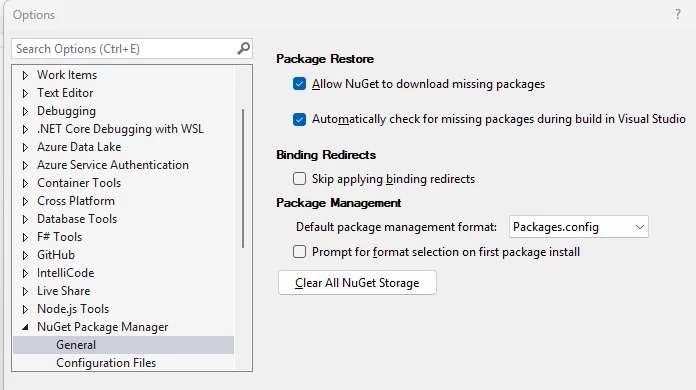
I think I really screwed up VS.  A google post recommended clearing All Nuget Storage.

I now get more errors than I did before

When I go to Nuget package manager, I cannot even find these dlls when searching for them.

I really screwed things up I think.  I will try to get things back to where they were.  I submitted a support request to Acumatica.  I’ll let you know what they say.


DrewNisley
Pro I
Forum|alt.badge.img+4
  • Pro I
  • October 20, 2025

I think I remember what I did now. I went into the Nugget Package Manager, installed the correct version of Microsoft.Bcl.AsyncInterfaces under the browse tab (should be version 9.0.2 I believe) and then compiled. Then I get the site error and I changed the web config file for the Microsoft.Extensions.Options.ConfigurationExtensions to the 9.0.0.0 version. Then everything seemed to work I believe.

It is definitely an issue that they should be aware of however.


Joe Schmucker
Captain II
Forum|alt.badge.img+3
  • Author
  • Captain II
  • October 20, 2025

@DrewNisley  I thank you greatly for your attempts to help me.  

I updated my nuget packages as follows:

I can compile the project with no errors.

After compiling, it kills the site.

Could not load file or assembly 'Microsoft.Bcl.AsyncInterfaces' or one of its dependencies


I uninstalled the bcl dll using nuget.  Project compiles with no errors now.

Site breaks after compile.

I modified web.config as you described.  

Site is still broken.  Hopefully Acumatica support can help me fix this.


Joe Schmucker
Captain II
Forum|alt.badge.img+3
  • Author
  • Captain II
  • October 20, 2025

@Chris Hackett This is a big deal for my customer.  I submitted a support ticket.  If you can pull strings to get this worked on, I would be super grateful.


Chris Hackett
Community Manager
Forum|alt.badge.img
  • Acumatica Community Manager
  • October 20, 2025

Hi ​@Joe Schmucker - I did make support management aware of your post. 😁


Joe Schmucker
Captain II
Forum|alt.badge.img+3
  • Author
  • Captain II
  • October 20, 2025

I have a temporary workaround.  I think it is working.

In VS, disconnect the project reference from the web site.

Build the project

Manually copy the project DLL from the project bin\debug to the website bin folder.


Chris Hackett
Community Manager
Forum|alt.badge.img
  • Acumatica Community Manager
  • October 20, 2025

@Joe Schmucker please let me know case #


Joe Schmucker
Captain II
Forum|alt.badge.img+3
  • Author
  • Captain II
  • October 20, 2025

@Chris Hackett  case number 473799

Thank you so much.


Chris Hackett
Community Manager
Forum|alt.badge.img
  • Acumatica Community Manager
  • October 20, 2025

Appears this is a dev support case. Adding ​@Dmitrii Naumov for awareness 


Forum|alt.badge.img+9
  • Captain II
  • October 20, 2025

@Joe Schmucker 


@Kyle Vanderstoep helped me out on this one.


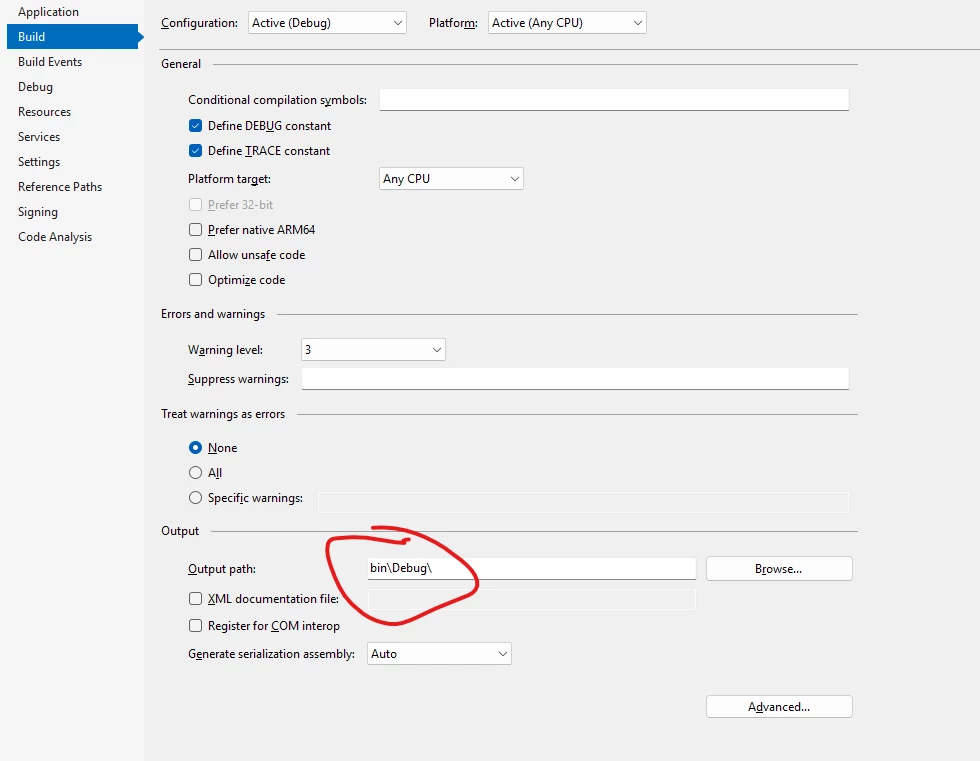
You want to set the compile path of the project to the customisation bin folder, and add a target to the .csproj to copy the .dll to the site bin folder.


Joe Schmucker
Captain II
Forum|alt.badge.img+3
  • Author
  • Captain II
  • October 20, 2025

Hi ​@aiwan 

I think i have the customization bin folder set ok.

Not sure what you mean by setting the target to the the csproj to copy the .dll to the bin folder.  I haven’t done that before and I’m don’t know how to do that.

Edit…

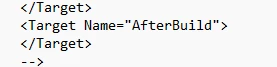
I think you mean here:

Not sure of the syntax for this

I found this on StackOverflow.  I think I see how to access my source file, but not sure how I would reference the website.

 <Target Name="AfterBuild">
    <Copy SourceFiles="$(ProjectDir)\Bin\Debug\GreenSpark.dll" DestinationFolder="?????????????" ContinueOnError="true" />
  </Target>
 

EDIT 2!

I think I got it!

xcopy /y "$(TargetDir)GreenSpark.dll" "C:\Sites\GreenSpark25\GreenSpark25\Bin\GreenSpark.dll"

This copies the dll to the web site.  

Thanks!


Forum|alt.badge.img+9
  • Captain II
  • October 20, 2025

@Joe Schmucker 


Yes pretty much like that, just in case anyone else needs the complete thing:

<Target Name="CopyDLL" AfterTargets="Build">
    <Copy SourceFiles="$(OutputPath)$(AssemblyName).dll" DestinationFolder="$(AcumaticaSiteDir)Bin\" SkipUnchangedFiles="False" />
  </Target>


Joe Schmucker
Captain II
Forum|alt.badge.img+3
  • Author
  • Captain II
  • October 20, 2025

I used a wildcard to get the pdb file too.

copy "$(TargetDir)GreenSpark.*" "C:\Sites\GreenSpark25\GreenSpark25\Bin\"


Forum|alt.badge.img+9
  • Captain II
  • October 20, 2025

Ahhhh! Good to know!